Introduction
With GitHub Pages, you can publish websites for free. I learned that combining it with a static site generator (Hugo in this case) makes it easy to create a blog, so I decided to try it. This is a summary of that process.
What is Hugo?
When building a blog, Content Management Systems (CMS) like WordPress are commonly used for their ease of content creation and editing. However, using a CMS requires installing and configuring the CMS itself and setting up a database, which can be complex. For small blogs, creating a static site with HTML files can be more cost-effective. That said, manually creating HTML files is tedious. This is where static site generators come in, and Hugo is one of them.
Hugo is a static site generator built with Go. With Hugo, you can create a blog consisting of static HTML and CSS files without needing a database. Content is written in Markdown format, and building generates static HTML files.

Advantages of Hugo:
- Fast build and rendering
- No database required, making management simple
How static site generation (SSG) works: how it differs from SSR and CSR
The phrase “building generates static HTML files” matters more than it looks — it points to a fundamentally different rendering model from the other two common approaches used on the web today.
- SSG (Static Site Generation) — Hugo’s approach. Content files (Markdown + front matter) and layout templates are combined by Hugo’s Go template engine exactly once, at build time, producing a complete set of pre-rendered HTML files. After that, the server just serves those files as-is.
- SSR (Server-Side Rendering) — an application server (Node.js, Ruby on Rails, etc.) runs the template engine on every incoming request, typically querying a database each time.
- CSR (Client-Side Rendering) — used by SPAs (React, etc.). The server returns a near-empty HTML shell plus a JavaScript bundle, and the browser’s JS engine renders the page after it loads.
This distinction produces two concrete, practical consequences:
- Performance: with SSG, the templating cost is paid exactly once at build time. Whether a page gets 1 visitor or 100,000, what’s served is the same pre-generated HTML file — there’s no per-request templating engine invocation or database round-trip like SSR, and no client-side rendering wait like CSR.
- Hosting simplicity: the build output (the
public/directory) is nothing but plain static files — HTML, CSS, JS, images. No application server, database, or runtime is required, so it can be hosted anywhere files can be served from a static path. GitHub Pages, covered later in this post, is exactly that: a free host that only serves static files.
This blog’s own deployment pipeline (.github/workflows/deploy.yml) reflects this directly: CI runs hugo --gc --minify once per push, and the resulting public/ directory is deployed as-is to GitHub Pages. There is no step anywhere in the request path where a server computes anything per visitor.
Creating a Site with Hugo
Installing Hugo
# With Homebrew (macOS)
brew install hugo
For other installation methods, see Install Hugo .
Creating a Site
hugo new site test # 'test' can be any name
cd test
hugo # This command generates the site
Previewing on Local Server
hugo server
Preview at http://localhost:1313 .
Directory Structure
.
├── archetypes # Files processed by Hugo Pipes
├── config.toml # Hugo configuration file
├── content # Article files go here
├── data # Data files referenced across all pages
├── layouts # For customizing theme files or adding layout partials
├── public # Generated HTML code (this gets published)
├── static # Static files for the site
└── themes # Theme files
Using a Theme
Choose a theme from Hugo Themes and clone it into the themes folder.
cd themes
git clone <theme-repo-url>
Add the following line to config.toml:
theme = "chosen-theme-name"

Creating Blog Posts
cd test
hugo new post/new-post.md
Contents of new-post.md:
---
title: "Title"
date: 2020-08-16T15:17:23+09:00
draft: false # Set to true to hide the post
tags: ["python", "ros"]
---
Write your article in Markdown here
- Run the
hugocommand to generate static files under thepublicdirectory:
cd test
hugo
GitHub Pages
Creating a GitHub Repository
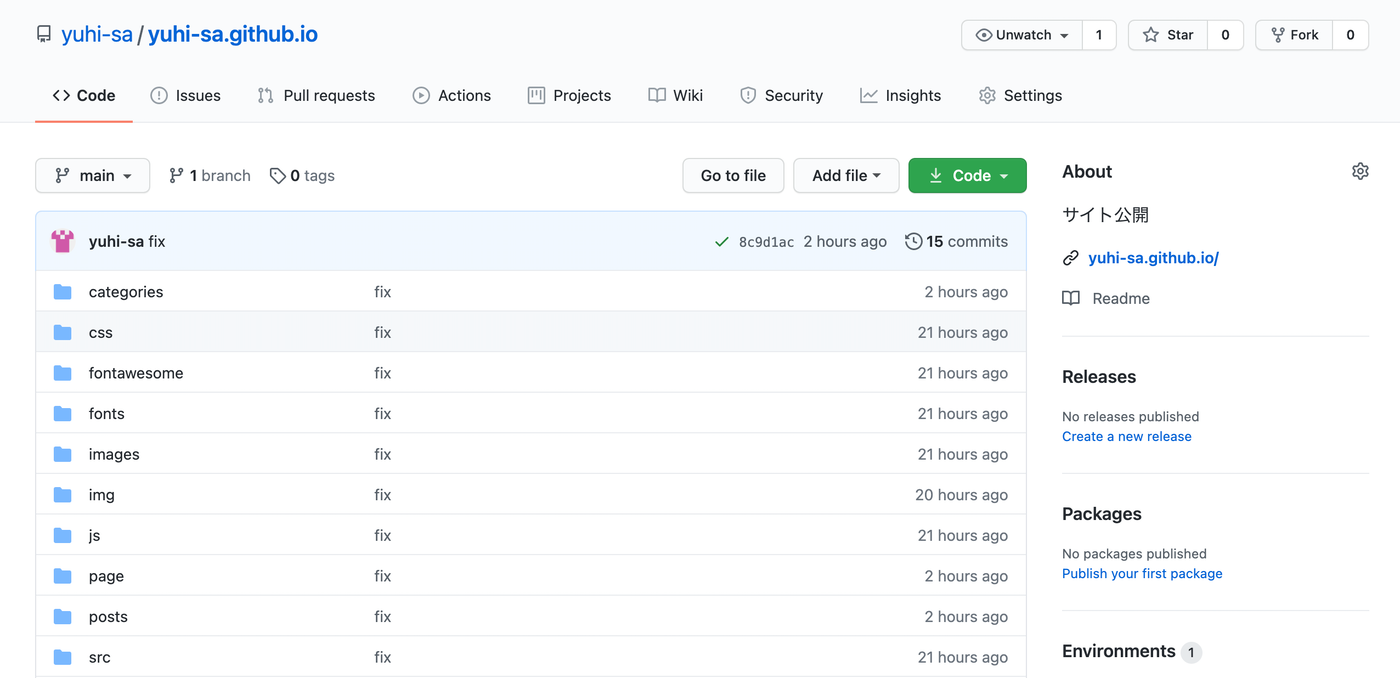
Click the “+” icon in the top right of GitHub and select “New repository.” Name the repository “username.github.io.” The published URL will be https://username.github.io .
Upload the public Folder
Since GitHub Pages only serves HTML files from the repository root, upload the public folder from your Hugo project to the “username.github.io” repository. Manage the Hugo project (test folder) itself in a separate repository or branch.
Additional Tips
Running Hugo
Preview locally:
hugo server
Preview including drafts:
hugo server -D
Enabling LaTeX Math Formulas
Create /layouts/partials/add_mathjax.html:
<script>
    MathJax = {
        tex: {
        inlineMath: [['$', '$'], ['\\(', '\\)']]
        }
    };
</script>

<script id="MathJax-script" async src="https://cdn.jsdelivr.net/npm/mathjax@3/es5/tex-chtml.js"></script>
Add to /layouts/partials/site-header.html:
{{ partial "add_mathjax.html" . }}
Google Analytics
Add the following to config.toml:
googleAnalytics = "Measurement-ID"
Since the built-in template for Google Analytics integration is outdated, edit layouts/partials/head.html:
- {{ template "_internal/google_analytics_async.html" . }}
+ {{- partial "analytics" . -}}
Create layouts/partials/analytics.html:
{{ if not .Site.IsServer }}
{{ with .Site.GoogleAnalytics }}
<!-- Global site tag (gtag.js) - Google Analytics -->
<script async src="https://www.googletagmanager.com/gtag/js?id={{ . }}"></script>
<script>
   window.dataLayer = window.dataLayer || [];
   function gtag(){dataLayer.push(arguments);}
   gtag('js', new Date());
   gtag('config', '{{ . }}');
</script>
{{ end }}
{{ end }}
Creating a Sitemap
Create layouts/sitemap.xml:
<urlset xmlns="http://www.sitemaps.org/schemas/sitemap/0.9">
{{ range .Data.Pages }}{{ if .IsPage }}
<url>
  <loc>{{ .Permalink }}</loc>
  {{ if not .Lastmod.IsZero }}
  <lastmod>{{ safeHTML ( .Lastmod.Format "2006-01-02T15:04:05-07:00" ) }}</lastmod>
  <changefreq>weekly</changefreq>
  {{ end }}
</url>
{{ end }}{{ end }}
</urlset>
Create layouts/robots.txt:
Sitemap : {{ $.Site.BaseURL }}sitemap.xml
Edit config.toml:
enableRobotsTXT = true
The sitemap is available at /sitemap.xml.
Execution verification: actually building and measuring
Claims that “Hugo builds are fast” are easy to make and hard to verify — but since this very blog runs on Hugo, we can just build it and check the real numbers.
Real measurement on the production site
We ran a production-equivalent build against this blog (apps/blog):
time hugo --gc --minify -d /tmp/hugo-build-test-public
Result (a read-only measurement — no content was changed, only the output directory was redirected to a temp path):
Total in 4674 ms
hugo --gc --minify ...  19.67s user 1.09s system 439% cpu 4.721 total
This build covers 542 Japanese pages and 563 English pages — 1,105 pages total, including posts, tag lists, and pagination — through full Markdown parsing, template application, syntax highlighting, CSS/JS/HTML minification, and garbage collection. Hugo’s own internal timer (Total in) reports 4.674 seconds; the shell’s time command, measuring wall-clock time for the whole process, reports 4.721 seconds. The 439% cpu figure shows the build parallelizing across cores (19.67s of user CPU time divided by 4.721s wall-clock time works out to roughly 4.4 cores of effective parallelism).
Scaling verification: measuring build time against page count
The production site bundles a theme, multiple languages, and affiliate features, which makes it hard to isolate the effect of page count alone. So, in a scratch directory completely separate from this repository, we created a fresh Hugo site with only minimal single.html/list.html templates, then generated 10, 100, and 1,000 dummy posts and measured real build times at each step.
| Generated pages (posts + lists, etc.) | Build time (Hugo’s own timer) |
|---|---|
| 21 (10 posts) | 12 ms |
| 111 (100 posts) | 24 ms |
| 1,011 (1,000 posts) | 154 ms |
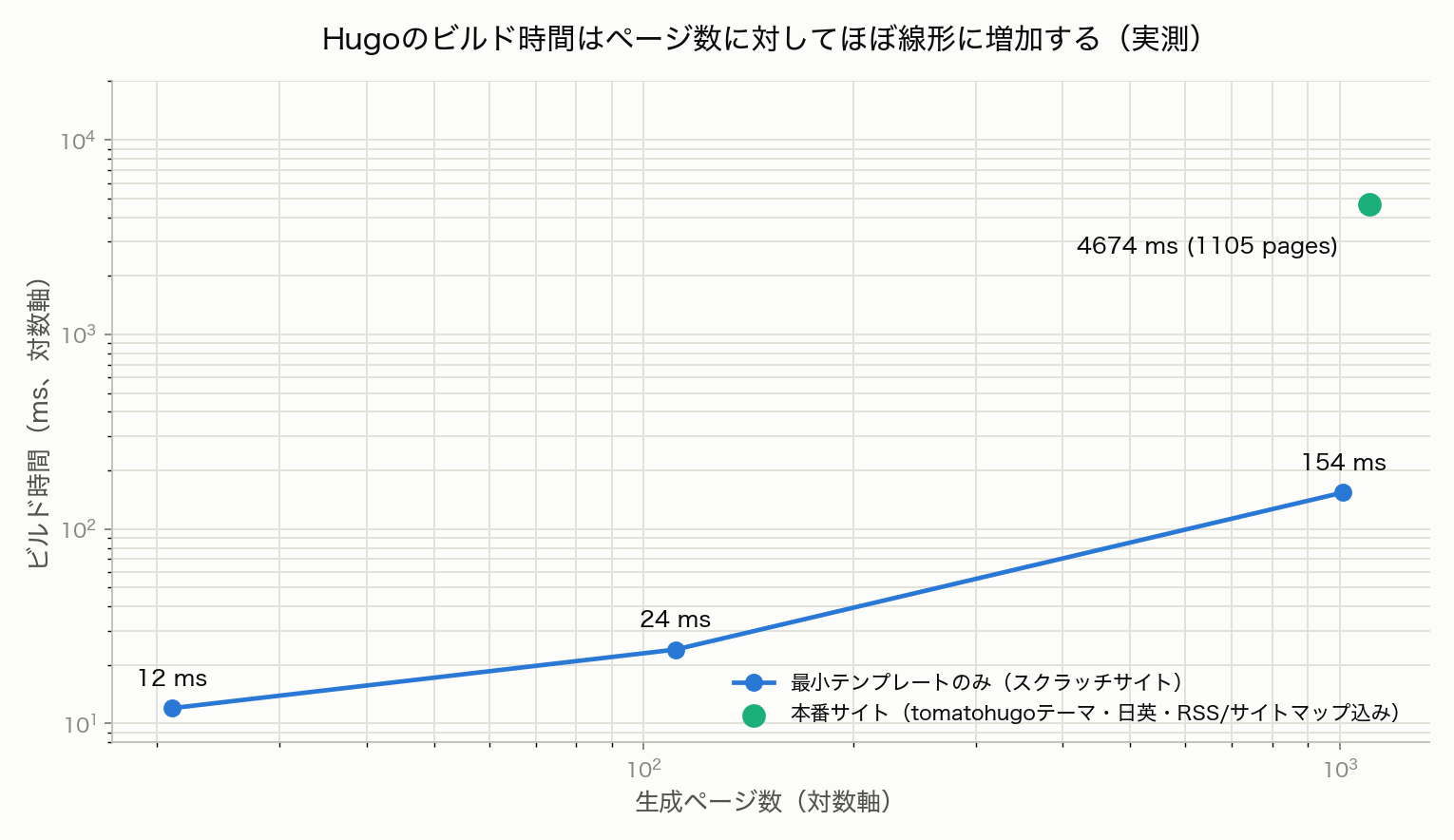
Going from 10 to 100 posts (10x) only doubled the build time (12ms → 24ms), because at small scale, fixed costs unrelated to page count — process startup, module resolution, and so on — dominate. Going from 100 to 1,000 posts (10x) increased build time 6.4x (24ms → 154ms), which matches the intuition that as page count grows, the per-page processing cost becomes the dominant factor.
By contrast, the production site (1,105 pages, full theme, multilingual, minification) took 4,674ms — a much higher per-page cost than the scratch site’s 1,011-page data point (154ms). This is because a real theme adds layout inheritance, partial invocation, shortcode expansion, syntax highlighting, and asset minification per page — build time depends not just on page count but on how much work each page actually does. Still, building a real 1,000+ page site in under 5 seconds is a concrete data point backing up Hugo’s reputation for speed.
Edge cases worth knowing
Content organization: leaf bundles, branch bundles, and plain content files
Hugo’s content directory supports three distinct organizational patterns, and they change how related files (like images) are resolved. We verified all three empirically on the scratch site.
- Leaf bundle — e.g.
content/posts/foo/index.md, where the Markdown file inside the directory is literally namedindex.md. Any file placed alongside it becomes a page resource, accessible from templates via.Resources. In our test, a directory withindex.mdplus a sibling image reported{{ len .Resources }}as 1 in the template — enabling Hugo’s built-in image-processing pipeline ({{ with .Resources.GetMatch "fig.png" }}{{ .Resize "300x" }}{{ end }}, responsive images, etc.). - Branch bundle — e.g.
content/posts/foo/_index.md, where the file is named_index.md. This directory becomes a section (list) page, not a single post. In our test, a directory with_index.mdwas rendered withlist.htmlinstead ofsingle.html, and could enumerate nested child pages (other leaf bundles) via.Pages. - Plain content file — a Markdown file named neither
index.mdnor_index.md(e.g.1.md), sitting in a directory. This is exactly the pattern this blog itself uses —content/posts/YYYYMMDD_topic/1.md— and this very article is no exception. When we tested this pattern,{{ len .Resources }}returned 0 in the template: page-resource features like image processing are not available. However, sibling files in the same directory are still copied by Hugo to the matching path in the output (we confirmedpublic/posts/20210204_hugo/fig1.pngis actually generated). That’s exactly why plain absolute-path Markdown images likework correctly throughout this blog even though these directories aren’t true leaf bundles. The tradeoff: to use Hugo’s built-in image processing (resize, responsive images, EXIF reading) on these images, you’d need to rename1.mdtoindex.md— but doing so would change the post’s URL, since1.mditself currently becomes a URL segment (/posts/20210204_hugo/1/, the structure actually used across this site).
The draft: true gotcha: posts silently missing from production builds
The “Additional Tips” section above mentions hugo server -D, a command commonly used during local development — and it hides a gotcha that trips people up in practice. We added a post with draft: true on the scratch site and compared a production-equivalent build (no -D) against a drafts-included build (-D):
=== Production build (no -D) ===
Pages: 1011 (same as before adding the draft)
public/posts/draft-test/ → not generated

=== Build with -D ===
Pages: 1012 (+1)
public/posts/draft-test/index.html → generated
Because hugo server -D correctly shows the post locally, it’s easy to assume “I confirmed it works, so it’s fine” — but a production build without -D (exactly what CI runs via hugo --gc --minify) doesn’t just hide the draft page, it doesn’t count it in the page total at all, and generates no output file whatsoever. What appeared to work locally can vanish entirely in production, so always confirm draft: false before publishing, and test with a build that omits -D at least once before shipping.
Verifying sitemap.xml and the RSS feed
We inspected the actual production build output rather than assuming the sitemap and feed “probably” look right.
public/sitemap.xmlturned out to be a sitemap index (<sitemapindex>), not a flat list of URLs. Since this site is bilingual (Japanese/English) and shares a domain with separate Next.js apps (DevToolBox, CalcBox, Pomodoro), it aggregates references to multiple sitemaps:https://yuhi-sa.github.io/ja/sitemap.xml,.../en/sitemap.xml,.../devtoolbox/sitemap.xml, and so on.- The actual per-language sitemaps live at
public/ja/sitemap.xmlandpublic/en/sitemap.xml. Inspecting the Japanese one, its URLs (e.g.https://yuhi-sa.github.io/tags/db/) correctly omit the/ja/prefix that would suggest a subdirectory — even though the sitemap file itself lives at a/ja/path that doesn’t correspond to any real served page. The URLs inside point at the real serving paths. - The RSS feed (
public/index.xml) was also opened directly and confirmed to contain correct titles, links, and publish dates for recent posts.
Actually opening the build output — instead of assuming it’s “probably generated correctly” — is what catches SEO regressions before they ship.
Recent Hugo developments
Several years have passed since this post was originally written in 2021, so we checked in on Hugo’s current state.
- The Hugo build used for this update was
hugo v0.164.0+extended+withdeploy(released July 6, 2026), installed via Homebrew. This blog’s CI (.github/workflows/deploy.yml), however, pins0.155.3— nine minor versions behind the locally installed version. - v0.164.0 adds AVIF image encode/decode support, new template functions (
encoding.HexEncode,encoding.HexDecode,crypto.Hash), Pandoc citation support, and a fix for a performance regression that had been present since v0.128.0 (most noticeable on larger sites). - Building this site today also surfaces several deprecation warnings:
languages.ja.languageNamewas deprecated in Hugo v0.158.0 in favor oflanguages.ja.label, and.Language.LanguageCode,.Language.LanguageDirection, and.Language.LanguageNameare deprecated in favor of.Language.Locale,.Language.Direction, and.Language.Labelrespectively. This site’sconfig.tomlstill uses the older keys today and will need to migrate before they’re removed in a future major release.