Python provides built-in functions and operators for converting between integers and binary string representations, as well as for performing bitwise logical operations. This article introduces their basic usage and custom function implementations, then digs into how negative numbers are actually represented at the bit level (two’s complement), whether overflow can happen, and how the sign is handled during shifts — the exact points where people coming from C and other fixed-width languages tend to get tripped up in Python. Every claim below is backed by real executed output.
Binary Conversion
Using Python’s built-in bin() function, you can convert an integer to a binary string with a “0b” prefix.
num = 10
binary_str = bin(num)
print(f"Binary representation of {num}: {binary_str}") # Output: Binary representation of 10: 0b1010
Preparing Binary Representations with a Custom Function
To perform bitwise logical operations, we implement a function that converts two numbers into binary lists of equal length, padding the shorter one with zeros.
def prepare_binary_lists(num1, num2):
    # Convert to binary string using bin() and remove '0b' prefix
    bin_str1 = bin(num1)[2:]
    bin_str2 = bin(num2)[2:]

    # Pad the shorter one with zeros to equalize lengths
    max_len = max(len(bin_str1), len(bin_str2))
    bin_list1 = [int(bit) for bit in bin_str1.zfill(max_len)]
    bin_list2 = [int(bit) for bit in bin_str2.zfill(max_len)]

    return bin_list1, bin_list2

# Example
b1, b2 = prepare_binary_lists(3, 5)
print(f"Binary list of 3: {b1}") # Output: Binary list of 3: [0, 1, 1]
print(f"Binary list of 5: {b2}") # Output: Binary list of 5: [1, 0, 1]
Decimal Conversion
A function to convert a binary list back to a decimal number.
def binary_list_to_decimal(binary_list):
    decimal_num = 0
    power = 0
    # Process the binary list from right to left
    for bit in reversed(binary_list):
        if bit == 1:
            decimal_num += (2 ** power)
        power += 1
    return decimal_num

# Example
print(f"Convert [1, 0, 1] to decimal: {binary_list_to_decimal([1, 0, 1])}") # Output: Convert [1, 0, 1] to decimal: 5
Bitwise OR Operation
Python has a built-in bitwise OR operator |.
result_or = 3 | 5
print(f"3 (0b011) OR 5 (0b101) = {result_or} (0b{bin(result_or)[2:]})") # Output: 3 (0b011) OR 5 (0b101) = 7 (0b111)
Custom OR Operation
def custom_or(num1, num2):
    bin_list1, bin_list2 = prepare_binary_lists(num1, num2)
    or_result_list = []
    for i in range(len(bin_list1)):
        if bin_list1[i] == 1 or bin_list2[i] == 1:
            or_result_list.append(1)
        else:
            or_result_list.append(0)
    return binary_list_to_decimal(or_result_list)

# Example
print(f"Custom OR function: 3 OR 5 = {custom_or(3, 5)}") # Output: Custom OR function: 3 OR 5 = 7
Bitwise XOR Operation
Python has a built-in bitwise XOR operator ^.
result_xor = 3 ^ 5
print(f"3 (0b011) XOR 5 (0b101) = {result_xor} (0b{bin(result_xor)[2:]})") # Output: 3 (0b011) XOR 5 (0b101) = 6 (0b110)
Custom XOR Operation
def custom_xor(num1, num2):
    bin_list1, bin_list2 = prepare_binary_lists(num1, num2)
    xor_result_list = []
    for i in range(len(bin_list1)):
        if bin_list1[i] != bin_list2[i]: # When bits differ
            xor_result_list.append(1)
        else:
            xor_result_list.append(0)
    return binary_list_to_decimal(xor_result_list)

# Example
print(f"Custom XOR function: 3 XOR 5 = {custom_xor(3, 5)}") # Output: Custom XOR function: 3 XOR 5 = 6
How Are Negative Numbers Represented? Two’s Complement
So far we’ve only dealt with non-negative integers. But passing a negative number to bin() gives a result that surprises people coming from C.
print(bin(5))   # Output: 0b101
print(bin(-5))  # Output: -0b101
print(bin(0))   # Output: 0b0
bin(-5) returns -0b101 — literally “a minus sign followed by the binary digits of 5.” In C, printing a 32-bit int equal to -5 gives you the bit pattern 11111111111111111111111111111011, the actual two’s complement encoding. Python does not do this: it is not showing you a signed bit pattern at all. This is because Python integers are arbitrary-precision integers — they don’t have a fixed bit width the way C’s int or long do. bin() simply stringifies “sign + binary digits of the magnitude”; it is not the two’s complement bit pattern.
That said, the bitwise operators &, |, ^, ~, <<, and >> behave on Python’s negative integers as if they were an infinite-width two’s complement representation (demonstrated below). So Python’s negative integers have a dual nature: they display as signed magnitude, but they compute as two’s complement.
Why Two’s Complement Is Used
Most CPUs, and languages with fixed-width integers like C, encode negative numbers as bit patterns using two’s complement. The reason is that it lets addition and subtraction be computed for both positive and negative numbers using exactly the same hardware circuit.
There are other ways to represent negative numbers, but each is less convenient than two’s complement:
- Sign-magnitude: the top bit is the sign, the rest is the magnitude. Intuitive for humans, but it produces two representations of zero (
+0and-0), and the adder needs separate logic depending on the signs of the operands. - One’s complement: negate a number by flipping every bit. This also produces two zeros (
00000000and11111111), and carry handling is awkward. - Two’s complement: negate a number by “flipping every bit, then adding 1.” There is exactly one representation of zero (
00000000), and a plain binary adder — with no special-casing for sign — produces the correct result for any combination of signs (subtractiona - bis computed asa + (-b)on the very same adder).
Deriving Two’s Complement
To form the two’s complement negation \(-x\) of a number \(x\) in an \(n\) -bit width:
- Invert every bit of \(x\)
(bitwise NOT, i.e.,
~x) - Add 1 to the inverted value
In other words, \(-x = (\lnot x) + 1\) . Since inverting all bits of an \(n\) -bit number means \(\lnot x = (2^n - 1) - x\) , this gives
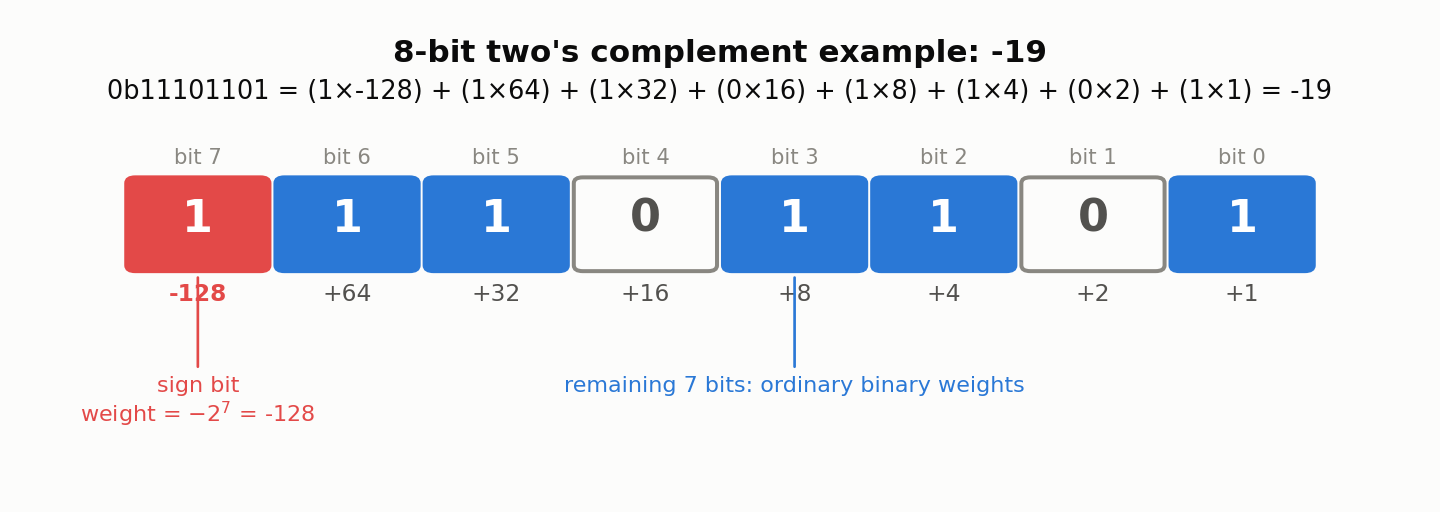
\[ -x \equiv (2^n - 1 - x) + 1 = 2^n - x \pmod{2^n} \]Two’s complement is therefore “residue modulo \(2^n\) ” — with one twist: the most significant bit (the sign bit) carries a negative weight \(-2^{n-1}\) instead of the positive weight an ordinary binary digit would have. For 8 bits, the sign bit’s weight is \(-2^7 = -128\) , while the remaining 7 bits carry the usual \(+64, +32, \dots, +1\) weights.
The figure below shows 0b11101101, the 8-bit two’s complement encoding of \(-19\)
. The sign bit (red) carries weight \(-128\)
; the remaining 7 bits (blue) carry their ordinary binary weights; the total sums to \(-19\)
.
Let’s reproduce 8-bit two’s complement arithmetic directly in Python. Masking with & 0xFF keeps only the low 8 bits, and subtracting \(2^8 = 256\)
whenever the top bit (0x80) is set recovers the value an 8-bit signed integer would hold.
def to_int8(n):
    n = n & 0xFF
    if n & 0x80:
        n -= 0x100
    return n

for v in [0, 1, 127, 128, 200, 255, -1, -128]:
    masked = v & 0xFF
    print(f"{v:>5} & 0xFF = {masked:>3} (0b{masked:08b}) -> to_int8 = {to_int8(v)}")

# Output:
#     0 & 0xFF =   0 (0b00000000) -> to_int8 = 0
#     1 & 0xFF =   1 (0b00000001) -> to_int8 = 1
#   127 & 0xFF = 127 (0b01111111) -> to_int8 = 127
#   128 & 0xFF = 128 (0b10000000) -> to_int8 = -128
#   200 & 0xFF = 200 (0b11001000) -> to_int8 = -56
#   255 & 0xFF = 255 (0b11111111) -> to_int8 = -1
#    -1 & 0xFF = 255 (0b11111111) -> to_int8 = -1
#  -128 & 0xFF = 128 (0b10000000) -> to_int8 = -128
Notice that -1 & 0xFF evaluates to 255 (0b11111111). Python’s integers have unlimited width, but bitwise operations on a negative Python integer treat it as if the upper bits are all 1s, extending infinitely to the left. Truncating to the lowest 8 bits then reproduces exactly the bit pattern that an 8-bit signed -1 has in C. This is precisely why Python’s negative integers are said to behave as “infinite-width two’s complement.”
The “invert every bit, then add 1” derivation is directly verifiable too.
def negate_int8(n):
    inverted = (~n) & 0xFF
    return to_int8(inverted + 1)

for v in [19, -19, 1, -128, 0]:
    print(f"negate_int8({v}) = {negate_int8(v)}")

# Output:
# negate_int8(19) = -19
# negate_int8(-19) = 19
# negate_int8(1) = -1
# negate_int8(-128) = -128
The last line, negate_int8(-128) = -128, is an important edge case. An 8-bit signed integer can represent values from \(-128\)
to \(127\)
— and \(+128\)
is simply outside that range. Negating \(-128\)
would require representing \(+128\)
, which doesn’t fit, so the sign fails to flip and the result silently comes back as \(-128\)
. This is the 8-bit miniature of the same reason that negating INT_MIN in C is undefined behavior.
Overflow: The Crucial Difference Between C and Python
In fixed-width integer types, an operation whose true result falls outside the representable range “overflows” and wraps around. Let’s use to_int8 from above to simulate 8-bit signed addition.
def add_int8(a, b):
    return to_int8(a + b)

print("127 + 1 =", add_int8(127, 1))     # Output: 127 + 1 = -128
print("-128 + -1 =", add_int8(-128, -1)) # Output: -128 + -1 = 127
Mathematically 127 + 1 is 128, but that falls outside the 8-bit signed range (-128 to 127), so it wraps around to -128. This is exactly what happens in C if you add 1 to an int8_t holding 127.
Python’s own integer arithmetic, in contrast, never overflows at all. Python’s int is an arbitrary-precision integer that automatically grows as many digits as memory allows.
x = 2**64
print(x)              # Output: 18446744073709551616
print(type(x))        # Output: <class 'int'>
print(x * x)            # Output: 340282366920938463463374607431768211456
print(x * x == 2**128) # Output: True
2**64 already exceeds the range of a 64-bit unsigned integer in C, yet Python computes it exactly with no warning, and even squares it (a number on the order of 2**128) with no loss of precision. In C, multiplying two uint64_t values would overflow within 64 bits and silently keep only the low bits — an incorrect result. Python’s int structurally cannot overflow this way, because it simply grows as many digits as the true value needs.
Put differently: if you want to reproduce fixed-width overflow/wraparound behavior in Python, you have to mask explicitly, as to_int8 does with & 0xFF. Fixed-width types such as NumPy’s int8 / uint32 do overflow the same way C does, so their behavior differs from plain Python int — worth keeping in mind if you switch between the two.
Bitwise Operators on Negative Numbers
Bitwise NOT (~)
Python’s ~x is “flip every bit,” but since Python’s int is never unsigned, the identity ~x == -x - 1 always holds.
print(~5)    # Output: -6
print(~0)    # Output: -1
print(~-1)   # Output: 0
print(~127)  # Output: -128
This is just the earlier “two’s complement = invert then add 1” relationship, \(-x = (\lnot x) + 1\) , rearranged into \(\lnot x = -x - 1\) .
Shifts (<<, >>): Python’s Right Shift Is Arithmetic
For non-negative numbers, << (left shift) and >> (right shift) correspond to multiplying by 2 and floor-dividing by 2, respectively. For negative numbers, Python’s >> matches an arithmetic shift (a sign-extending shift) as found in C and elsewhere: the sign bit is preserved as the value shifts right, so a negative number stays negative.
print(-8 >> 1)     # Output: -4
print(-7 >> 1)     # Output: -4
print(-1 >> 100)   # Output: -1
print(-8 << 1)      # Output: -16
Note that -7 >> 1 rounds toward negative infinity, giving -4, and that -1 stays -1 no matter how far right you shift it (a natural consequence of treating the sign bit as extending infinitely).
The other kind of shift commonly used with fixed-width integers is the logical right shift, which ignores the sign entirely and always fills the vacated high bits with 0. Python has no dedicated operator for this, but masking to 8 bits with & 0xFF before shifting reproduces a logical right shift over an 8-bit unsigned integer.
def logical_rshift8(n, k):
    return (n & 0xFF) >> k

n = -8
print(f"arithmetic n >> 1        = {n >> 1}")                              # Output: arithmetic n >> 1        = -4
print(f"logical (8-bit) n >> 1   = {logical_rshift8(n, 1)} (0b{logical_rshift8(n,1):08b})")
# Output: logical (8-bit) n >> 1   = 124 (0b01111100)
Shifting the same -8 right by one bit gives two very different answers depending on which kind of shift you use: the arithmetic shift preserves the sign, giving -4 (floor of -8 / 2); the logical shift instead treats -8 as the 8-bit pattern 0b11111000 (decimal 248) and fills the vacated top bit with 0, giving 124 (0b01111100). In C, whether >> behaves arithmetically or logically depends on whether the operand’s type is signed or unsigned (most implementations do arithmetic shift for signed types, logical for unsigned) — reproducing a fixed-width logical shift in Python requires this kind of explicit masking.
Common Bit-Manipulation Idioms
Checking If a Number Is a Power of Two
Whether an integer \(n\)
is a power of two can be tested in one line: n & (n - 1) == 0. A power of two has exactly one bit set (e.g. 0b1000); subtracting 1 flips that bit and every bit below it to 1 (e.g. 0b0111), so ANDing the two always yields 0.
def is_power_of_two(n):
    return n > 0 and (n & (n - 1)) == 0

for n in [0, 1, 2, 3, 4, 16, 18, 1024]:
    print(n, is_power_of_two(n))

# Output:
# 0 False
# 1 True
# 2 True
# 3 False
# 4 True
# 16 True
# 18 False
# 1024 True
Note the n > 0 guard: without it, n = 0 would make 0 & -1 == 0 true, incorrectly classifying 0 as a power of two.
Counting Set Bits (Popcount)
Counting how many bits are set to 1 in an integer’s binary representation — the population count, or popcount — is another common operation. A naive string-based approach looks like this:
n = 0b1011010111
print(n, bin(n))              # Output: 727 0b1011010111
print(bin(n).count('1'))      # Output: 7
Since Python 3.10, there is a dedicated method, int.bit_count(), that avoids the round-trip through a string and is both faster and more concise.
print(n.bit_count()) # Output: 7
bin(n).count('1') goes through a string (and bin() on a negative number returns a -0b... string, so the idiom doesn’t behave sensibly for negatives), whereas int.bit_count() has clear, well-defined behavior — it counts the bits of the absolute value. If you don’t need to support Python versions older than 3.10, bit_count() is the recommended choice today.
Summary
In Python, the built-in operators | (OR), ^ (XOR), & (AND), ~ (NOT), and << / >> (shifts) are the most efficient and recommended way to perform bitwise logical operations. Custom functions are useful for learning purposes to understand how these operations work.
When dealing with negative numbers, two points prevent most confusion:
- Display functions like
bin()show signed magnitude (a string like-0b101), but bitwise operators like&and>>behave as infinite-width two’s complement. - Python’s
intis arbitrary-precision and therefore never overflows on its own, but reproducing fixed-width (8-bit, 32-bit, etc.) behavior requires an explicit mask such as& 0xFF.
The idea of treating an exponent as a sequence of bits and processing it one bit at a time is exactly what powers
Fast Modular Exponentiation Using Binary Exponentiation in Python
’s exponentiation by squaring (binary method) for fast modular exponentiation. That article’s main implementation is written with exp % 2 == 1 / exp //= 2 (modulo and integer division), which is exactly equivalent to the bitwise exp & 1 / exp >>= 1 (its Montgomery-ladder variant does in fact use the bitwise form directly, as (exp >> i) & 1). Reading the exponent one bit at a time this way computes a huge power in only \(O(\log k)\)
multiplications. The bitwise operations covered in this article are the foundation that technique is built on.