The Art of Readable Code: Simple and Practical Techniques for Writing Better Code (Dustin Boswell and Trevor Foucher, O’Reilly, 2012) is still one of the books most often recommended as a first technical read for working engineers. This post reorganizes the book’s key ideas in my own words and illustrates them with original code examples (TypeScript / Python) rather than the book’s own examples, so you can see concretely what “readable code” looks like. By the end, you should have enough of a map of the book to want to read the whole thing.
1. What Is The Art of Readable Code — Why It’s Still Read Years Later
The book is focused on a single question: how do you make code readable? It ranges from small things like variable naming all the way to more design-oriented topics like splitting functions and restructuring code. It isn’t a guide to any particular language or framework — its examples span C++, Python, and JavaScript — but the principles it draws out apply regardless of the language you use.
More than a decade after its first edition, I think it still holds up for two reasons. First, the topic itself — readability — isn’t tied to any particular language trend or framework fashion; it’s a fairly timeless property of code. Second, the principles are broken down to a granularity you can act on today, one line at a time. Rather than abstract design theory, it starts from things as concrete as a single variable name or a single if statement, which makes it approachable even for less experienced engineers.
I think the core audience is engineers roughly six months to a few years into their careers. That said, it’s also worth revisiting once you start reviewing other people’s code, as a way to put words to the vague sense that “this code is hard to read.” I read it once as a junior engineer, and then again after I started doing code reviews — several principles only really landed for me the second time.
2. The Core Idea: The “Fundamental Theorem of Readability”
There’s a single thread running through the whole book: code should be written so that the time it takes another person (including your future self) to read and understand it is as short as possible. The book uses this repeatedly as a kind of decision criterion.
What makes this framing useful is that it doesn’t reduce to a simple metric like “fewer lines” or “shorter code.” Code crammed onto a single line is often shorter but takes longer to understand, while code that’s a few lines longer because it introduces explanatory variables can often be understood instantly — and by this standard, the longer version is the more “readable” one. In other words, “good code” here is judged not by how long it takes to write, but by how long it takes to read — and specifically, how long it takes someone other than the author to read it.
Once you adopt this as the underlying standard, the individual techniques the book covers — naming, comments, control flow, function decomposition — all read as means to the same end. The diagram below lays out the book’s overall flow as a progression from small, single-line-level improvements up to design decisions that span multiple files.
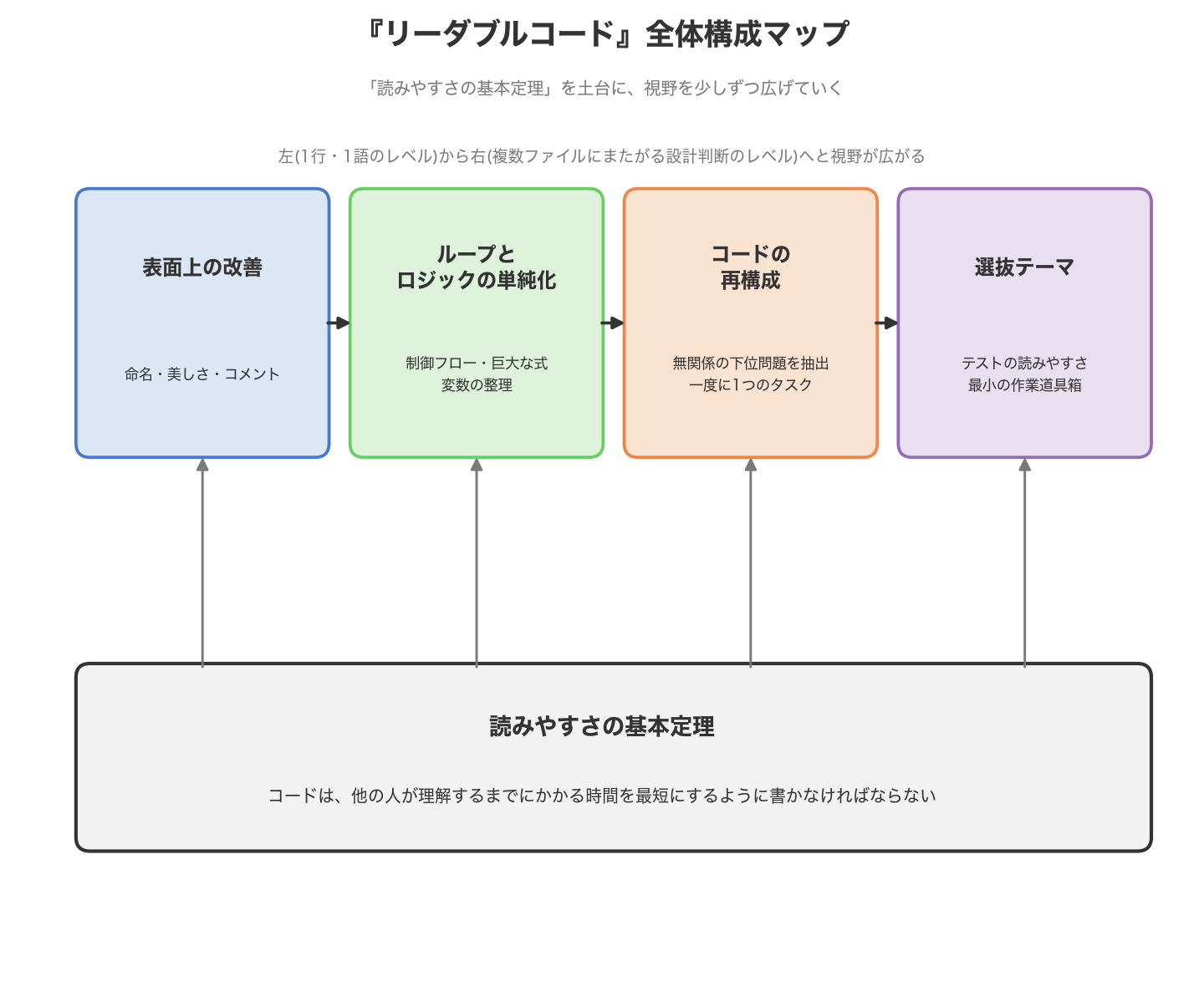
The sections below walk through the first three stages of this diagram, from left to right, each with original code examples.
3. Surface-Level Improvements — Naming, Aesthetics, and Comments
This is the layer that’s easiest to act on and yields the biggest return for the effort. Renaming a variable, adding a blank line, adding one comment — none of these changes touch the underlying logic, and they’re all easy things to flag in review.
3-1 Pack Information into Names
Generic verbs can often be swapped for something more specific to the situation. Here’s an example involving a data-fetch function with a cache.
// Before: "get" implies something lightweight, but this call may hit the network
function getUser(id: string) {
  const cached = cache.lookup(id);
  if (cached) return cached;
  return fetchFromApi(`/users/${id}`); // network round trip
}

// After: the verb reflects what the function actually does (a potentially costly fetch)
function fetchUserWithCache(id: string) {
  const cached = cache.lookup(id);
  if (cached) return cached;
  return fetchFromApi(`/users/${id}`);
}
The word “get” tends to set an expectation of a lightweight accessor. If the implementation involves a network call or disk I/O, swapping in a verb like fetch or load lets callers brace for the possibility that each call has a real cost. I once ran into a get〇〇() that silently hid an expensive aggregation, and it got called inside a loop with no one noticing until performance suffered — since then, this is one of the first things I check in review.
3-2 Use Names That Can’t Be Misunderstood
Boolean variable names are especially prone to ambiguity. Consider this example.
// Before: unclear whether "disable" is a command or a state
let disable = false;
if (!disable) {
  submitForm();
}

// After: the is_ prefix and the meaning of "true" are both clear from the name alone
let isSubmitDisabled = false;
if (!isSubmitDisabled) {
  submitForm();
}
Naming a boolean after a bare verb like disable leaves it ambiguous whether it’s an instruction (“disable this now”) or a state (“this is currently disabled”), and that ambiguity depends entirely on context. Adding a prefix like is_ or has_ makes it immediately clear from the code alone both that this is a flag and what true means. It’s a small change, but it also helps prevent double-negative conditions like if (!isNotDisabled) from creeping in.
3-3 Aesthetics — Let Layout Communicate Structure
Formatting similar code the same way makes differences jump out at a glance.
# Before: it isn't visually obvious that these three assignments share the same shape
user_name = request.form.get("name")
user_email = request.form.get("email")
user_phone_number = request.form.get("phone")

# After: vertical alignment communicates "this is the same pattern repeated" instantly
user_name         = request.form.get("name")
user_email        = request.form.get("email")
user_phone_number = request.form.get("phone")
Vertical alignment is somewhat a matter of taste, but at minimum it conveys the fact that “these three lines are structurally doing the same thing” without needing a sentence of explanation. That said, if your team runs an auto-formatter, this kind of manual alignment can get undone, so it’s worth checking it doesn’t conflict with your team’s formatting rules first.
3-4 Let Comments Explain “Why”
The value of a comment isn’t in restating what the code already says — it’s in filling in background that the code alone can’t convey.
// Before: just restates what's already obvious from the code
// sort the list
items.sort((a, b) => a.priority - b.priority);

// After: explains the reasoning behind the choice of ordering and implementation
// We want insertion order preserved when priorities tie, so we rely on this
// being a stable sort — guaranteed by Array.prototype.sort since ES2019.
items.sort((a, b) => a.priority - b.priority);
“What” is something the code itself usually explains well enough on its own. A comment earns its keep when it explains “why this implementation” or “why this code looks unnatural at first glance.” In review, I often flag comments that just restate the code (“you can already tell that from reading it”), but more often I find myself asking “why is this in this order?” on code that’s missing a “why” comment — and that question is usually exactly what the missing comment should have said.
4. Simplifying Loops and Logic
Once the surface has been cleaned up with naming and comments, the next step is tackling the complexity of the control flow itself. The goal here is to let the reader avoid holding a mental stack of conditions in their head.
4-1 Use Guard Clauses to Flatten Nesting
Deeply nested conditionals force the reader to remember which condition they’re currently inside.
// Before: the happy path is buried at the bottom of the nesting
function calculateShippingFee(order: Order): number {
  if (order.items.length > 0) {
    if (order.address !== null) {
      if (order.address.country === "JP") {
        return order.weight * 100;
      } else {
        return order.weight * 300;
      }
    } else {
      throw new Error("address is required");
    }
  } else {
    return 0;
  }
}

// After: handle edge cases and early returns up front, keep the happy path unnested
function calculateShippingFee(order: Order): number {
  if (order.items.length === 0) return 0;
  if (order.address === null) throw new Error("address is required");

  return order.address.country === "JP"
    ? order.weight * 100
    : order.weight * 300;
}
Guard clauses — handling edge cases and early returns up front — leave the rest of the function free to assume only the happy path. Removing even a single level of nesting noticeably reduces the number of preconditions a reader has to keep in mind. Personally, whenever I see three or more levels of nesting in a function, the first thing I check is whether a guard clause can flatten it.
4-2 Break Large Expressions into Explanatory Variables
A long conditional crammed onto one line tends to stall reviewers even when it’s logically correct.
# Before: the condition is long, and it's not obvious at a glance what it's checking
if (user.age >= 18 and user.country == "JP" and
        not user.is_suspended and user.email_verified):
    grant_access(user)

# After: break it into explanatory variables, one per logical unit
is_adult = user.age >= 18
is_domestic = user.country == "JP"
is_in_good_standing = not user.is_suspended and user.email_verified

if is_adult and is_domestic and is_in_good_standing:
    grant_access(user)
Introducing explanatory variables adds lines, but each variable’s name does the work of explaining what that part of the expression checks, removing the need to parse the raw expression. It also has the side benefit of confining future changes — if the “domestic” check changes, there’s exactly one line to touch. When I’m unsure whether to break an expression apart, I ask myself “how would I explain this condition out loud to someone else?” — the answer is usually a ready-made variable name.
5. Restructuring Code
Even after cleaning up naming and simplifying logic, a function that’s still doing several unrelated jobs at once remains hard to read. This section is about restructuring at the level of functions and modules.
5-1 Extract Unrelated Subproblems
This is about noticing when a function contains a “subproblem” that has nothing to do with its core business logic.
// Before: date-formatting detail is tangled up with computing the order total
function buildInvoiceSummary(order: Order): string {
  const d = order.createdAt;
  const formatted = `${d.getFullYear()}/${String(d.getMonth() + 1).padStart(2, "0")}/${String(d.getDate()).padStart(2, "0")}`;

  const total = order.items.reduce(
    (sum, item) => sum + item.price * item.quantity,
    0,
  );
  return `${formatted} order total: ${total}`;
}

// After: extract the unrelated subproblem of date formatting into its own function
function formatDateJP(date: Date): string {
  return `${date.getFullYear()}/${String(date.getMonth() + 1).padStart(2, "0")}/${String(date.getDate()).padStart(2, "0")}`;
}

function buildInvoiceSummary(order: Order): string {
  const total = order.items.reduce(
    (sum, item) => sum + item.price * item.quantity,
    0,
  );
  return `${formatDateJP(order.createdAt)} order total: ${total}`;
}
What buildInvoiceSummary should really be doing is assembling a summary string for the order; how to format a date is an independent, reusable subproblem that has nothing to do with that. Extracting it into its own function not only clarifies buildInvoiceSummary itself but also makes formatDateJP reusable elsewhere. In my experience, subproblems like date formatting, string sanitization, or unit conversion tend to creep into the main logic unless you’re actively watching for them. When you’re reading a function and think “this part has nothing to do with the problem at hand,” that’s usually the signal to extract it.
5-2 Do One Task at a Time
When a single function works through several tasks in sequence, it gets harder to follow partway through.
# Before: validation, transformation, and persistence all live in one function
def register_user(raw_data: dict) -> User:
    if "email" not in raw_data or "@" not in raw_data["email"]:
        raise ValueError("invalid email")
    if len(raw_data.get("password", "")) < 8:
        raise ValueError("password too short")

    normalized_email = raw_data["email"].strip().lower()
    user = User(email=normalized_email, password_hash=hash_password(raw_data["password"]))

    db.session.add(user)
    db.session.commit()
    return user

# After: split by task, with register_user acting purely as a coordinator
def validate_registration(raw_data: dict) -> None:
    if "email" not in raw_data or "@" not in raw_data["email"]:
        raise ValueError("invalid email")
    if len(raw_data.get("password", "")) < 8:
        raise ValueError("password too short")


def build_user(raw_data: dict) -> User:
    normalized_email = raw_data["email"].strip().lower()
    return User(email=normalized_email, password_hash=hash_password(raw_data["password"]))


def register_user(raw_data: dict) -> User:
    validate_registration(raw_data)
    user = build_user(raw_data)
    db.session.add(user)
    db.session.commit()
    return user
After splitting, register_user becomes a coordinator that simply calls “validate,” “build,” and “save” in order. Each individual task is understandable from its name alone, so if you only need to fix validation, you only need to look at validate_registration. There’s also a real payoff when writing tests, since each task can now be tested independently. A useful rule of thumb for whether a function needs splitting: does describing it require the word “and” — e.g., “a function that validates and saves”?
6. How This Played Out in Practice — Turning It into a Code Review Checklist
The biggest change this book produced for me wasn’t in how I write code, but in how I review other people’s code. Being able to put words to a vague sense of “this is hard to read,” grounded in the book’s principles, made the biggest difference. Here’s a rough checklist, organized around the book’s structure, that I actually use in reviews.
- Naming: Does the name alone convey what it’s for? Are generic words (
data,process,handle, etc.) used without further specificity? - Booleans: Do prefixes like
is_,has_,can_make the meaning oftrueunambiguous? - Comments: Does the comment just restate what the code already shows? Conversely, is a “why” comment missing where one is needed?
- Control flow: Is there nesting three levels deep or more? Could a guard clause move the happy path out of the nesting?
- Expression complexity: Is a single-line condition too long? Could explanatory variables break it apart?
- Function responsibility: Can this function only be described using “and” — e.g., “does X and Y”?
I run this checklist as a quick, fairly mechanical first pass in review. Clearing these surface-level points before moving on to higher-level discussions — design soundness, test coverage, and so on — tends to keep the rest of the review focused on what actually matters.
7. Who Should Read It / How to Read It
I think the audience that benefits the most is engineers roughly six months to two or three years into writing production code. At that point you can already write code that works, but you may not yet have much practice putting into words why one way of writing something is better than another — reading the book at this stage sharpens the everyday judgment calls you make while coding.
That said, it’s also worth revisiting once you start reviewing other people’s code more regularly. Once you can name the source of a “this is hard to read” feeling using the book’s vocabulary — naming, comments, control flow, function decomposition — your review comments become noticeably more persuasive.
As for how to read it: rather than reading straight through, it tends to stick better if you read with code you’re currently writing (or recently reviewed) in hand, and jump to whichever chapter seems relevant. The chapters are fairly independent and the examples are short, which makes it well suited to this kind of selective reading. Applying even one principle to your own code right away is usually what makes the material actually stick.
Summary
The Art of Readable Code starts from a single premise — code should be written so that the time it takes someone else to understand it is minimized — and works outward from there: surface-level improvements like naming and comments, then simplifying control flow, then restructuring at the level of functions and modules, each stage widening the scope. Because most of its guidance operates at a granularity you can apply to a single line today, rather than staying abstract, I think there’s something in it regardless of how many years of experience you have. What’s covered here is just the skeleton; the book itself includes many more concrete examples and careful explanation for each principle. If any of the ideas above caught your interest, it’s worth picking up the original.
FAQ
Is this readable for beginners?
Yes, as long as you’ve already learned the basics of programming — variables, functions, conditionals, loops. The sample code spans several languages (C++, Python, JavaScript), but it doesn’t rely on advanced features of any of them, so basic familiarity with one language should be enough to follow along.
Does it still hold up today?
Since the topics it covers — naming, comments, control flow, function decomposition — are fairly universal and not tied to any particular language feature or framework, I think the core of the book still holds up well even years after its first edition. Some of the individual example code inevitably shows its age, but the underlying principles translate to essentially any language or stack.
How long does it take to read?
The book runs a bit over 200 pages, and with short, largely independent chapters, a straight read-through can be done in a few hours. That said, as this post illustrates, actually applying each idea to your own code as you go takes longer. Reading through once for the overall picture and then returning to specific chapters as needed tends to work well.
References
- Dustin Boswell, Trevor Foucher, The Art of Readable Code: Simple and Practical Techniques for Writing Better Code, O’Reilly Media (2012)