During frontend development or API integration testing, a mock server is very useful when the backend API is not yet ready or when you want to simulate specific responses. Here, we introduce how to build a simple mock server that returns JSON data using Python’s standard library wsgiref. Rather than just pasting working code, this article also covers:
- what the WSGI interface actually specifies at the protocol level
- edge cases specific to mock servers — status codes, CORS preflight, and concurrency
- how this approach differs from
unittest.mock,responses, andrespx
all verified by actually starting the server and sending real HTTP requests.
What WSGI (Web Server Gateway Interface) Actually Specifies
wsgiref.simple_server is the reference implementation of WSGI (
PEP 3333
), the standard interface between Python web applications and web servers. WSGI is not a framework — it is a calling convention between a web server and a Python application. The convention is remarkably small and consists of just two pieces:
- The application is a callable with the signature
application(environ, start_response) - The server invokes it once per request and receives back an iterable of byte strings
The environ Dictionary — the Request Itself
environ is a dictionary modeled on CGI environment variables, and it carries every piece of information about the request. The most important keys:
| Key | Meaning |
|---|---|
REQUEST_METHOD | HTTP method such as GET / POST / OPTIONS |
PATH_INFO | Request path (e.g. /api/1) |
QUERY_STRING | Query string after ? |
CONTENT_TYPE | MIME type of the request body |
CONTENT_LENGTH | Length of the request body |
SERVER_NAME / SERVER_PORT | Server hostname and port |
wsgi.input | File-like object for reading the request body |
wsgi.errors | File-like object for writing error logs |
wsgi.url_scheme | http or https |
In other words, environ.get("PATH_INFO") is nothing magic — it’s a plain dictionary lookup on CGI-derived data.
start_response — the Callable That Begins the Response
The application must call the start_response callable exactly once, passed in by the server. Its signature is:
start_response(status: str, response_headers: list[tuple[str, str]], exc_info=None)
status: a string containing the status code and reason phrase, e.g."200 OK"response_headers: a list of(name, value)tuplesexc_info: an optional argument used to propagate exception information to the server on error
After calling start_response, the application returns the response body as an iterable of byte strings (note: bytes, not str). As long as this contract is honored, the application can be invoked by any WSGI-compliant server — not just wsgiref, but Gunicorn, uWSGI, and others.
How This Differs from Other Mocking Approaches: What’s “Real”
When Python developers hear “mocking,” unittest.mock often comes to mind first. But the “WSGI-based mock server” covered here operates at an entirely different layer.
| Approach | What it replaces | Real socket traffic |
|---|---|---|
unittest.mock.patch | Any Python object or function call | None (in-process object substitution) |
responses (by getsentry) | Patches requests.Session.send to intercept requests | None (intercepted before reaching urllib3/the socket) |
respx / pytest-httpx | Patches the httpx / httpcore transport layer | None (works for both sync and async) |
wsgiref.simple_server (this article) / pytest-httpserver | Starts an HTTP server that actually listens on a TCP socket | Yes (real HTTP requests/responses traverse the network stack) |
unittest.mock and responses/respx replace “the function your Python client code calls,” which is fast and keeps tests isolated — but it assumes the code under test is a Python HTTP client. A wsgiref-based mock server, on the other hand, goes through a real TCP connection and real HTTP parsing, so it can be hit the same way by a browser’s fetch, curl, HTTP clients in other languages, or E2E tools like Playwright. If you need to verify actual browser behavior — such as a CORS preflight — only the “spin up a real server” approach can reproduce it.
Building the Mock Server
With that in mind, here is a mock server that, in addition to /api/1 and /api/2, also handles 404 / 500 / CORS preflight (OPTIONS) / a simulated slow endpoint:
from wsgiref.simple_server import make_server
import json
import time

PORT = 8081

# Mock data definitions
# Set JSON data to return based on PATH_INFO (request path)
MOCK_DATA_SETTINGS = [
    {
        "PATH": "/api/1",
        "VALUE": {"items": [{"item1": "test1"}, {"item2": "test2"}]},
    },
    {
        "PATH": "/api/2",
        "VALUE": {"items2": [{"itemA": "testA"}, {"itemB": "testB"}]},
    },
]

ALLOWED_METHODS = "GET, POST, OPTIONS"
ALLOWED_HEADERS = "Content-Type"


def cors_headers():
    return [
        ("Access-Control-Allow-Origin", "*"),
        ("Access-Control-Allow-Methods", ALLOWED_METHODS),
        ("Access-Control-Allow-Headers", ALLOWED_HEADERS),
        ("Access-Control-Max-Age", "86400"),
    ]


def application(environ, start_response):
    """
    WSGI application entry point.
    Returns appropriate JSON data, errors, or CORS headers based on the request.
    """
    method = environ.get("REQUEST_METHOD", "GET")
    path = environ.get("PATH_INFO", "/")

    # --- CORS preflight ---
    # Browsers don't treat a POST/PUT/DELETE with Content-Type: application/json
    # as a "simple request", so they send an OPTIONS preflight before the real
    # request. If we don't return Access-Control-Allow-* here, the real request
    # is never sent and is blocked by the browser.
    if method == "OPTIONS":
        start_response("204 No Content", cors_headers())
        return [b""]

    # --- Error endpoint (intentionally returns 500) ---
    if path.startswith("/api/error"):
        headers = [("Content-type", "text/plain; charset=utf-8")] + cors_headers()
        start_response("500 Internal Server Error", headers)
        return [b"500 Internal Server Error"]

    # --- Simulated slow endpoint (for the concurrency demo) ---
    if path.startswith("/api/slow"):
        time.sleep(0.2)
        headers = [
            ("Content-type", "application/json; charset=utf-8"),
        ] + cors_headers()
        start_response("200 OK", headers)
        return [json.dumps({"slept": 0.2}).encode("utf-8")]

    # --- Regular mock data ---
    for setting in MOCK_DATA_SETTINGS:
        if path.startswith(setting["PATH"]):
            headers = [
                ("Content-type", "application/json; charset=utf-8"),
            ] + cors_headers()
            start_response("200 OK", headers)
            return [json.dumps(setting["VALUE"]).encode("utf-8")]

    # --- If no rule matches ---
    headers = [("Content-type", "text/plain; charset=utf-8")] + cors_headers()
    start_response("404 Not Found", headers)
    return [b"404 Not Found"]


if __name__ == "__main__":
    httpd = make_server("", PORT, application)
    print(f"Serving on port {PORT}...")
    httpd.serve_forever()
Code Explanation
make_server('', PORT, application):''means connections are accepted on all available interfaces (equivalent to0.0.0.0).applicationis invoked for every incoming request.cors_headers(): a helper that bundles theAccess-Control-Allow-*headers. Attaching it to every response — 200, 404, 500, and OPTIONS alike — consistently allows cross-origin access from browsers.- The
OPTIONSbranch: preflight requests are conventionally answered with a bodyless204 No Content, communicating which methods/headers are allowed. /api/error: an endpoint that intentionally returns500 Internal Server Error, useful for testing the frontend’s error handling — retries, toast notifications, and so on — under backend failure./api/slow: simulates a 200ms-latency API viatime.sleep(0.2). Used in the concurrency demo below.- Any unmatched path falls through to
404 Not Found.
Verifying the Server With Real Requests
We now start this server as a subprocess and send real HTTP requests to it with the requests library. All output shown below is actual captured output from running the code.
Status Codes: 200 / 404 / 500
import subprocess, sys, time, requests

proc = subprocess.Popen([sys.executable, "mock_server.py"], ...)
try:
    r = requests.get("http://localhost:8081/api/1")
    print(r.status_code, r.text)

    r = requests.get("http://localhost:8081/api/2")
    print(r.status_code, r.text)

    r = requests.get("http://localhost:8081/api/nonexistent")
    print(r.status_code, r.text)

    r = requests.get("http://localhost:8081/api/error")
    print(r.status_code, r.text)
finally:
    proc.terminate()  # always clean up the server process after the demo
    proc.wait(timeout=5)
Actual output:
=== GET /api/1 (200 OK) ===
status: 200
headers: Content-Type=application/json; charset=utf-8
body: {"items": [{"item1": "test1"}, {"item2": "test2"}]}

=== GET /api/2 (200 OK) ===
status: 200
body: {"items2": [{"itemA": "testA"}, {"itemB": "testB"}]}

=== GET /api/nonexistent (404 Not Found) ===
status: 404
body: 404 Not Found

=== GET /api/error (500 Internal Server Error) ===
status: 500
body: 500 Internal Server Error
Anything other than the two configured paths falls back to 404, and /api/error explicitly returns 500 — both confirmed against real HTTP responses. To exercise a frontend’s error handling comprehensively, it’s important to provide such failure-path endpoints alongside the happy-path mock data.
Verifying CORS Preflight (OPTIONS)
Before sending a request that doesn’t qualify as a “simple request” — such as a POST with Content-Type: application/json — a browser sends a preflight request using the OPTIONS method against the same URL. Unless the server responds with the appropriate Access-Control-Allow-* headers there, the real request is blocked by the browser and only shows up in JavaScript as an opaque “CORS error.” This is one of the easiest things to get wrong when building a mock server.
r = requests.options(
    "http://localhost:8081/api/1",
    headers={
        "Origin": "https://example.com",
        "Access-Control-Request-Method": "POST",
        "Access-Control-Request-Headers": "Content-Type",
    },
)
Actual output:
=== OPTIONS /api/1 (CORS preflight) ===
status: 204
Access-Control-Allow-Origin: *
Access-Control-Allow-Methods: GET, POST, OPTIONS
Access-Control-Allow-Headers: Content-Type
Access-Control-Max-Age: 86400
body length: 0

=== Actual request following preflight: GET /api/1 with Origin header ===
status: 200
Access-Control-Allow-Origin: *
body: {"items": [{"item1": "test1"}, {"item2": "test2"}]}
Because the preflight returns 204 along with the full set of required headers, the subsequent real request is not blocked and gets a 200 response. Access-Control-Max-Age: 86400 tells the browser it may cache this preflight result for 24 hours — without it, the browser would re-issue a preflight for every single request from the same origin.
Handling Concurrent Requests: Single-Threaded vs Threaded
The WSGIServer returned by wsgiref.simple_server.make_server is just a socketserver.TCPServer subclass — it is single-threaded. That means socket handling for the next request doesn’t begin until the current request finishes processing. This is fine for one-off requests during frontend development, but it becomes a bottleneck for tests that fire off multiple requests concurrently — a screen that calls several APIs at once, or a load-testing tool.
Mixing in socketserver.ThreadingMixIn turns it into a server that spawns a thread per request:
from socketserver import ThreadingMixIn
from wsgiref.simple_server import WSGIServer, make_server
import time

PORT = 8082


def application(environ, start_response):
    time.sleep(0.2)  # simulated I/O wait
    start_response("200 OK", [("Content-type", "text/plain; charset=utf-8")])
    return [b"ok"]


class ThreadingWSGIServer(ThreadingMixIn, WSGIServer):
    daemon_threads = True  # take request-handling threads down with the process on exit


def main(mode):
    if mode == "threaded":
        httpd = make_server("", PORT, application, server_class=ThreadingWSGIServer)
    else:
        httpd = make_server("", PORT, application)  # single-threaded by default
    httpd.serve_forever()
We compared the two by sending 10 concurrent requests to /api/slow (0.2s sleep) using a ThreadPoolExecutor:
from concurrent.futures import ThreadPoolExecutor
import time, requests

def run_one_request(_):
    t0 = time.perf_counter()
    requests.get("http://localhost:8082/api/slow")
    return time.perf_counter() - t0

t0 = time.perf_counter()
with ThreadPoolExecutor(max_workers=10) as ex:
    latencies = list(ex.map(run_one_request, range(10)))
total = time.perf_counter() - t0
Measured results (from an actual run of the server and benchmark):
| Mode | Total time (10 requests) | Mean latency | Max latency |
|---|---|---|---|
| Single-threaded (default) | 2.107 s | 1.161 s | 2.104 s |
Threaded (ThreadingMixIn) | 0.211 s | 0.209 s | 0.210 s |
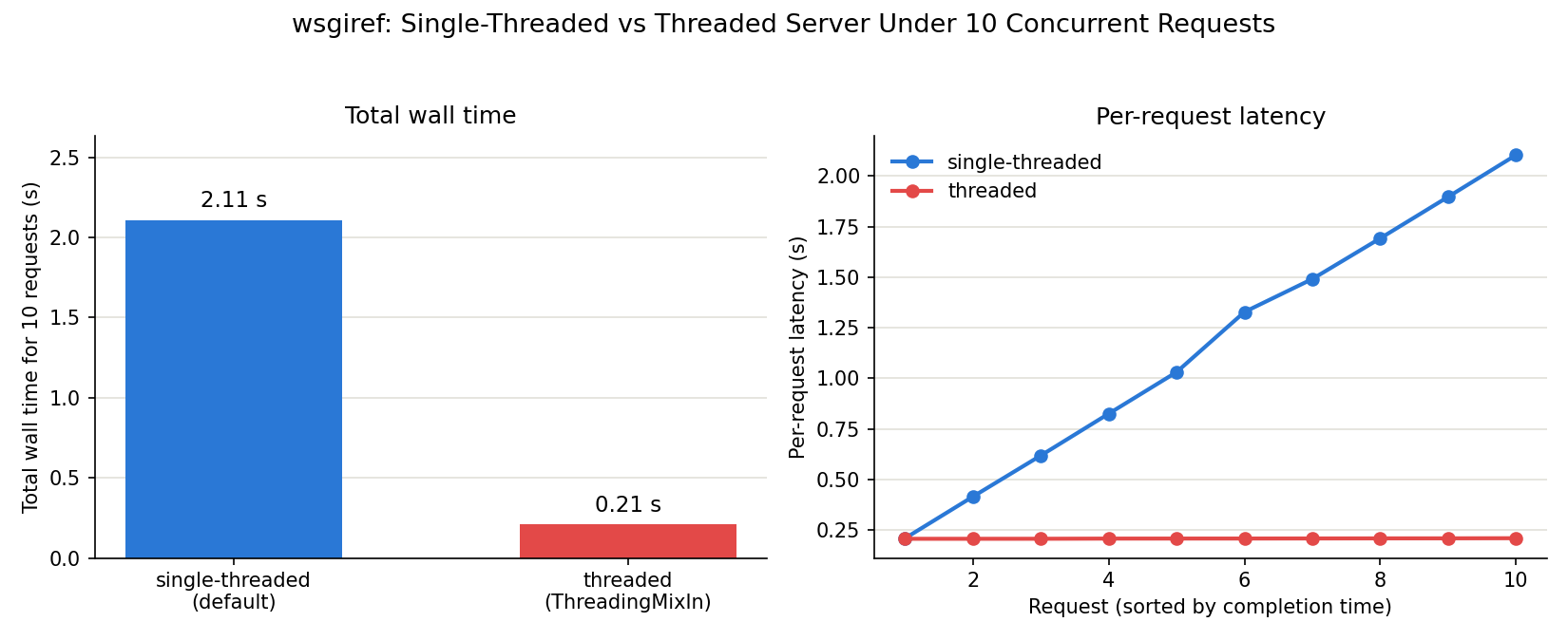
In the single-threaded version, the 10 requests are fully serialized inside the server, so the total time matches almost exactly “0.2s × 10 = 2s” — and the right-hand chart shows latency climbing in a staircase pattern, request by request. In the threaded version, all requests are processed nearly simultaneously, so the total time converges to a single sleep duration (about 0.21s), and per-request latency is nearly constant.
One caveat: without daemon_threads = True, in-flight request-handling threads can keep the process alive after you try to stop the server with Ctrl+C. Also, if the mock application mutates shared mutable state — a dict or list, for example — threading it introduces the possibility of race conditions, so either protect it with a threading.Lock or, better yet, avoid holding state in a mock server at all. Note that wsgiref remains a reference implementation intended for development and testing; production traffic should still be served by a production-grade WSGI server such as Gunicorn or uWSGI.
A Note on Modern Tooling
A hand-rolled WSGI-based mock server is still useful for learning purposes and for cases where you genuinely need a real HTTP server. But as of mid-2026, if your goal is specifically to test Python HTTP client code, more specialized tools have matured:
responses(by getsentry): for testing code that usesrequests. It patchesrequests.Session.sendto intercept requests, so no actual socket traffic occurs. Usable as a decorator or a context manager with minimal boilerplate.respx/pytest-httpx: for testing code that useshttpx. These patch the transport layer and work with both sync and async clients.pytest-httpserver(latest release 1.1.5 as of July 2026): spins up a real, Werkzeug-based HTTP server as a pytest fixture. It shares the same underlying idea as this article’swsgirefapproach — real socket traffic — but comes with server lifecycle management and a routing DSL out of the box, making it the more productive choice for real projects.
As a rule of thumb: if the code under test is a Python HTTP client and nothing more, an in-process substitute like responses/respx is faster and simpler. If you need to verify actual browser CORS behavior, run E2E tests, or exercise clients written in other languages, you need an approach that actually listens on a socket — wsgiref (or, more practically, pytest-httpserver).
Summary
- WSGI is a remarkably small calling convention built from just two pieces: the
environdictionary and thestart_responsecallable - Because a
wsgiref-based mock server opens a real TCP socket, it can verify things in-process mocks likeunittest.mockorresponses/respxcannot reproduce — browser CORS preflight behavior and requests from non-Python clients wsgiref.simple_serveris single-threaded by default, so concurrent requests are serialized. In our measurement, the total time for 10 concurrent requests was 2.1s single-threaded versus 0.21s withThreadingMixIn— roughly a 10x difference- For unit-testing Python client code, an in-process mock like
responses/respxis simpler and faster; when you need a real HTTP server,pytest-httpserveris close to the current de facto choice