This article explains how to build a modern web application development environment for React and TypeScript from scratch using webpack and Babel. Rather than just listing configuration files, we dig into why these three tools must be combined, a common pitfall in Babel’s TypeScript handling, and we verify everything with real, executed output — build logs, bundle sizes, and error messages — not hypothetical examples.
What is Webpack?
Webpack is a module bundler for JavaScript applications. It analyzes multiple JavaScript files and other assets (CSS, images, etc.) based on their dependencies and bundles them into single or multiple files that can be executed in the browser.
- Key Features:
- Module resolution: Interprets
importandrequiresyntax and resolves dependencies. - Bundling: Combines multiple files into one.
- Transpilation: Works with loaders like Babel to convert new JavaScript syntax for older browsers.
- Optimization: Performs optimizations like code minification and dead code elimination.
- Module resolution: Interprets
What is Babel?
Babel is a JavaScript transcompiler. It is primarily used to convert code written in the latest JavaScript (ES2015+) into compatible JavaScript (ES5, etc.) that runs in older browsers and execution environments.
- Key Features:
- Syntax conversion: Converts
async/await, arrow functions, class syntax, etc. - JSX conversion: Converts React’s JSX syntax to regular JavaScript.
- TypeScript conversion: Converts TypeScript code to JavaScript.
- Syntax conversion: Converts
That last item — “TypeScript conversion” — has an important caveat, which the next section covers in detail.
Why combine all three tools?
Webpack, Babel, and TypeScript (tsc) all appear to overlap in that they each “transform code” in some sense, but in practice their responsibilities are entirely disjoint, and none of them can substitute for another.
| Tool | Responsibility | Good at | Cannot do |
|---|---|---|---|
| Babel | Syntax transformation | Converting JSX / modern syntax / TypeScript syntax per-file, very fast | Checking type correctness (it never looks at types at all) |
tsc (TypeScript) | Type checking, type-driven emit | Whole-project, cross-file type consistency checks | Fast single-file transforms (comparatively slow) |
| Webpack | Module resolution, bundling, pipeline orchestration | Building the dependency graph, running loaders/plugins in order | Syntax transformation or type checking itself (delegated to loaders) |
The key point: Babel’s @babel/preset-typescript only strips TypeScript syntax — it never checks types. Babel is designed around isolatedModules (transforming each file independently, without seeing other files), so it is architecturally incapable of cross-file type checking. This is not a missing feature; it’s a fundamental constraint of Babel’s design.
tsc, on the other hand, builds a whole-project type graph before checking anything, so its type checking is accurate — but that also makes it too slow to use as a per-file, hot-reloading transform step.
In practice, teams typically split the work like this:
- Babel (
babel-loader) quickly transforms JSX/TS syntax, and Webpack bundles the result (type checking is skipped entirely). tsc --noEmitruns as a separate process/command dedicated to catching type errors (in CI, a pre-commit hook, or the editor’s Language Server).- Alternatively, a plugin like
fork-ts-checker-webpack-pluginruns type checking in a background process, surfacing type errors as warnings without slowing down the main build.
If you only use babel-loader without understanding this split, you can end up with a false sense of security — “the build passed, so the types must be fine.” That is not true, and the next section reproduces this exact failure mode with real commands.
Setting up the environment (verified for real)
The steps below were actually executed in the following environment.
Node.js: v26.5.0
npm: 11.17.0
@babel/core: 8.0.1
@babel/preset-env: 8.0.2
@babel/preset-react: 8.0.1
@babel/preset-typescript: 8.0.1
babel-loader: 10.1.1
webpack: 5.108.4
webpack-cli: 7.2.1
typescript: 7.0.2
react / react-dom: 19.2.7
The major versions here (Babel 8, TypeScript 7, React 19) have moved on since this article’s original publication (2022), but the core architecture — Babel handling syntax only, tsc handling type checking — has not changed. We confirm this directly in the next section.
Create a project directory and initialize with npm.
mkdir react_test
cd react_test

# Initialize the project
npm init -y

# Babel-related modules
npm install -D @babel/core          # Babel core
npm install -D @babel/preset-env    # Convert latest JS syntax for target environments
npm install -D @babel/preset-react  # Convert React JSX
npm install -D @babel/preset-typescript # Convert TypeScript

# Webpack-related modules
npm install -D webpack webpack-cli babel-loader # Webpack core, CLI, and the loader for Babel

# React and TypeScript modules
npm install react react-dom         # React core and DOM library
npm install -D typescript @types/react @types/react-dom # TypeScript and React/ReactDOM type definitions

# Generate tsconfig.json
npx tsc --init
File Structure
The final file structure looks like this.
.
├── dist/
│   ├── index.html
│   └── bundle.js
├── node_modules/
├── package-lock.json
├── package.json
├── src/
│   ├── index.html
│   └── index.tsx
├── tsconfig.json
└── webpack.config.js
Configuration Files
src/index.html
The HTML file that serves as the entry point for the React application. React components are mounted on the div element.
<!DOCTYPE html>
<html lang="ja">
  <head>
    <meta charset="UTF-8" />
    <meta name="viewport" content="width=device-width, initial-scale=1.0" />
    <title>React App</title>
  </head>
  <body>
    <div id="app"></div>
    <!-- Bundled JavaScript by Webpack is automatically injected here -->
  </body>
</html>
src/index.tsx
The main entry file for the React application, written in TypeScript and JSX. For this article’s verification, a small child component with its own props type was added so the type-checking demo later on is easy to follow.
import React from "react";
import { createRoot } from "react-dom/client";

interface GreetingProps {
  name: string;
}

const Greeting = ({ name }: GreetingProps) => {
  return <h1>Hello, {name}!</h1>;
};

const App = () => {
  return <Greeting name="React with TypeScript" />;
};

const container = document.getElementById("app");
if (container) {
  const root = createRoot(container);
  root.render(<App />);
}
.babelrc
The Babel configuration file. Defines which presets (sets of plugins) are used to transform the code.
{
  "presets": [
    "@babel/preset-env",
    "@babel/preset-react",
    "@babel/preset-typescript"
  ]
}
tsconfig.json
The TypeScript compiler configuration file. noEmit: true explicitly encodes the division of labor: Babel/Webpack own the JS output; tsc is used purely for type checking.
{
  "compilerOptions": {
    "target": "es2020",
    "module": "esnext",
    "jsx": "react-jsx",
    "strict": true,
    "esModuleInterop": true,
    "skipLibCheck": true,
    "forceConsistentCasingInFileNames": true,
    "moduleResolution": "bundler",
    "resolveJsonModule": true,
    "isolatedModules": true,
    "noEmit": true,
    "lib": ["dom", "dom.iterable", "esnext"]
  },
  "include": ["src"]
}
isolatedModules: true forces tsc itself to reject any code that could not be compiled correctly on a per-file basis without cross-file type information — matching the constraint Babel already operates under. Code that violates isolatedModules (for example, using const enum) cannot be transformed correctly by Babel, so tsc flags it at this stage instead.
webpack.config.js
The Webpack bundling configuration file. Note that the source map type differs between dev and production mode — we verify why in the edge-case section below.
const path = require("path");

module.exports = (env, argv) => ({
  entry: "./src/index.tsx",
  output: {
    path: path.resolve(__dirname, "dist"),
    filename: "bundle.js",
    clean: true, // Clean dist directory before build
  },
  resolve: {
    extensions: [".ts", ".tsx", ".js", ".jsx"], // Extensions to resolve on import
  },
  module: {
    rules: [
      {
        test: /\.(ts|tsx)$/, // Apply to .ts or .tsx files
        exclude: /node_modules/, // Exclude node_modules
        use: {
          loader: "babel-loader", // Transform with Babel (no type checking)
        },
      },
    ],
  },
  // Switch source map type based on mode
  devtool: argv.mode === "production" ? "source-map" : "eval-source-map",
});
Register dev and production build commands in package.json’s scripts:
{
  "scripts": {
    "build:dev": "webpack --mode development",
    "build:prod": "webpack --mode production"
  }
}
Diagram: the build pipeline
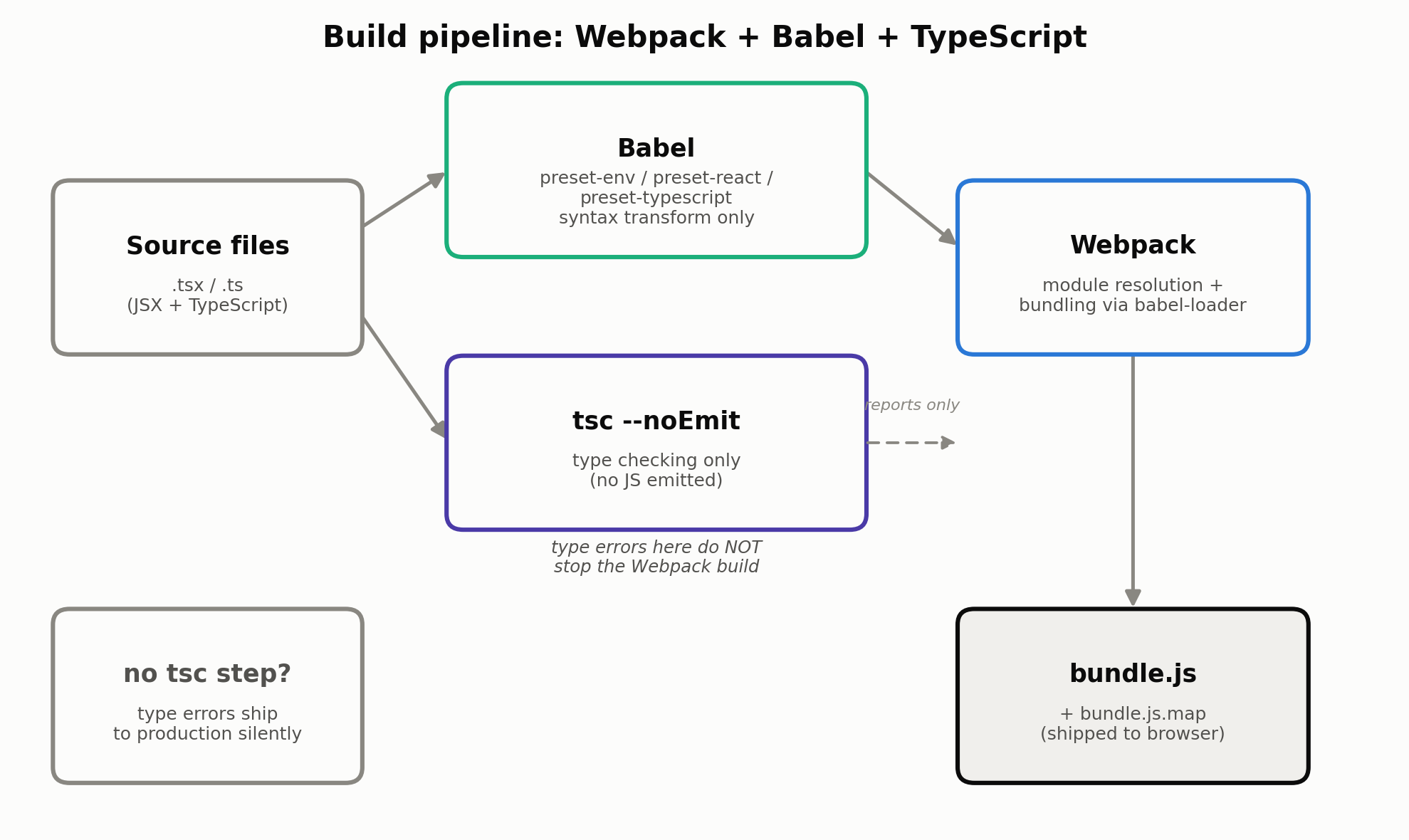
Here is how the three tools connect. Babel’s syntax transform and tsc’s type check are two independent, parallel pipelines — tsc’s type errors do not stop the Webpack build. This is the single most important thing to take away from this article.
Building it for real
With the configuration files above in place, here is the real output of running npx webpack --mode development (the bundle size and timing are actual measurements, unedited).
$ npx webpack --mode development

asset bundle.js 2.89 MiB [emitted] (name: main)
runtime modules 1.46 KiB 5 modules
modules by path ./node_modules/ 1.1 MiB
  modules by path ./node_modules/react/ 58.3 KiB
    modules by path ./node_modules/react/*.js 404 bytes 2 modules
    modules by path ./node_modules/react/cjs/*.js 57.9 KiB 2 modules
  modules by path ./node_modules/react-dom/ 1.04 MiB
    modules by path ./node_modules/react-dom/*.js 2.67 KiB 2 modules
    modules by path ./node_modules/react-dom/cjs/*.js 1.03 MiB 2 modules
  modules by path ./node_modules/scheduler/ 12 KiB
    ./node_modules/scheduler/index.js 194 bytes [built] [code generated]
    ./node_modules/scheduler/cjs/scheduler.development.js 11.9 KiB [built] [code generated]
./src/index.tsx 553 bytes [built] [code generated]
webpack 5.108.4 compiled successfully in 436 ms
bundle.js came out to 2.89 MiB (3,029,177 bytes on disk). That’s because it includes not just React itself but the development build of react-dom (roughly react-dom-client.development.js), which ships extra warning messages.
Edge case 1: development vs. production builds, measured
Building the same source with --mode production runs Terser minification, dead code elimination, and replaces process.env.NODE_ENV (stripping development-only branches).
$ npx webpack --mode production

asset bundle.js 185 KiB [emitted] [minimized] (name: main) 2 related assets
modules by path ./node_modules/react/ 17.6 KiB
  modules by path ./node_modules/react/*.js 404 bytes 2 modules
  modules by path ./node_modules/react/cjs/*.js 17.2 KiB 2 modules
modules by path ./node_modules/react-dom/ 533 KiB
  modules by path ./node_modules/react-dom/*.js 2.67 KiB 2 modules
  modules by path ./node_modules/react-dom/cjs/*.js 530 KiB
    ./node_modules/react-dom/cjs/react-dom-client.production.js 523 KiB [built] [code generated]
    ./node_modules/react-dom/cjs/react-dom.production.js 6.5 KiB [built] [code generated]
modules by path ./node_modules/scheduler/ 10.1 KiB
  ./node_modules/scheduler/index.js 194 bytes [built] [code generated]
  ./node_modules/scheduler/cjs/scheduler.production.js 9.94 KiB [built] [code generated]
./src/index.tsx 553 bytes [built] [code generated]
webpack 5.108.4 compiled successfully in 1210 ms
Comparing the actual dist/bundle.js file size to the same file compressed with gzip -c dist/bundle.js | wc -c:
| Build | Measured size |
|---|---|
| Development (unminified) | 2,958 KiB (3,029,177 bytes) |
| Production (Terser-minified) | 185.0 KiB (189,435 bytes) |
| Production + gzip | 58.2 KiB (59,605 bytes) |
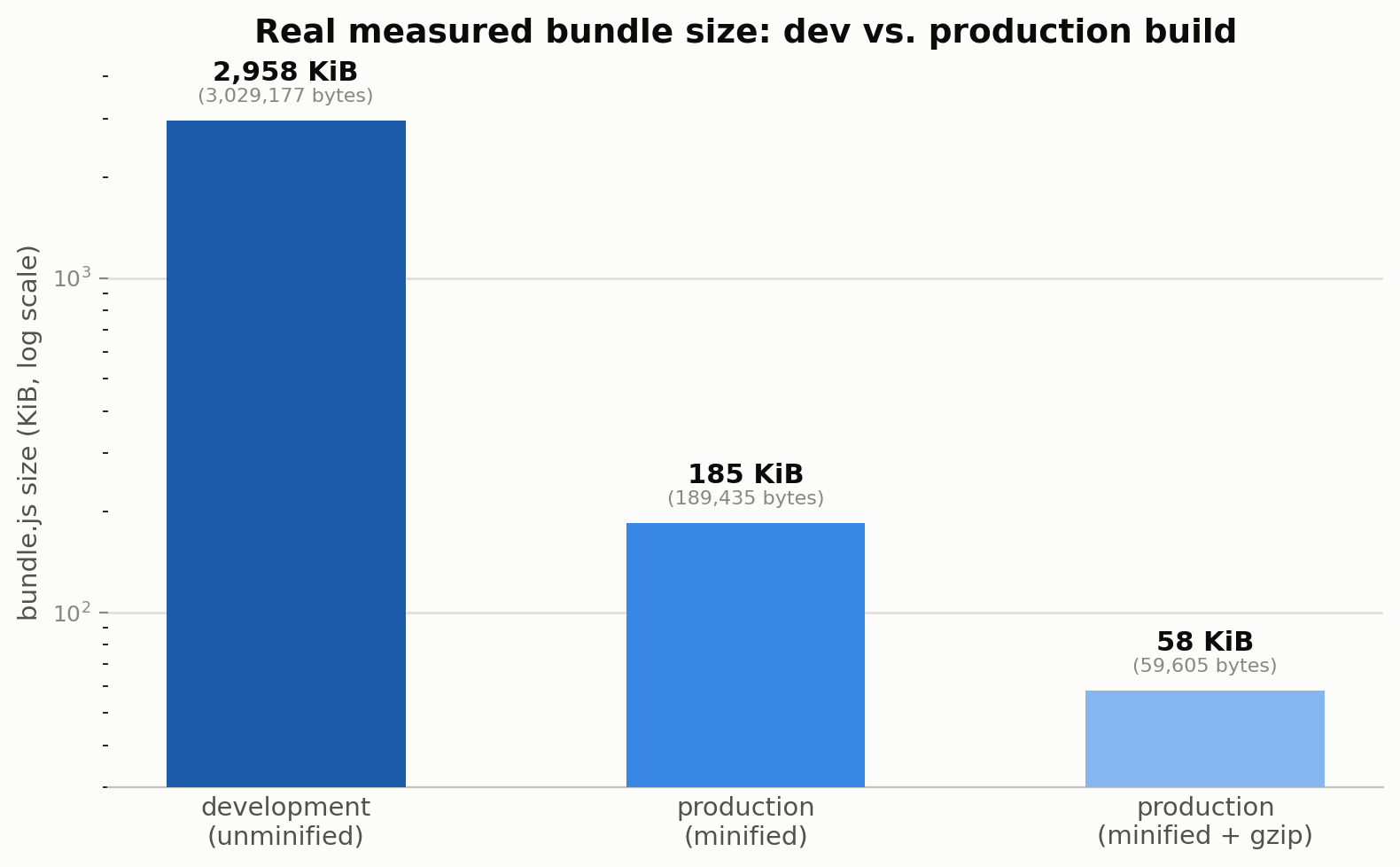
Going from the development build to the production (minified) build shaves off about 93.7% of the size, and gzip on top of that shaves off a further 68.5% (about a 98.0% total reduction from development to gzip-compressed production). This gap comes from three compounding factors: (1) React itself swaps from the development module (with its warning machinery) to the leaner production module, (2) Terser shortens variable names, strips whitespace, and eliminates dead code, and (3) gzip compresses the remaining text. These measurements are a concrete argument for always building with --mode production for deployment.
Confirming, for real, that Babel strips types without checking them
This is the core of the article. We introduce a deliberate bug into src/index.tsx’s App component: passing a number where the Greeting component’s name prop expects a string.
const App = () => {
  // Bug: `name` is typed as `string`, but we pass a number here.
  return <Greeting name={42} />;
};
1. Webpack build using only babel-loader → succeeds anyway
$ npx webpack --mode production

asset bundle.js 185 KiB [emitted] [minimized] (name: main) 2 related assets
modules by path ./node_modules/react/ 17.6 KiB
  modules by path ./node_modules/react/*.js 404 bytes 2 modules
  modules by path ./node_modules/react/cjs/*.js 17.2 KiB 2 modules
modules by path ./node_modules/react-dom/ 533 KiB
  modules by path ./node_modules/react-dom/*.js 2.67 KiB 2 modules
  modules by path ./node_modules/react-dom/cjs/*.js 530 KiB
    ./node_modules/react-dom/cjs/react-dom-client.production.js 523 KiB [built] [code generated]
    ./node_modules/react-dom/cjs/react-dom.production.js 6.5 KiB [built] [code generated]
modules by path ./node_modules/scheduler/ 10.1 KiB
  ./node_modules/scheduler/index.js 194 bytes [built] [code generated]
  ./node_modules/scheduler/cjs/scheduler.production.js 9.94 KiB [built] [code generated]
./src/index.tsx 598 bytes [built] [code generated]
webpack 5.108.4 compiled successfully in 1228 ms

$ echo "exit code: $?"
exit code: 0
Despite the type error, the build completes with no warning at all (exit code 0). babel-loader simply discards the name={42} type annotation and transforms the syntax — it has no mechanism to detect the type mismatch in the first place. This bundle could be deployed to production exactly as-is.
2. Running tsc --noEmit → actually catches it
$ npx tsc --noEmit

src/index.tsx(14,20): error TS2322: Type 'number' is not assignable to type 'string'.

$ echo "exit code: $?"
exit code: 1
Running tsc --noEmit against the same code reports a real TS2322 error, and the process exits with code 1 (failure). For comparison, restoring the fix (name="React with TypeScript") and running the same command again produces no output and exits with code 0, which we also verified directly:
$ npx tsc --noEmit
$ echo "exit code: $?"
exit code: 0
This side-by-side comparison demonstrates two things concretely:
- A Webpack +
babel-loader-only setup lets type errors through the build and ship straight to production. - Guaranteeing type safety requires wiring
tsc --noEmitin separately — as a CI step, a pre-commit hook, or viafork-ts-checker-webpack-plugin.
“We use TypeScript, so we’re type-safe” is not automatically true — it depends entirely on the build configuration. Never skip the tsc --noEmit step; make it a hard rule for the team.
Edge case 2: resolving minified stack traces back to source with source maps
Production builds collapse code into a single minified line, so a runtime error’s stack trace points at meaningless line numbers. Here we build code that throws a real error and compare the stack trace with and without source maps.
A small module for the demo:
// srcmap-demo.ts
function calculateTotal(price: number, quantity: number): number {
  if (quantity < 0) {
    throw new Error("quantity must not be negative");
  }
  return price * quantity;
}

function checkout(price: number, quantity: number): number {
  return calculateTotal(price, quantity);
}

checkout(1000, -1);
Building this in production mode with devtool: "source-map" collapses bundle.js to a single line (with a separate .map file generated alongside it):
// dist-srcmap/bundle.js contents (verbatim real output)
!(function () {
  throw new Error("quantity must not be negative");
})();
//# sourceMappingURL=bundle.js.map
Running this with Node.js, without source map resolution first:
$ node dist-srcmap/bundle.js

dist-srcmap/bundle.js:1
!function(){throw new Error("quantity must not be negative")}();
            ^

Error: quantity must not be negative
    at dist-srcmap/bundle.js:1:19
    at Object.<anonymous> (dist-srcmap/bundle.js:1:62)
    at Module._compile (node:internal/modules/cjs/loader:1934:14)
    ...
(Paths shortened for readability.) All we get is bundle.js:1:19 — no indication of which original function or line actually threw. Now with Node’s built-in --enable-source-maps flag (the same mechanism browser devtools use automatically when a .map file is present):
$ node --enable-source-maps dist-srcmap/bundle.js

webpack://react_test/src/srcmap-demo.ts:6
    throw new Error("quantity must not be negative");
    ^

Error: quantity must not be negative
    at calculateTotal (webpack://react_test/src/srcmap-demo.ts:6:11)
    at Object.<anonymous> (webpack://react_test/src/srcmap-demo.ts:12:10)
    at Module._compile (node:internal/modules/cjs/loader:1934:14)
    ...
With source maps enabled, the single-line minified stack trace is resolved back to the exact original function name (calculateTotal), file, and line number — matching line 6 (the throw) and line 12 (the call into calculateTotal from checkout) in srcmap-demo.ts precisely.
The same mechanism applies when debugging production errors in a browser: if “Enable JavaScript source maps” is turned on in devtools, opening a stack trace from the minified bundle.js automatically jumps to the corresponding line in the original .tsx/.ts file. Error-tracking services like Sentry work the same way — upload the .map file, and production exceptions are displayed against the original source location.
As for why webpack.config.js uses eval-source-map for development and source-map for production: eval-source-map rebuilds faster on incremental changes but produces a larger artifact, which is fine for local development. Production’s source-map is emitted as an independent .map file, which (unless you deliberately serve it) is not shipped to end users and is only consulted for debugging.
A note on the current tooling landscape: Vite, esbuild, and SWC
The Webpack + Babel + TypeScript setup covered in this article is still widely used, but as of 2026 the more commonly recommended starting point for new projects is Vite . The official React documentation now points to Vite as a starting point in place of the now-deprecated Create React App.
- Vite: uses
esbuildfor fast transpilation during development, and the well-establishedRollupfor production bundling. It has a large plugin ecosystem and a dev server that starts in a few hundred milliseconds. - esbuild: an extremely fast Go-based bundler/transpiler. Like Babel, it only strips TypeScript types without checking them — the same need for a separate
tsc --noEmitstep applies here too. - SWC: a Rust-based transpiler often used as a Babel replacement, and the default transpiler in Next.js.
Regardless of which of these tools you pick, the underlying design — separating fast syntax transformation from type checking — is the same one discussed in this article. The Webpack-based setup shown here remains relevant if you need advanced features like Webpack Module Federation, or if you’re maintaining an existing complex Webpack configuration. For a brand-new project, though, it’s worth evaluating Vite. This article’s goal is to explain how Webpack and Babel actually work, so it doesn’t pivot the whole setup to a different toolchain — but it’s worth knowing these alternatives exist.
Summary
- Babel,
tsc, and Webpack each own a distinct responsibility — syntax transformation, type checking, and bundling orchestration — and none of them substitutes for the others. @babel/preset-typescriptonly strips type annotations; it never checks them. We confirmed this directly: a Webpack build usingbabel-loadercompletes successfully (exit code 0) even with a real type error present.- Guaranteeing type safety requires running
tsc --noEmitas its own step. We confirmed it correctly catches the same error (TS2322, exit code 1). - Development and production builds differ by roughly 38x in measured size (2,958 KiB → 185 KiB → 58.2 KiB gzipped). Always use
--mode productionfor deployment. - Source maps precisely recover the original file, line number, and function name from a minified stack trace. Generate
.mapfiles for production builds too, and use them for debugging and error tracking. - As of 2026, Vite has become the more common default for new projects, but the underlying principle — fast transforms need a separate type-checking step — is unchanged across tools.
Sources: React: Start a New React Project , Vite documentation , esbuild documentation , Next.js: SWC
Related Tools
- JSON Formatter (DevToolBox) - Format and validate JSON data
- Meta Tag Generator (DevToolBox) - Generate OGP/SEO meta tags