Every code example in this article was actually run with Node.js v26.5.0, and the output shown is the real captured output. Nowhere does a comment simply claim what “would” be printed.
Why Asynchronous Processing Matters in JavaScript
Single-Threaded
JavaScript fundamentally operates as single-threaded. This means it can only execute one task at a time. In web browser environments, the JavaScript execution thread shares the same thread as the browser’s UI rendering processes such as page layout, repaint (reflow), and garbage collection.
Therefore, if a time-consuming JavaScript process occupies the thread, page responsiveness degrades and the user interface appears frozen. Asynchronous processing is essential to solve this problem.
How Asynchronous Processing Works
Asynchronous processing separates time-consuming tasks (e.g., network requests, timers) from the main thread and allows the next operation to proceed without waiting for those tasks to complete. This prevents UI freezing and creates the appearance of parallel execution.
Event Loop Overview
JavaScript’s asynchronous processing is achieved through a mechanism called the event loop. The JavaScript engine (such as V8) works with the following main components.
- JavaScript Engine:
- Heap: A memory area where objects and variables are stored.
- Call Stack: A LIFO (Last In, First Out) area that manages currently executing function calls. Functions are pushed onto the stack when called and removed when execution completes.
- Web APIs (Browser) / libuv (Node.js):
- API groups provided by the browser (DOM manipulation, Ajax requests, timer functions like
setTimeout, etc.). These operate on threads separate from the JavaScript engine. In Node.js, the equivalent role is played bylibuv, a C library that coordinates timers, file I/O, and network I/O with a thread pool and the OS kernel’s asynchronous facilities.
- API groups provided by the browser (DOM manipulation, Ajax requests, timer functions like
- Task Queues (the macrotask queue and microtask queue described below):
- Callback functions received from Web APIs/libuv are stored here. This is actually not a single queue – there are two queues with different priorities. This distinction matters a great deal and is covered in depth in the section “ Understanding the Event Loop Precisely ” below.
At a high level, the event loop coordinates asynchronous processing as follows.
- JavaScript code executes and function calls are pushed onto the call stack.
- When asynchronous functions like
setTimeoutorfetchare called, the task is passed to Web APIs/libuv and processing begins there. - When processing completes, the result (callback function) is placed into a task queue.
- The event loop constantly monitors whether the call stack is empty (no tasks currently executing on the main thread).
- When the call stack becomes empty, the event loop takes a callback function from a task queue, pushes it onto the call stack, and executes it.
This high-level flow alone cannot explain a behavior that surprises many developers in practice – why setTimeout(fn, 0) does not run “immediately.” Understanding that requires knowing that there are actually two task queues, with a strict priority between them, which is explained next.
Callback Hell
In early JavaScript async processing, callback functions were heavily used to wait for processing completion before executing the next task. However, when multiple async operations are chained, callback functions become deeply nested, severely degrading code readability and maintainability. This is called “callback hell.”
// Callback hell example
setTimeout(() => {
  console.log(1);
  setTimeout(() => {
    console.log(2);
    setTimeout(() => {
      console.log(3);
    }, 300); // Execute after 300ms
  }, 200); // Execute after 200ms
}, 100); // Execute after 100ms
Actual output (Node.js v26.5.0):
1
2
3
Each additional level of nesting adds one more level of indentation. As this grows to five, ten levels deep, code readability degrades rapidly. To solve this problem, Promise was introduced in ES2015.
Promise Object [ES2015]
Promise is an object introduced in ES2015 (ECMAScript 2015) that represents the eventual completion (or failure) of an asynchronous operation and its resulting value. It wraps the state of an asynchronous operation and provides a mechanism to call registered callbacks when that state changes.
Basic Usage of Promise
The Promise constructor takes a function with two arguments: resolve and reject.
// asyncPromiseTask function returns a Promise instance.
// To make the output reproducible, this example uses an explicit `succeed`
// argument instead of Math.random() to switch between resolve/reject
// (this pattern is used consistently throughout this article).
function asyncPromiseTask(succeed) {
  return new Promise((resolve, reject) => {
    // Write asynchronous processing here
    // Call resolve() on success
    // Call reject(error object) on failure
    setTimeout(() => {
      if (succeed) {
        resolve("Success!");
      } else {
        reject(new Error("Failed..."));
      }
    }, 200);
  });
}

// Register callbacks using then() for when the Promise resolves or rejects
asyncPromiseTask(true)
  .then((result) => {
    console.log("Success handler:", result);
  })
  .catch((error) => {
    // Register failure handler with catch() (recommended)
    console.error("Failure handler:", error.message);
  })
  .finally(() => {
    // Register handler that runs regardless of success/failure
    console.log("Processing complete.");
  });
Actual output with succeed = true:
Success handler: Success!
Processing complete.
Changing the call to asyncPromiseTask(false) skips then() and runs catch() instead:
Failure handler: Failed...
Processing complete.
Notice that finally() runs in both cases.
Promise States
A Promise instance internally has one of the following three states.
- Pending: The initial state where the asynchronous operation has not yet completed.
- Fulfilled: The state where the asynchronous operation succeeded and a result value is available. Enters this state when
resolve()is called. - Rejected: The state where the asynchronous operation failed and an error occurred. Enters this state when
reject()is called.
Once a Promise becomes Fulfilled or Rejected, it will not change to another state.
Promise Chaining
When you want to execute multiple asynchronous operations sequentially, use Promise chaining. Since then() always returns a new Promise instance, you can chain additional then() and catch() methods on its return value. This eliminates callback hell and improves code readability.
Promise.resolve()
  .then(() => {
    console.log("Step 1");
    return asyncPromiseTask(true); // Return a Promise
  })
  .then((result) => {
    console.log("Step 2:", result);
    return "Next data"; // Return a value (automatically wrapped with Promise.resolve)
  })
  .then((data) => {
    console.log("Step 3:", data);
  })
  .catch((error) => {
    console.error("An error occurred:", error.message);
  });
Actual output:
Step 1
Step 2: Success!
Step 3: Next data
You can see the value returned by each then() being passed directly as the argument to the next then().
Limitations of Promise
While Promise solved callback hell, some challenges remained.
- Coordination between async operations becomes a chain of
then()methods, still a special coding style compared to synchronous code. - Error handling uses the
catch()method rather than thetry...catchsyntax, which can be less intuitive. Promiseis just an object without language-level syntax support, leading to demand for more natural async code writing.
Async/Await [ES2017]
async/await is JavaScript syntax based on Promise that allows asynchronous processing to be written more like synchronous code.
async Functions
Adding the async keyword before a function declares it as an asynchronous function. async functions always return a Promise instance.
async function doAsync() {
  return "value"; // This value is wrapped as Promise.resolve("value")
}

// The above is roughly equivalent to:
function doAsyncLegacy() {
  return Promise.resolve("value");
}

console.log(doAsync()); // Confirm a Promise is returned, not the value itself
doAsync().then((v) => console.log("doAsync resolved value:", v));
console.log(doAsyncLegacy());
doAsyncLegacy().then((v) => console.log("doAsyncLegacy resolved value:", v));
Actual output:
Promise { 'value' }
Promise { 'value' }
doAsync resolved value: value
doAsyncLegacy resolved value: value
At the point of console.log(doAsync()), what is printed is not the string "value" but the Promise object itself, Promise { 'value' } – confirming from the actual output that doAsync and doAsyncLegacy return exactly equivalent Promises.
await Expression
The await keyword, usable only within async functions, waits for a Promise to resolve (Fulfilled or Rejected). Using await allows you to wait for async processing to complete before executing the next line of code, enabling a more intuitive, readable synchronous-style writing of the flow that was previously achieved with Promise chaining.
async function asyncMain() {
  console.log("Processing started");
  // Wait until the Promise resolves
  const result = await asyncPromiseTask(true); // asyncPromiseTask returns a Promise
  console.log("Promise resolved:", result);
  console.log("Processing finished");
}

asyncMain();
Actual output:
Processing started
Promise resolved: Success!
Processing finished
Error Handling
The await expression throws an error when a Promise is Rejected. This allows async processing errors to be caught using the standard try...catch syntax, just like synchronous processing, making error handling very simple.
async function asyncMainWithErrorHandling(succeed) {
  try {
    console.log("Starting potentially error-prone processing");
    const value = await asyncPromiseTask(succeed); // Promise that may fail
    console.log("Success:", value);
  } catch (error) {
    console.error("Error caught:", error.message);
  } finally {
    console.log("Finally block executed.");
  }
}

asyncMainWithErrorHandling(true);
Actual output with succeed = true:
Starting potentially error-prone processing
Success: Success!
Finally block executed.
Changing to asyncMainWithErrorHandling(false) routes into the catch block:
Starting potentially error-prone processing
Error caught: Failed...
Finally block executed.
async/await dramatically improved JavaScript’s asynchronous processing, enabling even complex async logic to be written concisely. However, async/await is nothing more than syntax sugar over Promise, and its execution timing still obeys the rules of the event loop. The next section examines those rules precisely.
Understanding the Event Loop Precisely: Call Stack, Macrotasks, and Microtasks
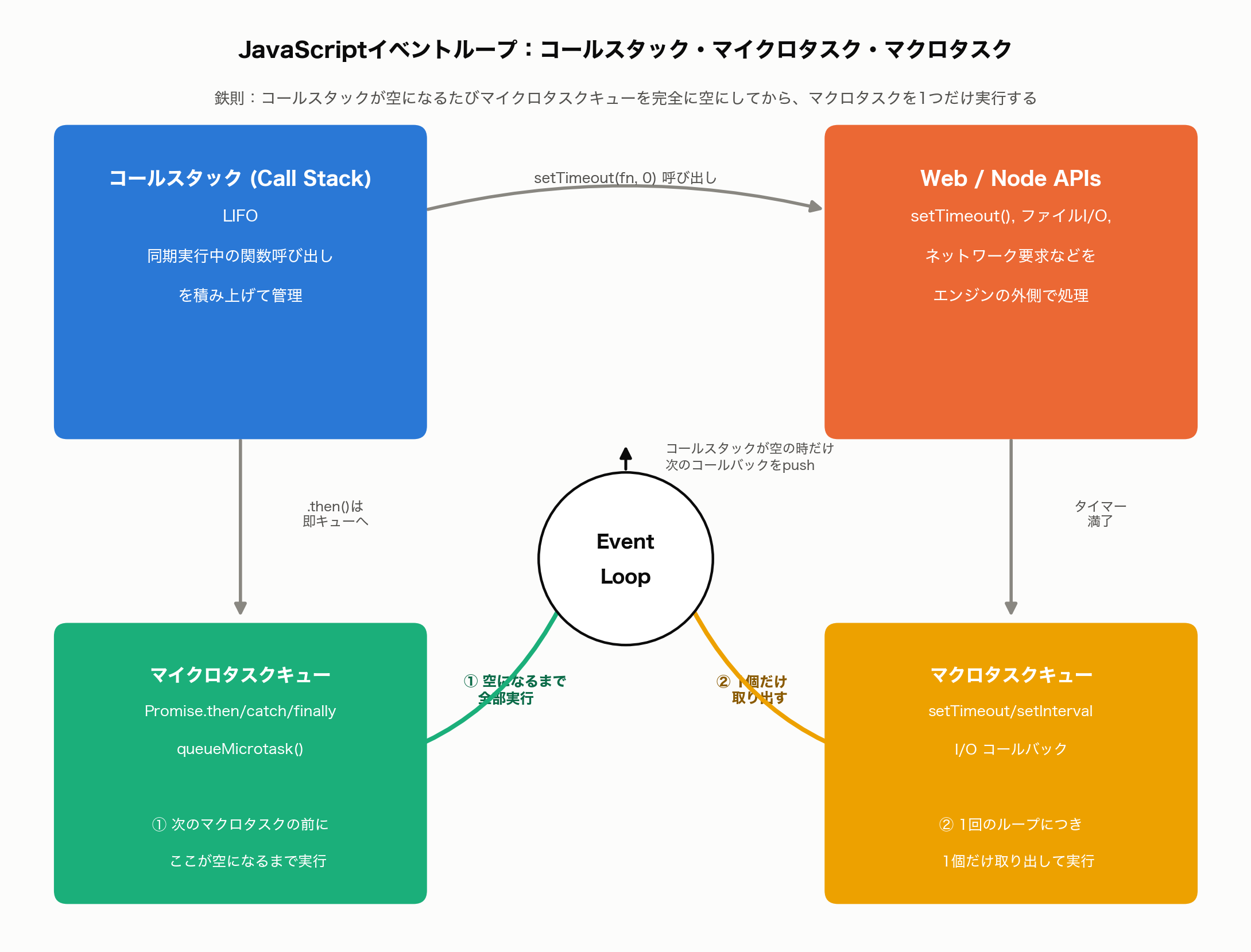
It is a natural misconception to assume that setTimeout(fn, 0) runs “almost immediately” because the delay is 0 milliseconds. In reality, JavaScript has two task queues with different priorities, and this is exactly what causes the misconception.
- Macrotask Queue (Task Queue): Callbacks from
setTimeout,setInterval, and I/O are queued here. - Microtask Queue: Callbacks from
Promise.then/catch/finallyandqueueMicrotask()are queued here.
And between the two, there is a strict rule:
Every time the call stack becomes empty, the event loop fully drains the microtask queue before taking exactly one item from the macrotask queue.
In other words, the order “run one macrotask -> drain all microtasks -> run one macrotask -> …” is strictly enforced. Even if a microtask registers a new microtask while running, that new one is also processed in the same round – a macrotask never gets a turn until the microtask queue is completely empty.
Verifying the Execution Order for Real
Let’s mix setTimeout(fn, 0), Promise.resolve().then(fn), and synchronous code to verify the actual execution order.
console.log("1: sync code (top of script)");

setTimeout(() => {
  console.log("5: setTimeout(fn, 0) callback (macrotask)");
}, 0);

Promise.resolve()
  .then(() => {
    console.log("3: Promise.then #1 (microtask)");
  })
  .then(() => {
    console.log("4: Promise.then #2 (microtask, queued even further back)");
  });

queueMicrotask(() => {
  console.log("(note) queueMicrotask also goes into the same microtask queue");
});

console.log("2: sync code (bottom of script)");
Actual output:
1: sync code (top of script)
2: sync code (bottom of script)
3: Promise.then #1 (microtask)
(note) queueMicrotask also goes into the same microtask queue
4: Promise.then #2 (microtask, queued even further back)
5: setTimeout(fn, 0) callback (macrotask)
Many people expect setTimeout(fn, 0) to print second or third, but in reality it prints last. Here is why:
console.log("1: ...")runs synchronously.- When
setTimeout(fn, 0)is called, its callback is immediately registered on the macrotask queue (even with a 0ms delay, it still goes through the queue). Promise.resolve().then(...)’s callback is registered on the microtask queue.queueMicrotask(...)similarly registers on the microtask queue.console.log("2: ...")runs synchronously, and the call stack becomes empty.- Since the call stack is empty, the event loop first fully drains the microtask queue. This is why
3->(note)->4print in that order (registration order = FIFO). - Only once the microtask queue is empty does the event loop take exactly one item from the macrotask queue. Only now does the
setTimeoutcallback run, printing5.
This is the mechanism behind the counter-intuitive behavior that setTimeout(fn, 0) does not run immediately. In practice, chaining a large number of Promises can delay a UI update (which often happens via a macrotask) until all pending microtasks finish, even if the setTimeout delay itself is short.
Edge Cases
Three pitfalls that are easy to understand in theory but only really click once you run the code yourself.
1. async Function Throw vs. a Forgotten .catch()
When an async function throws, the exception is automatically converted into a rejected Promise.
// (a) Throwing inside an async function: the exception becomes a rejected Promise
async function asyncThrows() {
  throw new Error("Exception thrown inside asyncThrows");
}

const p = asyncThrows();
console.log(p); // Becomes Promise { <rejected> Error: ... }
p.catch((e) => console.log("Caught by catch:", e.message));
Actual output:
Promise {
  <rejected> Error: Exception thrown inside asyncThrows
      at asyncThrows (/path/to/asyncThrows.js:3:9)
      ...(stack trace omitted)
}
Caught by catch: Exception thrown inside asyncThrows
Notice the <rejected> state shown in the console.log(p) output. Because .catch() is attached afterward, the exception is properly handled and the process continues normally.
But if a Promise rejects and no .catch() is ever attached, the outcome is very different.
// (b) Leaving a rejected Promise unhandled by forgetting .catch()
function rejectingPromise() {
  return new Promise((resolve, reject) => {
    reject(new Error("Never caught error"));
  });
}

rejectingPromise(); // No .catch() and no second argument to .then() -- unhandled rejection

console.log("This line still runs (synchronous code isn't halted)");
Actual output (saved and run as unhandled_rejection.js):
This line still runs (synchronous code isn't halted)
unhandled_rejection.js:4
    reject(new Error("Never caught error"));
           ^

Error: Never caught error
    at unhandled_rejection.js:4:12
    at new Promise (<anonymous>)
    at rejectingPromise (unhandled_rejection.js:3:10)
    at Object.<anonymous> (unhandled_rejection.js:8:1)
    ...(module loader stack frames omitted)

Node.js v26.5.0
This script crashes with exit code 1. The “This line still runs” log is printed, but once the event loop finishes a turn and the microtask queue is drained, Node.js detects that the rejected Promise was never handled by anyone, and terminates the entire process as an uncaught exception. Since Node.js 15, the default unhandledRejection behavior changed from warn to throw – on plain Node.js, an unhandled rejection crashes the process (in contrast to browsers, which merely log a console warning and keep running). This can be relaxed to warning-only with the node --unhandled-rejections=warn flag, but crashing by default – so problems surface early – is the recommended posture in production.
Countermeasure: Always attach .catch() (or wrap the await in try...catch) wherever you call a function that returns a Promise. Don’t leave the return value of an async function unhandled (a “floating Promise”) – an ESLint rule such as no-floating-promises (@typescript-eslint) can catch this mechanically.
2. Promise.all vs. Promise.allSettled
When running several asynchronous operations concurrently and aggregating the results, whether you use Promise.all() or Promise.allSettled() makes a large difference in behavior when one of them fails.
Promise.all() fails immediately, without waiting for the others, the instant any single element rejects (fail-fast).
function delay(ms, value, shouldReject = false) {
  return new Promise((resolve, reject) => {
    setTimeout(() => {
      if (shouldReject) {
        reject(new Error(value));
      } else {
        resolve(value);
      }
    }, ms);
  });
}

async function withAll() {
  console.log("--- Promise.all ---");
  try {
    const results = await Promise.all([
      delay(100, "A"),
      delay(50, "B-fails", true), // Fails first
      delay(300, "C"), // Not yet done when all() already failed
    ]);
    console.log("results:", results);
  } catch (error) {
    console.error(
      "Promise.all fails immediately on the first reject:",
      error.message,
    );
  }
}

withAll();
Actual output:
--- Promise.all ---
Promise.all fails immediately on the first reject: B-fails
The moment B-fails rejects after 50ms, control jumps to catch – the results of A (due to succeed after 100ms) and C (due to succeed after 300ms) are never observable (C keeps running in the background, but its result is simply discarded).
Promise.allSettled(), on the other hand, waits for every Promise to settle even if one fails, and returns per-item success/failure results for all of them.
async function withAllSettled() {
  console.log("--- Promise.allSettled ---");
  const t0 = Date.now();
  const results = await Promise.allSettled([
    delay(100, "A"),
    delay(50, "B-fails", true),
    delay(300, "C"),
  ]);
  console.log(
    `Elapsed: ~${Date.now() - t0}ms (waits for the slowest, C, at 300ms)`,
  );
  for (const r of results) {
    if (r.status === "fulfilled") {
      console.log("fulfilled:", r.value);
    } else {
      console.log("rejected:", r.reason.message);
    }
  }
}

withAllSettled();
Actual output:
--- Promise.allSettled ---
Elapsed: ~301ms (waits for the slowest, C, at 300ms)
fulfilled: A
rejected: B-fails
fulfilled: C
The elapsed time of roughly 301ms is the decisive difference from Promise.all. allSettled properly waits for the slowest one, C (300ms), to finish before returning all results in {status, value} or {status, reason} form. Use Promise.all when “if one fails, the whole thing should fail,” and Promise.allSettled when “I need every result regardless of failures.”
3. await Inside forEach Doesn’t Actually Wait Sequentially
A very common real-world bug. When you want to run an asynchronous operation on each array element in sequence, using await inside Array.prototype.forEach() does not wait the way you’d expect.
function delay(ms, value) {
  return new Promise((resolve) => setTimeout(() => resolve(value), ms));
}

async function fetchItem(id) {
  const data = await delay(100, `item-${id}`);
  console.log(`  fetched: ${data}`);
  return data;
}

async function withForEach() {
  console.log("--- forEach + await (a common mistake) ---");
  const t0 = Date.now();
  [1, 2, 3].forEach(async (id) => {
    await fetchItem(id);
  });
  console.log(
    `Elapsed right after forEach: ${Date.now() - t0}ms (* reaches here without waiting for sequential completion)`,
  );
}
Actual output:
--- forEach + await (a common mistake) ---
Elapsed right after forEach: 0ms (* reaches here without waiting for sequential completion)
  fetched: item-1
  fetched: item-2
  fetched: item-3
Notice that the elapsed time right after forEach is 0ms. forEach never waits for the Promise its callback returns, so all three async callbacks start almost simultaneously (the await inside each callback is still honored within that callback), and forEach itself returns immediately, letting execution fall through to the next line. The three fetched: logs all print after the “Elapsed right after forEach” line precisely because they resolved in the background after the forEach call itself had already returned.
To actually run sequentially, use a for...of loop (or a plain for loop) instead.
async function withForOf() {
  console.log("--- for...of + await (the correct way) ---");
  const t0 = Date.now();
  for (const id of [1, 2, 3]) {
    await fetchItem(id);
  }
  console.log(
    `Elapsed at for...of completion: ${Date.now() - t0}ms (* waits ~300ms for all 3 before reaching here)`,
  );
}
Actual output:
--- for...of + await (the correct way) ---
  fetched: item-1
  fetched: item-2
  fetched: item-3
Elapsed at for...of completion: 304ms (* waits ~300ms for all 3 before reaching here)
With for...of, the await in each iteration genuinely blocks the loop body’s progress, so item-1 -> item-2 -> item-3 run sequentially at roughly 100ms each, for a total of about 300ms – reflected in the measured 304ms at loop completion.
Countermeasure: For sequential async processing over an array, use for...of + await. If concurrent execution is acceptable, use Promise.all(array.map(async (item) => ...)) rather than forEach – forEach is designed to ignore its callback’s return value, which is fundamentally a poor fit for async work, so it’s safest not to reach for it in this context at all.
Recent Developments: Node.js 26 and V8 14.6
Node.js 26, released in May 2026, upgraded the V8 engine to 14.6. This V8 update optimizes the execution paths for async/await, Promise chains, and async iterators, and reports faster performance for related processing such as JSON parsing. Node.js 26 also enables the Temporal API by default for date/time handling – one of several surrounding APIs commonly paired with async code that continue to see modernization.
The old trick of wrapping code in an immediately-invoked async function just to use await is increasingly unnecessary. Top-level await, which lets you write await directly at a module’s top level, was standardized as part of ES2022, and in an ES module (a .mjs file, or a .js file under "type": "module") you can await directly at the top of the module, as shown here:
// top-level-await-demo.mjs
function delay(ms, value) {
  return new Promise((resolve) => setTimeout(() => resolve(value), ms));
}

console.log("Module load started");
const value = await delay(50, "Top-level await result");
console.log(value);
Separately, Node.js has announced that starting with Node.js 27 (planned for October 2026), it will move from two major releases per year to one, with every release becoming an LTS (Long-Term Support) release. Breaking changes to async-related APIs across versions are expected to become even more gradual going forward.
Sources:
- Node.js — Node.js 26.5.0 (Current) official release notes
- Node.js v26 Is Here: What Actually Changed | NodeSource
- What’s new in Node.js 26 | Node.js Design Patterns
- Top-level await | V8
Related Articles
- Introduction to Asynchronous Programming with Python asyncio - How async/await works in Python, comparing the concepts with JavaScript
- Building a React/TypeScript Development Environment with Webpack and Babel - Practical JavaScript ecosystem tooling and development setup