In team development, consistent commit messages make project history easier to understand and are useful for automated changelog generation and CI/CD triggers. Commitizen is a tool for effectively unifying Git commit messages, assisting in creating commit messages through interactive prompts.
Beyond installation and usage, this article covers why the structured Conventional Commits format lets tooling automate version bumps and changelog generation, real execution results from a hands-on test repository, and practical edge cases: monorepo scoping, CI enforcement, and how squash merges interact with the convention.
What is Commitizen
Commitizen is a CLI tool that enforces commit message formatting and helps developers create consistent messages. Since each element of the commit message (type, scope, description, etc.) can be entered interactively, there is no need to memorize the format manually.
How Conventional Commits Enables Automatic Version Bumps
The messages Commitizen generates follow the Conventional Commits specification. The core idea is to treat a commit message not as free-form prose for humans, but as structured data a machine can parse:
<type>(<scope>): <description>

<body>

<footer>
semantic-release and standard-version (see the note on its successor below) parse this header line with a regular expression, extracting the type field and checking whether a BREAKING CHANGE: footer is present, or whether the header carries a ! (as in type(scope)!:). The next version number is decided by the single most severe change among all commits since the last release.
| What’s detected | Effect on semver | Example |
|---|---|---|
BREAKING CHANGE: footer, or type!: | MAJOR (X.0.0) | feat(devtoolbox)!: drop support for legacy tool ID format |
feat: | MINOR (0.X.0) | feat(blog): add tag-based CTA filter |
fix: | PATCH (0.0.X) | fix(calcbox): correct rounding error in unit converter |
docs:, style:, refactor:, test:, build:, ci:, chore: | No version change | chore(scratch): add junk placeholder file |
The decision flow looks like this:
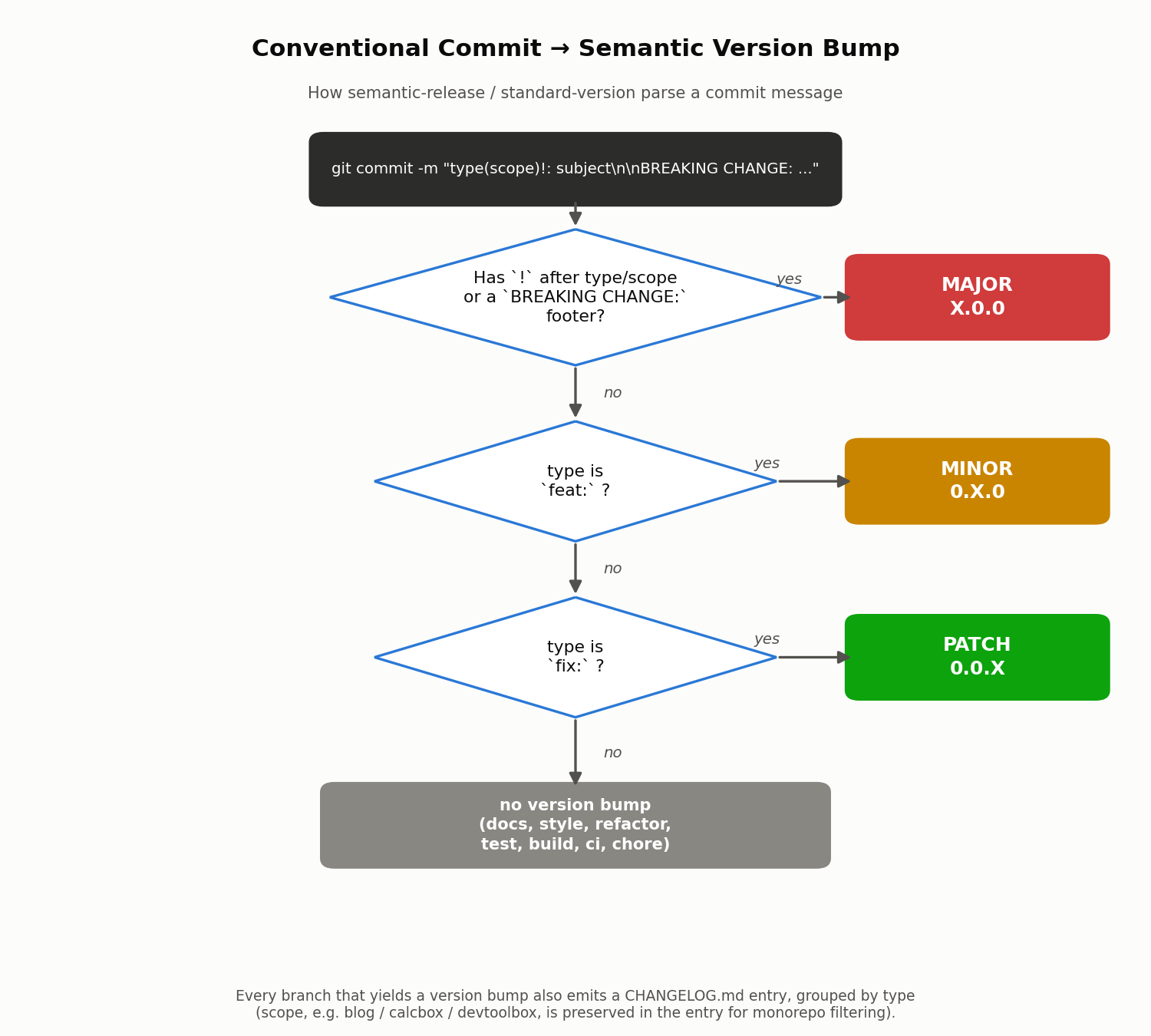
Internally, semantic-release implements this logic in the @semantic-release/commit-analyzer plugin, and @semantic-release/release-notes-generator groups the same commit set by type to build CHANGELOG.md. In other words, by fixing the format of a commit message, Conventional Commits turns two tasks that normally require human judgment — “what should the next version number be?” and “what goes in the release notes?” — into pure string-parsing that can run unattended.
Installation Steps
1. Installing Commitizen
First, install the Commitizen CLI globally.
npm install -g commitizen
This makes the git cz command available.
2. Installing a Commit Message Convention Adapter
When using Commitizen, you need an “adapter” that defines the format for commit messages. Here, we’ll use cz-conventional-changelog, which creates commit messages compliant with the Conventional Commits convention.
npm install -g cz-conventional-changelog
Next, create a configuration file so that Commitizen uses this adapter.
# Create a .czrc file and specify the adapter path
echo '{ "path": "cz-conventional-changelog" }' > ~/.czrc
Note: This .czrc file is created in the user’s home directory. If you want to use different adapters for each project, you can also create a package.json at the project root and configure config.commitizen.path.
3. Validating the Format with commitlint
Commitizen makes it easier to write the correct format — it does not prevent the wrong one. Running git commit -m "whatever" directly still lets a non-conforming message in. To mechanically reject those, pair it with
commitlint
.
npm install -D @commitlint/cli @commitlint/config-conventional
// commitlint.config.js
module.exports = { extends: ["@commitlint/config-conventional"] };
Wiring the following into .git/hooks/commit-msg (in practice, managed via
Husky
or, as in this repository,
Lefthook
) makes a format violation fail right at git commit time, locally:
#!/bin/sh
npx --no-install commitlint --edit "$1"
Usage
Use the git cz command instead of the regular git commit command to create commit messages.
git cz
Running this command displays an interactive prompt where you can select and enter each part of the commit message.
cz-cli@4.3.1, cz-conventional-changelog@3.3.0

? Select the type of change that you're committing: (Use arrow keys)
> feat:     A new feature
  fix:      A bug fix
  docs:     Documentation only changes
  style:    Changes that do not affect the meaning of the code (white-space,
formatting, missing semi-colons, etc)
  refactor: A code change that neither fixes a bug nor adds a feature
  perf:     A code change that improves performance
By following the prompt instructions and entering the commit type (feat, fix, docs, etc.), scope, short description, and detailed description, a commit message following the Conventional Commits convention is automatically generated.
Main Conventional Commits Types
feat: New feature additionfix: Bug fixdocs: Documentation-only changesstyle: Code style changes (formatting, semicolons, etc.)refactor: Refactoring (code changes that neither fix bugs nor add features)perf: Performance improvementtest: Adding or modifying test codebuild: Changes to the build system or external dependenciesci: CI/CD-related changeschore: Other miscellaneous changes (build process, auxiliary tools, etc.)revert: Reverting a previous commit
Verifying It End to End
Explaining that Conventional Commits “enables automation” is easy to state abstractly but hard to trust without seeing it run. So I built an isolated Git repository under /private/tmp (unrelated to this blog’s own repository), installed commitizen, cz-conventional-changelog, @commitlint/cli, and conventional-changelog-cli for real, and ran the whole pipeline end to end.
Actually driving the interactive git cz prompt
Using expect to script the keystrokes (arrow-key selection, text input, Enter) into the real interactive prompt, I ran ./node_modules/.bin/git-cz and produced one commit. Below is the actual session transcript (terminal control codes stripped for readability):
$ ./node_modules/.bin/git-cz
cz-cli@4.3.1, cz-conventional-changelog@3.3.0

? Select the type of change that you're committing:
  feat:     A new feature

? What is the scope of this change (e.g. component or file name): (press enter to skip)
blog

? Write a short, imperative tense description of the change (max 88 chars):
add tag-based CTA filter for affiliate cards

? Provide a longer description of the change: (press enter to skip)


? Are there any breaking changes? No

? Does this change affect any open issues? No

[main 6e71014] feat(blog): add tag-based CTA filter for affiliate cards
 1 file changed, 3 insertions(+)
 create mode 100644 src.js
Building on that with a fix(calcbox): ... commit, a feat(devtoolbox)!: ... commit carrying a real BREAKING CHANGE: footer, and a plain non-conventional commit, here is the actual git log output:
$ git log --oneline
cdcd80a chore(scratch): add junk placeholder file
7d77cd8 feat(devtoolbox)!: drop support for legacy tool ID format
cab1887 fix(calcbox): correct rounding error in unit converter
6e71014 feat(blog): add tag-based CTA filter for affiliate cards
dc68d2a feat: initial project scaffold with commitizen and commitlint config
The feat(devtoolbox)!: commit really does carry this footer:
$ git log -1 --format='%H%n%s%n%n%b' 7d77cd8
7d77cd88705ce25739f93e87e17fa38663f9ce01
feat(devtoolbox)!: drop support for legacy tool ID format

BREAKING CHANGE: tool IDs must now be kebab-case; old camelCase IDs
registered before v2 will 404. Run the migration script in
scripts/migrate-tool-ids.js before upgrading.
commitlint actually rejecting and accepting messages
Piping a message into commitlint on stdin: a non-conforming message really does fail with exit code 1.
$ echo "fixed the thing" | npx --no-install commitlint
⧗   input: fixed the thing
✖   subject may not be empty [subject-empty]
✖   type may not be empty [type-empty]

✖   found 2 problems, 0 warnings
ⓘ   Get help: https://github.com/conventional-changelog/commitlint/#what-is-commitlint

exit code: 1
A conforming message produces no output and exits 0:
$ echo "fix(calcbox): correct rounding error in unit converter" | npx --no-install commitlint
exit code: 0
With the same check wired up as a real commit-msg hook, running git commit directly means a non-conforming commit never lands (no new entry appears in git log):
$ echo "wip stuff" > junk.txt && git add junk.txt
$ git commit -m "update stuff"
⧗   input: update stuff
✖   subject may not be empty [subject-empty]
✖   type may not be empty [type-empty]

✖   found 2 problems, 0 warnings
ⓘ   Get help: https://github.com/conventional-changelog/commitlint/#what-is-commitlint

commit exit code: 1
The same staged change with a conforming message actually commits:
$ git commit -m "chore(scratch): add junk placeholder file"
[main cdcd80a] chore(scratch): add junk placeholder file
 1 file changed, 1 insertion(+)
 create mode 100644 junk.txt
commit exit code: 0
Actually generating a changelog
Running conventional-changelog-cli against that real commit history produces this actual CHANGELOG.md — note how the BREAKING CHANGE footer content is automatically pulled into its own section:
$ npx --no-install conventional-changelog -p angular -i CHANGELOG.md -s -r 0
## 1.0.0 (2026-07-19)

- chore(scratch): add junk placeholder file cdcd80a
- feat(devtoolbox)!: drop support for legacy tool ID format 7d77cd8
- fix(calcbox): correct rounding error in unit converter cab1887
- feat: initial project scaffold with commitizen and commitlint config dc68d2a
- feat(blog): add tag-based CTA filter for affiliate cards 6e71014

### BREAKING CHANGE

- tool IDs must now be kebab-case; old camelCase IDs
  registered before v2 will 404. Run the migration script in
  scripts/migrate-tool-ids.js before upgrading.
The raw conventional-changelog-cli output doesn’t add per-type headings (Features / Bug Fixes) on its own — it’s essentially a flat commit listing. semantic-release’s release-notes-generator, and release-please discussed below, layer a template on top of this same parsed data to produce grouped ### Features / ### Bug Fixes sections. The underlying mechanism — parse the message, bucket by type — is identical.
Monorepo Scoping, CI Enforcement, and the Squash-Merge Gotcha
(a) Filtering per-package changelogs by scope
This blog’s own repository is itself a monorepo spanning apps/blog, apps/calcbox, apps/devtoolbox, apps/pomodoro, and packages/shared. If the convention is to put the package name in the Conventional Commits scope (e.g. feat(calcbox): ...), commit history can be filtered down to a single package’s changes. Here’s that filtering, run for real against the test repository above:
$ git log --oneline --grep='(calcbox)'
cab1887 fix(calcbox): correct rounding error in unit converter

$ git log --oneline --grep='(devtoolbox)'
7d77cd8 feat(devtoolbox)!: drop support for legacy tool ID format

$ git log --oneline --grep='(blog)'
6e71014 feat(blog): add tag-based CTA filter for affiliate cards
The catch: scope is self-reported text in the commit message, with no guarantee it matches the actual changed file paths. Tools that need strict per-package changelog separation, like
Lerna
and
Nx
, split changelogs based on which package’s directory a commit actually touched (equivalent to git log -- apps/calcbox), not on a string match against scope. The reliable pattern is to use both: scope as a human-readable hint, and path-based detection as the actual package-boundary source of truth.
(b) Enforcing it in CI (commitlint’s GitHub Actions integration)
A local git hook can be bypassed (--no-verify, or pushing from an environment where the hook was never installed), so the standard practice is to run the same check in CI and block the PR. commitlint ships an official GitHub Action that validates every commit message on a PR:
# .github/workflows/commitlint.yml
name: Lint Commit Messages
on:
  pull_request:

jobs:
  commitlint:
    runs-on: ubuntu-latest
    steps:
      - uses: actions/checkout@v4
        with:
          fetch-depth: 0
      - uses: wagoid/commitlint-github-action@v6
This job runs commitlint against every commit in the PR (including the state after --amend or rebase), and fails the job if any of them violate the convention. Combined with a GitHub branch protection rule requiring this status check to pass before merging, it becomes a final backstop that mechanically blocks non-conforming history even when local hooks were skipped.
(c) The squash-merge interaction gotcha
A commonly missed subtlety when using GitHub/GitLab’s “Squash and merge”: the individual commits inside a PR branch don’t survive the squash — only the single squash commit’s message matters for the main branch’s history, changelog, and semver-bump decision.
- Messy in-progress commits on the PR branch (
wip,fix typo,address review comments) don’t need to be conventional — they disappear once squashed, with no lasting effect - However, GitHub’s default behavior is to prefill the squash commit’s message with the PR title, which means in practice the thing that actually needs to follow the convention is the PR title, not the branch’s commits
- A workflow that only lints individual commits (as in the example above) provides no real guarantee in a squash-merge-based project — it needs to instead (or additionally) lint the PR title (e.g. validating
github.event.pull_request.titleonpull_requestevents), or use a dedicated action such asamannn/action-semantic-pull-request
Missing this distinction leads to a confusing situation: commitlint reports green, yet the main branch’s history and changelog still don’t actually follow Conventional Commits — because what was linted (individual commits) isn’t what ends up in history (the squash commit built from the PR title).
Recent Developments: semantic-release, standard-version, release-please
The landscape of tools that turn Conventional Commits into an automatic version decision has shifted over the past few years.
- standard-version was officially marked unmaintained by its maintainer in May 2022. For GitHub users, migrating to release-please (maintained by Google) is the recommended path; for environments that can’t use GitHub Actions, the
commit-and-tag-versionfork is suggested instead. - semantic-release remains widely used as a continuous-delivery-oriented tool: every push to the release branch is analyzed and, if warranted, released immediately. Its plugin pipeline (
commit-analyzer→release-notes-generator→changelog→npm/github/gitpublish) implements exactly the parsing logic described above. - release-please instead maintains a standing “Release PR” that always reflects what the next release would contain, so a human reviews the release contents before merging — rather than semantic-release’s merge-triggers-release model.
- In monorepos, Changesets has also gained traction as an approach that doesn’t rely on parsing Conventional Commits at all: developers add a small “changeset” file per PR describing the change, and a CI bot opens version-bump PRs from those files — sidestepping the self-reported-
scopeproblem entirely.
Whichever tool you pick, the parsing logic covered in this article is the foundation underneath all of them — Commitizen is simply the first step toward making that input harder to get wrong.
Introducing Commitizen improves commit message quality across the team and makes the project easier to manage. But it’s only by also designing for commitlint’s CI enforcement, a deliberate monorepo scoping convention, and a PR-title policy for squash merges that Conventional Commits’ real automation value — automatic version decisions and changelog generation — can be realized safely.
Related Articles
- Preventing Direct Push to Main Branch Using Git Hooks
- covers a
pre-pushhook that works on the same mechanism as thecommit-msghook used here. - Git Branch Strategies: rebase vs merge and Team Workflows - covers merge strategy choices, including squash merging.
- GitHub Actions Basics: How to Write Workflow YAML Files - covers the workflow YAML fundamentals used by the commitlint GitHub Actions integration.