Anyone getting started with Next.js App Router runs into the "use client" directive almost immediately. Many developers paste it at the top of a component and move on without fully understanding what that one line actually means, or where it should correctly be placed.
This article works from primary sources as of July 2026 — the official React documentation and the official Next.js documentation (Next.js 16.2, App Router) — to lay out a precise definition of use client, the difference between Server Components and Client Components, how propagation works, principles for designing the boundary, the children-based composition pattern, and how to handle common errors.
1. What Is use client?
To state the conclusion up front: "use client" is not a declaration that “this code only runs on the client.” The official React documentation puts it this way:
'use client'lets you mark what code runs on the client.
This is a directive that draws a boundary in the module graph (the import dependency tree) between server and client. It must be placed at the very top of a file, before any imports.
"use client";

import { useState } from "react";

export default function Counter() {
  const [count, setCount] = useState(0);
  return <button onClick={() => setCount(count + 1)}>{count}</button>;
}
The Next.js documentation frames it the same way: "use client" declares the boundary between the Server and Client module graphs (trees).
The Common Misconception: “use client” Does Not Mean “Client-Only”
This is the point most often misunderstood. A component marked with "use client" is still executed on the server as well. Specifically, on first request, Next.js App Router prerenders Client Components into HTML on the server (SSR), and only afterward does the browser hydrate them to make them interactive.
In other words, what "use client" actually signals is “this code must also be able to run in a client environment (it uses browser APIs, state, or event handlers)” — not “this never runs on the server.” The React documentation makes clear that a component without 'use client' can be evaluated in both server and client contexts; conversely, a component inside the client boundary is still rendered once on the server before being sent to the browser. Both directions of this fact matter.
2. Server Components vs. Client Components
In Next.js App Router, everything under app/ is a Server Component by default. You only opt into a Client Component by explicitly declaring "use client".
Here is what each can and cannot do:
| Server Components | Client Components | |
|---|---|---|
| Direct access to a database or filesystem | Yes | No |
| Safely holding API keys and secrets | Yes (never sent to the client) | No (exposed in the bundle) |
Fetching data inside the component with async/await | Yes | No (unsupported as of React 19) |
State-management hooks like useState / useReducer | No | Yes |
Lifecycle hooks like useEffect | No | Yes |
Event handlers like onClick | No | Yes |
Browser APIs like window / localStorage | No | Yes |
| Creating and subscribing to React Context | No (cannot create a Provider) | Yes |
| Impact on the client JS bundle size | None (fully resolved on the server) | Yes (the code itself ships to the browser) |
The Next.js documentation summarizes the decision this way. Use Client Components when you need state, event handlers, lifecycle logic like useEffect, browser-only APIs such as localStorage or window, or custom hooks. Use Server Components when you need to fetch data directly from a database or API, use API keys or other secrets without exposing them to the client, reduce the amount of JavaScript shipped to the browser, or improve First Contentful Paint (FCP) by streaming content progressively.
A common misconception is that Server Components are declared with "use server". This is incorrect. As the React documentation states plainly, there is no dedicated directive for Server Components. Anything under app/ is a Server Component simply by default, with no directive needed; "use server" is an entirely different directive that declares Server Functions (covered later).
3. How Rendering Actually Works: RSC Payload, SSR, and Hydration
To understand use client precisely, you need to understand what Next.js does on the server side. The Next.js documentation splits server-side work into chunks by route segment (layouts and pages) and explains it as follows:
- Server Components are rendered into a special data format called the React Server Component Payload (RSC Payload).
- Client Components and the RSC Payload together are prerendered into HTML.
The RSC Payload contains:
- The rendered result of the Server Components
- Placeholders for where Client Components should be rendered, plus references to their JavaScript files
- Any props passed from a Server Component to a Client Component
On the initial load, the client processes things in this order:
- HTML is used to immediately show a fast, non-interactive preview.
- RSC Payload is used to reconcile the Client and Server Component trees.
- JavaScript hydrates the Client Components, making the application interactive.
Hydration is React’s process of attaching event handlers to static HTML to make it interactive. On subsequent navigations, the RSC Payload is prefetched and cached, and Client Components render entirely on the client without server-rendered HTML.
Figure 1: The flow from Server to RSC Payload to HTML/client JS bundle, and finally hydration in the browser
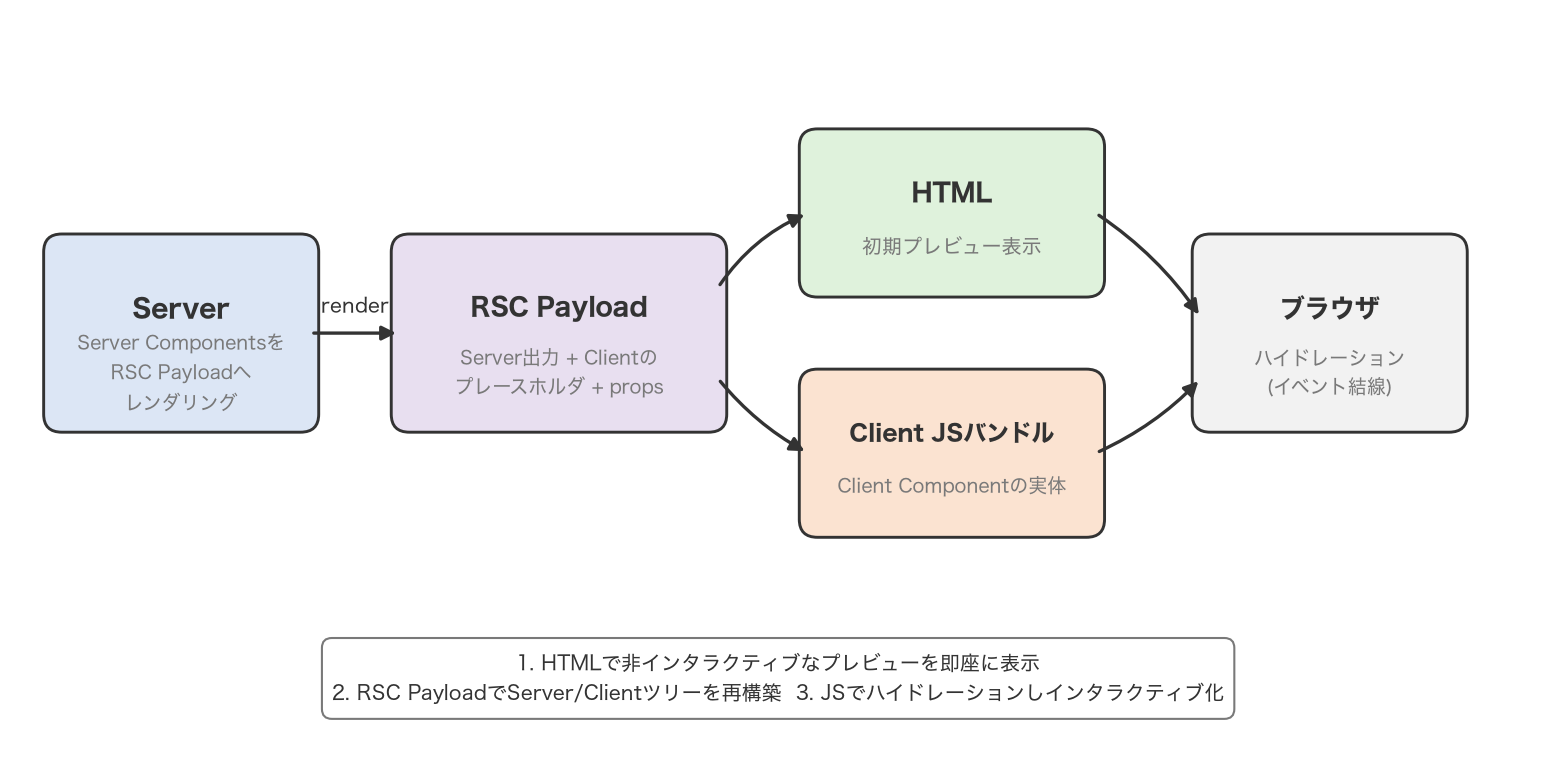
The key point is that a Client Component never simply “starts running in the browser” without first passing through the server. use client does not pin the execution environment to the client — it is more accurate to think of it as a boundary declaration stating that this component must also be able to run on the client (i.e., it is wired into the React tree at runtime in the browser).
4. How use client Propagation Works
"use client" can be declared anywhere, but its effect is not confined to the single file where it’s written. The Next.js documentation states this explicitly:
Once a file is marked with
"use client", all of its imports and the components it directly renders are included in the client bundle.
In other words, every component, function, and dependency module imported from a file marked with "use client" is automatically included in the client bundle. This is what’s known as “propagation,” and the React documentation describes the same behavior:
As dependencies of
RichTextEditor,formatDateandButtonwill also be evaluated on the client regardless of whether their modules contain a'use client'directive.
For example, if a SearchBox component marked with "use client" imports Icon and Input, those components are automatically treated as Client Components even if Icon.tsx and Input.tsx themselves have no "use client" declaration. Propagation continues further down the chain too — even a utility function used deep inside, such as a date-formatting helper, gets evaluated on the client.
Figure 2: A component tree showing how use client propagation pulls everything below the declaration point into the client bundle
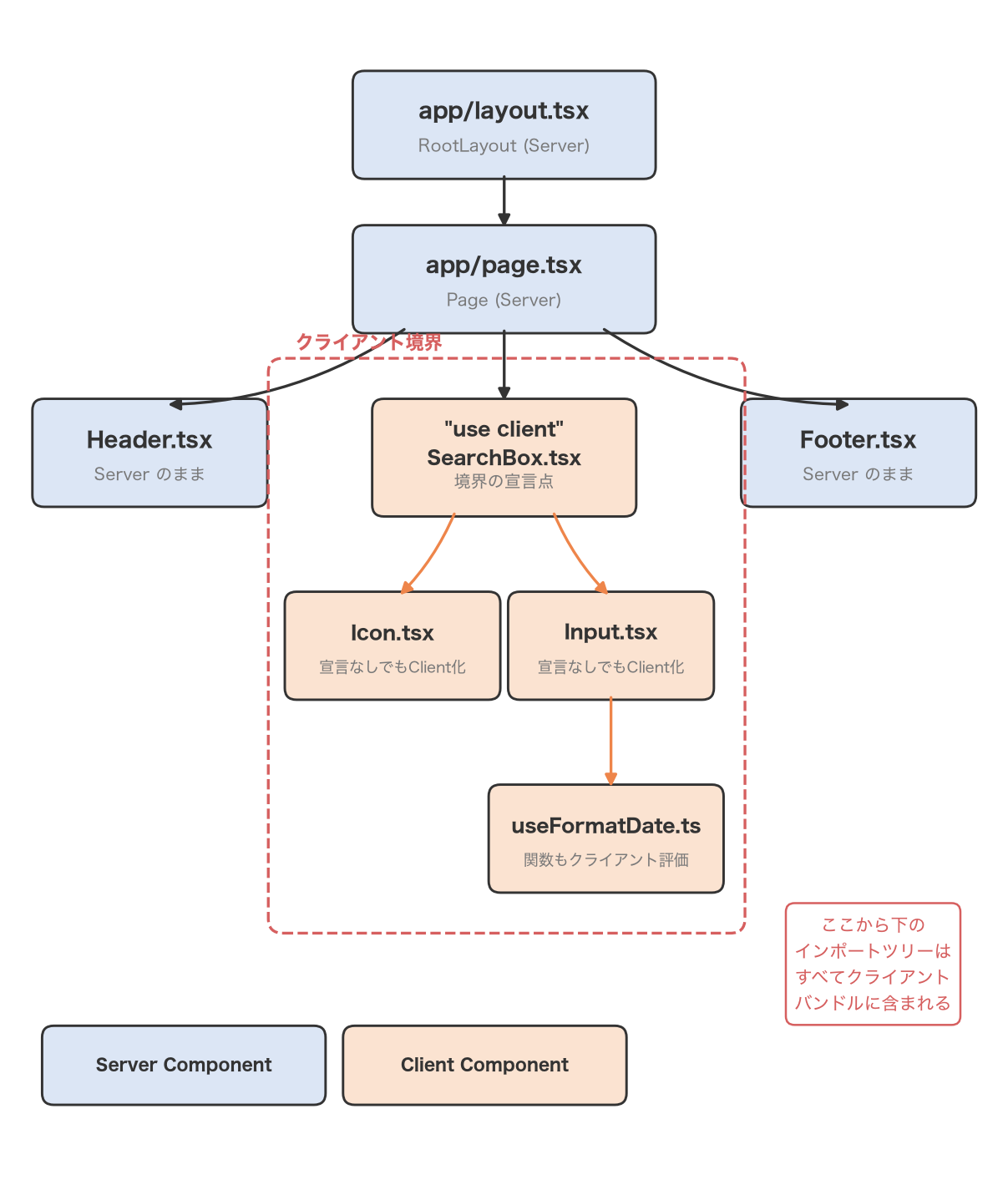
At the same time, the React documentation also emphasizes this point:
When a
'use client'module is imported from another client-rendered module, the directive has no effect.
That is, importing a file with its own "use client" from a module that’s already inside the client boundary does not create a second, redundant effect. The boundary is drawn exactly once, at the point where the tree first becomes client-rendered.
What Happens If You Don’t Understand Propagation
Adding "use client" to unnecessarily many files, without understanding this propagation behavior, causes real problems:
- Unnecessary JavaScript ships to the client: Components and logic that could have stayed entirely on the server end up in the client bundle, inflating its size.
- The server’s advantages are lost: Anything only Server Components can do — direct database access, using secrets, and so on — becomes impossible below that boundary.
- Component reusability drops: Generic UI components lose the flexibility to be used in either a Server or Client context.
5. Where Should You Place It? Principles for Designing the Boundary
Once you understand propagation, a clear design principle follows.
Principle: declare "use client" only at the boundary of the lowest, most leaf-like interactive components in the tree.
In other words, draw the boundary at “the most downstream (lowest-level) component that actually needs to switch from server to client.” Slapping "use client" on an entire page or an entire layout forces everything beneath it in the tree to become client-side, which is generally a pattern to avoid.
The Next.js documentation illustrates this with a layout that mixes mostly static elements (a logo, navigation links) with one interactive piece (a search bar), recommending a split like this:
// app/layout.tsx (stays a Server Component)
import Search from "./search"; // Client Component
import Logo from "./logo"; // Server Component

export default function Layout({ children }: { children: React.ReactNode }) {
  return (
    <>
      <nav>
        <Logo />
        <Search />
      </nav>
      <main>{children}</main>
    </>
  );
}
// app/search.tsx
"use client";

export default function Search() {
  // ...
}
Layout itself stays a Server Component, and only Search, which actually needs interactivity, is marked with "use client". This keeps the static parts around Logo and nav entirely on the server, and confines the JavaScript sent to the client to what Search alone needs.
Another important guideline concerns Context Provider placement. If you want to share global state — like the current theme — through React Context, creating the Context itself is only possible in a Client Component (Server Components don’t support it). But the Next.js documentation advises implementing that Provider as a thin Client Component that just accepts children, and placing it as deep in the tree as possible.
// app/theme-provider.tsx
"use client";

import { createContext } from "react";

export const ThemeContext = createContext({});

export default function ThemeProvider({
  children,
}: {
  children: React.ReactNode;
}) {
  return <ThemeContext.Provider value="dark">{children}</ThemeContext.Provider>;
}
// app/layout.tsx
import ThemeProvider from "./theme-provider";

export default function RootLayout({
  children,
}: {
  children: React.ReactNode;
}) {
  return (
    <html>
      <body>
        <ThemeProvider>{children}</ThemeProvider>
      </body>
    </html>
  );
}
In the documentation’s own words: you should render providers as deep as possible in the tree — notice how ThemeProvider only wraps {children} instead of the entire <html> document — which makes it easier for Next.js to optimize the static parts of your Server Components.
6. Placing a Server Component “Beneath” a Client Boundary: The Children Composition Pattern
The propagation rule — “everything below the boundary becomes client-side” — seems, at first glance, like an unavoidable constraint. What if you want to embed, inside a Client Component, a piece of UI that can only run on the server?
This is where the Composition Pattern recommended by both the React and Next.js documentation comes in: passing a Server Component as children (or another prop) instead of importing it.
Anti-pattern: Importing a Server Component Inside a Client Component
// app/ui/modal.tsx
"use client";

import Cart from "./cart"; // Cart becomes client-side the moment it's imported here

export default function Modal() {
  const [isOpen, setIsOpen] = useState(false);
  return isOpen ? (
    <div>
      <Cart />
    </div>
  ) : null;
}
Because Modal.tsx is marked "use client", Cart, imported directly from it, also falls under propagation and gets pulled into the client bundle. Even if Cart is a component that could stay entirely on the server (say, it just fetches product data from a database), this way of writing it gets none of that benefit.
Recommended Pattern: Receiving It as children
// app/ui/modal.tsx
"use client";

export default function Modal({ children }: { children: React.ReactNode }) {
  const [isOpen, setIsOpen] = useState(false);
  return isOpen ? <div>{children}</div> : null;
}
// app/page.tsx (Server Component)
import Modal from "./ui/modal";
import Cart from "./ui/cart";

export default function Page() {
  return (
    <Modal>
      <Cart />
    </Modal>
  );
}
Modal becomes a Client Component that merely holds a children slot. The caller, Page (a Server Component), plugs in the Server Component Cart via <Modal><Cart /></Modal>.
Figure 3: The difference between importing a Server Component directly and passing it in as children
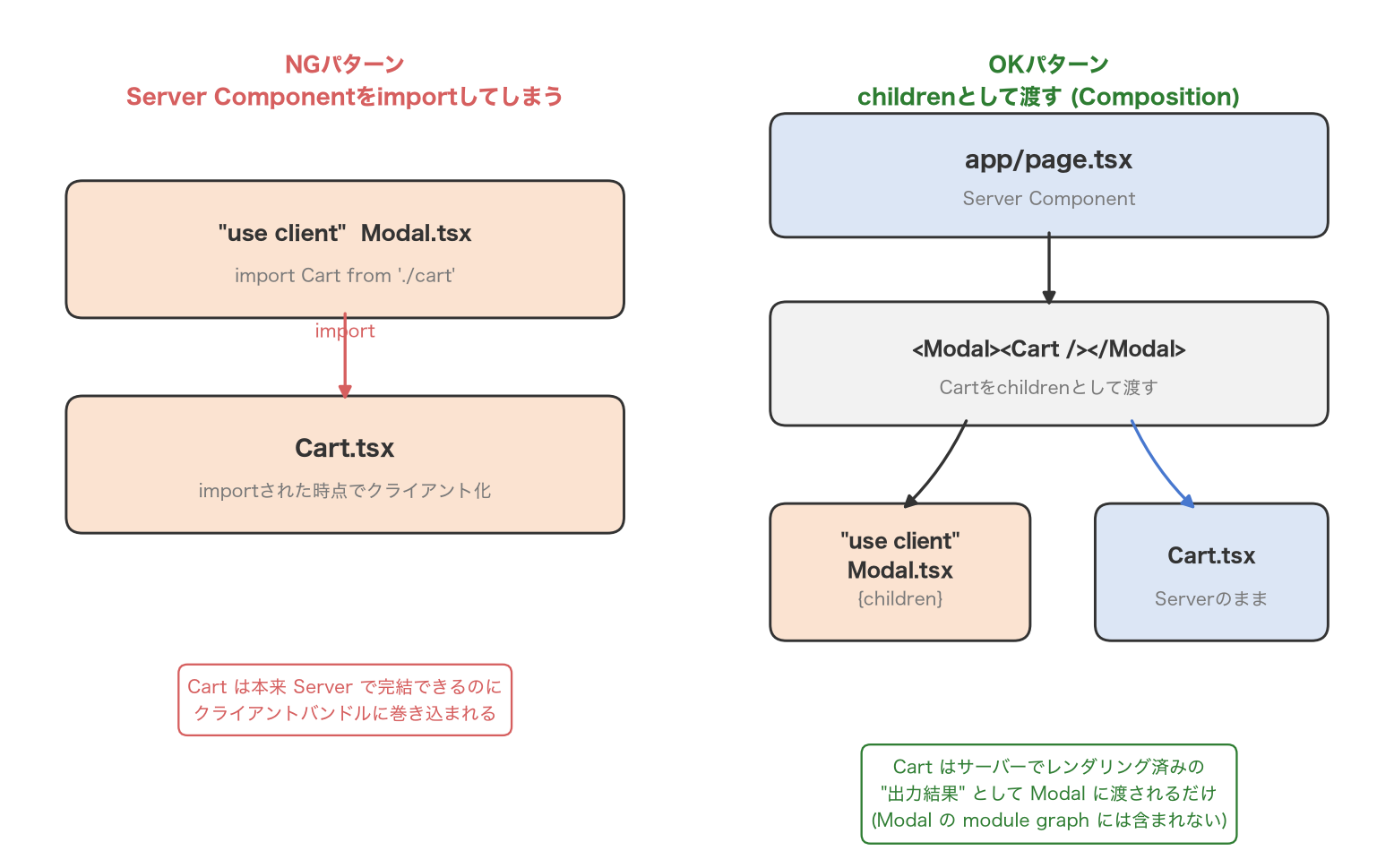
Why doesn’t this pull Cart into the client bundle? The Next.js documentation explains:
This behavior applies to components that are part of the Client Component’s module graph, which includes the modules it imports and the components it renders directly. It does not apply to Server Components passed as children or other props. Those components are not imported into the Client Component’s module graph. They are rendered on the server and passed to the Client Component as rendered output.
In other words, the Cart passed as children is never part of Modal.tsx’s module graph (its import relationships). Cart is rendered ahead of time on the server, and only its already-rendered output is passed to the Client Component as a prop. From the RSC Payload’s perspective, when Modal is open, the browser is simply displaying content that was already rendered on the server — the code for Cart itself never ships to the client.
This idea — render on the server first, then slot the result inside the client boundary — is echoed in the React documentation:
In the browser, the Client Components will see output of the Server Components passed as props.
The children-based slot pattern is especially useful for cases like modals, tabs, and accordions: situations where you want the open/closed or visibility state managed on the client, but the contents themselves are just server-fetched data rendered as-is.
7. Common Errors and How to Fix Them
“You’re importing a component that needs useState” and similar errors
If you accidentally use useState or useEffect inside a Server Component, Next.js throws an error like this:
Error: You're importing a component that needs useState. It only works in a Client
Component but none of its parents are marked with "use client", so they're Server
Components by default.
The cause is simple: neither that file nor any of its ancestors has a "use client" declaration. The fix is to add "use client" to the top of the component that actually uses hooks or event handlers (or a dedicated Client Component that wraps it). Note that the directive is case-sensitive — it must be exactly "use client" — and must be placed at the very top of the file, before any imports.
The Serialization Boundary for Props
When passing props from a Server Component to a Client Component, those props must be serializable. Since the RSC Payload is data sent over the network, trying to pass a value that can’t be transmitted as-is — a function or a class instance, for example — results in an error.
The types the React documentation lists as supported include primitives (strings, numbers, booleans, null, undefined), symbols registered via Symbol.for, iterables such as arrays, Maps, Sets, and TypedArrays, Date, plain objects, JSX elements, Promises, Server Functions, and Server/Client Component elements themselves. Conversely, ordinary functions (aside from those defined in client-marked modules or marked "use server"), classes and class instances, and non-globally-registered symbols cannot be passed.
// Not allowed: passing a plain function as a prop causes an error
<ClientComponent onSelect={() => doSomething()} />

// Allowed: pass it as a Server Function, or define the handler inside the Client Component itself
Confusing “use client” with “use server”
"use client" and "use server" sound similar and are easy to confuse, but they point in opposite directions. The React documentation summarizes 'use server' as follows:
'use server'marks server-side functions that can be called from client-side code.
"use server" declares Server Functions — server-side functions callable from the client, used for mutations like form submissions and data updates — and it is never attached to a component. It also comes with its own constraints: it can only be placed at the top of an async function, and can only be used in server-side files. It does not create a component boundary the way "use client" does. The idea that “Server Components are made with use server” is a mistake worth restating: there is no dedicated directive for Server Components at all.
8. Summary
"use client"is not a declaration that code “only runs on the client” — it’s a directive that declares the boundary between the server and client module graphs.- Client Components are still prerendered into HTML on the server on first load, then hydrated in the browser afterward.
- Every component and function imported from a file marked
"use client"is automatically included in the client bundle — this is propagation. - Because of propagation, the principle is to declare
"use client"only at the lowest boundary, closest to the leaves of the tree, where interactivity is actually needed. - To embed a Server Component inside a Client Component, use the Composition Pattern — pass it as
children(or another prop) instead of importing it — so the Server Component’s code never ends up in the client bundle. - Props passed from a Server Component to a Client Component must be serializable values.
"use server"is not the opposite of"use client"— it’s a directive for an entirely separate concept, Server Functions.
Frequently Asked Questions (FAQ)
Does adding use client mean the component is no longer server-side rendered?
No — that’s a misconception. A component marked with "use client" is still prerendered into HTML on Next.js’s server (SSR) on first load. What "use client" changes is whether that component’s code is included in the client bundle and executed/hydrated in the browser — it does not stop the initial server-side render.
What’s wrong with marking everything use client?
It would technically work — in fact, if you added "use client" to the top of every file in App Router, the app would behave roughly the way it did under the old Pages Router. But because of propagation, everything below each such boundary gets pulled into the client bundle, increasing the amount of JavaScript shipped to the browser and losing every optimization that’s only possible with Server Components, like direct database access or safe secret usage. To get the benefits App Router offers, you need to keep the boundary as small as possible.
Which file should use client go in?
It belongs in the file for “the lowest-level (most downstream) component that actually needs to switch from server to client.” Concretely, declare it at the very top of the file (before any imports) for the component that directly uses hooks like useState, event handlers, or browser APIs. Rather than casually turning an entire layout or page into a Client Component, the general approach is to carve out just the interactive part and mark that specific component with "use client".
Is 'use server' the opposite of use client?
Not exactly the opposite — they’re different things entirely. "use client" is attached to a component or module to declare the server/client boundary, while "use server" is attached to an async function to declare a server-side function callable from the client (a Server Function). There is no directive for creating Server Components — anything left undeclared under app/ is a Server Component by default. Keeping this asymmetry in mind makes the two much harder to confuse.
References
- Takefumi Yoshii, Practical Next.js – Evolving Web App Development with App Router , Gijutsu-Hyoron (2023)
- React Documentation: ‘use client’ directive
- React Documentation: Server Components
- React Documentation: ‘use server’ directive
- Next.js Documentation: Server and Client Components (Next.js 16.2, updated June 2026)