Introduction
This article explains the timezone (particularly JST/UTC) mismatch issues that commonly occur when combining Prisma and MySQL, and provides solutions.
Background and Prerequisites
In many Japanese development environments, MySQL server timezone settings are commonly set to JST (Japan Standard Time). On the other hand, Prisma (Node.js ORM) handles DateTime values as “ISO 8601 strings without timezone information” and does not automatically interpret or convert the DB server’s timezone settings or the timezone of values.
Timezone inconsistencies are particularly likely to occur under the following conditions:
- When the DB is a cloud managed service where the DB server’s timezone setting cannot be changed to JST, or when UTC-fixed operation is required
- When Prisma and the application handle times in UTC, but raw SQL operations or DB defaults/triggers generate JST times
- When the team or project has a culture of executing raw SQL, and operations that bypass the ORM coexist
Under these circumstances, time discrepancies and inconsistencies between the application, ORM, and DB become likely.
In practice, having multiple methods for generating and storing times makes it easy for time discrepancies to occur between the application, ORM, and DB. The three main patterns are:
Main Patterns for DB Time Generation and Storage
1. DB Auto-Generation
createdAtandupdatedAtare auto-generated in UTC via Prisma schema’s@default(now()).
createdAt DateTime @default(now()) @map("created_at")
updatedAt DateTime @default(now()) @map("updated_at")
2. App-Side Generation (new Date())
- Cases where the application generates times using
new Date()(UTC) and saves them to the DB.
const now = new Date();
await prisma.someModel.create({
  data: {
    // ...other fields
    deletedAt: now,
  },
});
3. Direct DB/SQL
- Cases where raw SQL is executed and DB-side mechanisms like
ON UPDATEorDEFAULT CURRENT_TIMESTAMPauto-generate JST times.
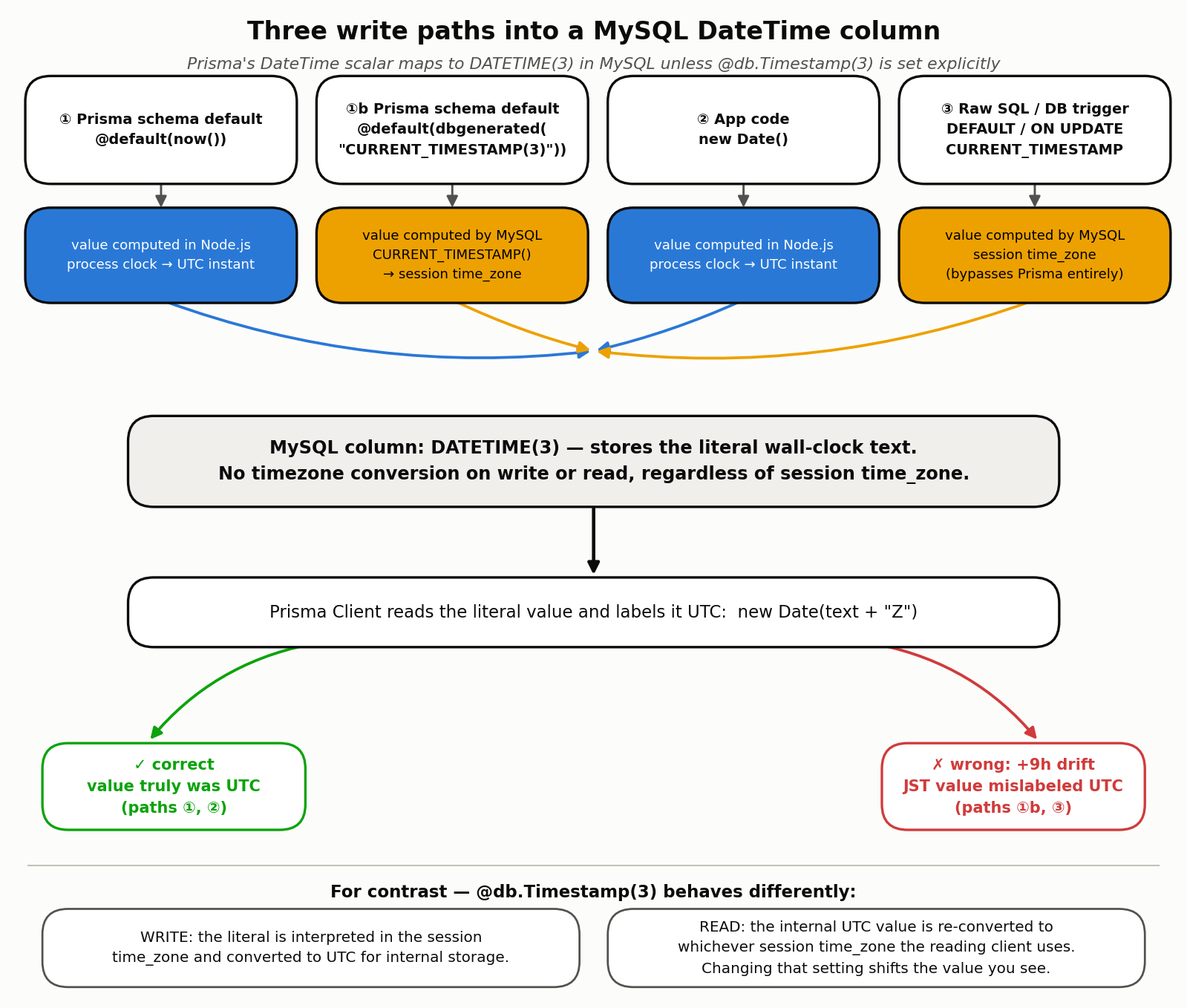
As the diagram shows, the three paths split on where the timestamp is computed. ① @default(now()) and ② the app’s new Date() are both computed by the Node.js process clock (a UTC-based epoch value), while ①b dbgenerated("CURRENT_TIMESTAMP(3)") and ③ direct DB/SQL are computed by the MySQL server itself via the CURRENT_TIMESTAMP() function. The latter two are evaluated according to MySQL’s session time_zone variable, so if the server’s time_zone is JST, the resulting string representation is a JST wall-clock value.
Why the mismatch happens: now() and MySQL’s CURRENT_TIMESTAMP are evaluated in different places
This is the core mechanism behind the article. Looking at the actual SQL Prisma Client issues (query logging) makes the difference directly visible (see the “Execution Verification” section below for the full environment and measured values).
prisma:query INSERT INTO `some_model_prisma`
  (`created_at_now`,`updated_at_dbg`,`app_written`,`event_date`,`created_at_ts`)
  VALUES (?,?,?,?,?)
The column list of this INSERT statement explicitly includes created_at_now, which uses @default(now()). In other words, Prisma Client does not defer now() to MySQL’s own DEFAULT CURRENT_TIMESTAMP(3) clause — it computes a new Date()-equivalent value inside the query engine and sends it as a bound parameter. created_at_dbg, which uses dbgenerated("CURRENT_TIMESTAMP(3)"), is not in that column list. Its value is left entirely to MySQL’s own DEFAULT CURRENT_TIMESTAMP(3) clause — Prisma never touches it.
To summarize:
| Path | Where the value is computed | Reference timezone | Value Prisma sends |
|---|---|---|---|
@default(now()) | Node.js (Prisma Client / query engine) | Always UTC | Explicit bound parameter |
@default(dbgenerated("CURRENT_TIMESTAMP(3)")) | MySQL server | Session time_zone | Not sent (left to the DB DEFAULT) |
App’s new Date() | Node.js | Always UTC | Explicit bound parameter |
| Direct DB/SQL / trigger | MySQL server | Session time_zone | Prisma not involved |
The change to dbgenerated described in “Revising DB Auto-Generation” is exactly a change of where the value is computed — from Node.js to MySQL — and only after that change does the MySQL server’s time_zone setting (JST) actually affect the generated timestamp. Conversely, as long as a field stays on @default(now()), changing the MySQL server’s timezone setting has no effect whatsoever, because the value is always determined by Node.js’s UTC clock.
TIMESTAMP vs. DATETIME: which one actually converts
MySQL has two column types for storing times, and they handle timezones in fundamentally different ways (see MySQL 8.0 Reference Manual: Date and Time Types ).
DATETIME: stores the wall-clock value as-is, as a string. Neither writes nor reads apply any timezone conversion based on the sessiontime_zone. Prisma’sDateTimescalar always maps toDATETIME(n)in MySQL unless@db.Timestamp(n)is specified explicitly (confirmed viaDESCRIBEin the execution verification below).TIMESTAMP: on write, the value is converted to UTC using the sessiontime_zoneand stored internally as a UTC epoch. On read, the stored UTC value is converted back using whatever the sessiontime_zoneis at that moment. This means reading the same row from sessions with differenttime_zonesettings returns different displayed values.
This is the actual mechanism behind the mismatch this article addresses. The values generated by path ①b or by raw SQL are JST wall-clock values computed by MySQL’s CURRENT_TIMESTAMP() function according to the session time_zone (JST) — but because the destination column is DATETIME, this value carries no indication that it is JST; it is stored purely as a string. When Prisma Client reads it back, it unconditionally interprets the MySQL DATETIME value as UTC and constructs a Date object with a trailing Z (see
Prisma docs: Type mappings between MySQL and Prisma schema
, and confirmed in the execution verification below). As a result, a value that is actually JST wall-clock time gets treated by the application as if it were a UTC instant — producing a 9-hour discrepancy against the real time.
Main Solutions
Design and operate so that regardless of which path (app, ORM, DB) generates and stores times, JST-consistent time management is achieved.
Revising DB Auto-Generation
Adopt dbgenerated("CURRENT_TIMESTAMP(3)") for Prisma schema @default values to generate times in JST.
createdAt DateTime @default(dbgenerated("CURRENT_TIMESTAMP(3)")) @map("created_at")
updatedAt DateTime @default(dbgenerated("CURRENT_TIMESTAMP(3) ON UPDATE CURRENT_TIMESTAMP(3)")) @map("updated_at")
Notes:
dbgenerated("NOW(3)")behaves the same way, butCURRENT_TIMESTAMPis recommended for standardization and portability.- Note that there is a known bug in Prisma’s MySQL support where setting
@default(dbgenerated("CURRENT_TIMESTAMP(3)"))onDATETIME(3)columns (especially combined withON UPDATE CURRENT_TIMESTAMP(3)) can causeprisma migrate devto repeatedly generate migration files with the same content even when there are no actual schema changes. In this case, you need to check the migration file content and manually delete it if there is no substantive difference. We actually reproduced this behavior live on Prisma 7.8.0 in the “Execution Verification” section below.- https://github.com/prisma/prisma/issues/11318
(reproduces with MySQL’s
ON UPDATE CURRENT_TIMESTAMP(3)combined withdbgenerated; closed but unresolved, folded into #12574) - https://github.com/prisma/prisma/issues/12574
(the former tracking issue for
dbgeneratedDEFAULT values causing endless migrations, spanning both MySQL and PostgreSQL; closed as a duplicate of #10795 in January 2025) - https://github.com/prisma/prisma/issues/10795
(the current tracking issue: unchanged fields/schema still trigger repeated
ALTER TABLEmigrations; still OPEN as of this writing) - Correction: an earlier version of this article cited
#20586as the source for this bug. That issue is actually about usingcurrent_setting()insidedbgeneratedon PostgreSQL (for row-level-security configuration values) and is unrelated to the MySQLCURRENT_TIMESTAMPbehavior this article covers. We’ve corrected the citation.
- https://github.com/prisma/prisma/issues/11318
(reproduces with MySQL’s
Correcting App-Side Generation
Use Prisma Client extensions ($extends) to automatically convert UTC to JST on writes and JST to UTC on reads.
const setOffsetTime = (object: any, offsetTime: number) => {
  if (object === null || typeof object !== "object") return;
  for (const key of Object.keys(object)) {
    const value = object[key];
    if (value instanceof Date) {
      object[key] = new Date(value.getTime() + offsetTime);
    } else if (value !== null && typeof value === "object") {
      setOffsetTime(value, offsetTime);
    }
  }
};

return new PrismaClient().$extends({
  query: {
    $allModels: {
      async $allOperations({ args, query }) {
        const offsetTime = 9 * 60 * 60 * 1000; // JST offset
        setOffsetTime(args, offsetTime);
        const result = await query(args);
        setOffsetTime(result, -offsetTime);
        return result;
      },
    },
  },
});
Direct DB/SQL
When generating or updating times directly via DB or SQL, if the MySQL server’s timezone setting is unified to JST, auto-generated times via DEFAULT CURRENT_TIMESTAMP or ON UPDATE CURRENT_TIMESTAMP will also be in JST.
Therefore, there is no discrepancy between JST-unified times from the app/ORM and times generated via direct DB/SQL, maintaining consistency.
Execution Verification: Confirming It for Real with MySQL 9.7 + Prisma 7
We verified that the explanation above matches actual MySQL/Prisma behavior, using a real environment built locally. Every number and log in this section comes from an actual run — none of it is an estimated “typical result.”
Verification environment
- OS: macOS (Docker was not available in this sandbox, so we installed MySQL directly via Homebrew instead)
- MySQL: 9.7.1 (Homebrew bottle. We started a temporary instance with
mysqld_safesupporting both TCP and a Unix socket, and fully uninstalled MySQL and removed its data directory after verification.) - Prisma: 7.8.0 /
@prisma/adapter-mariadb7.8.0 /mariadb(npm) 3.5.3 - MySQL’s session and global
time_zonewere set to JST withSET GLOBAL time_zone = '+09:00'; SET SESSION time_zone = '+09:00';, reproducing this article’s premise that “the DB server’s timezone is set to JST in many Japanese development environments.”
Note that Prisma 7 removes the ability to write url directly inside the datasource block of schema.prisma; the connection must instead be supplied via a driver adapter configured in prisma.config.ts (see “Recent Developments” below). We connected using the official MySQL/MariaDB adapter, @prisma/adapter-mariadb.
Measuring the three write paths: reproducing a 9-hour drift
We defined a model with fields corresponding to the three paths, using the following Prisma schema:
model SomeModel {
  id           Int      @id @default(autoincrement())
  createdAtNow DateTime @default(now()) @map("created_at_now")
  createdAtDbg DateTime @default(dbgenerated("CURRENT_TIMESTAMP(3)")) @map("created_at_dbg")
  appWritten   DateTime? @map("app_written")
  eventDate    DateTime @db.Date @map("event_date")
  createdAtTs  DateTime @default(now()) @db.Timestamp(3) @map("created_at_ts")
}
After applying it with npx prisma db push, checking the actual column types with DESCRIBE confirmed that only created_at_ts, which explicitly specifies @db.Timestamp(3), became TIMESTAMP(3); every other field remained DATETIME(3) even though its Prisma scalar is still plain DateTime — confirming the earlier claim that “Prisma’s DateTime maps to DATETIME unless stated otherwise.”
Here is the actual measured log (raw output captured with log: ["query"]) from creating one row with the Node.js process timezone set to TZ=UTC:
=== new Date() from Node ===  2026-07-19T01:27:09.333Z

prisma:query INSERT INTO `some_model_prisma`
  (`created_at_now`,`updated_at_dbg`,`app_written`,`event_date`,`created_at_ts`)
  VALUES (?,?,?,?,?)

createdAtNow.toISOString() = 2026-07-19T01:27:09.429Z
createdAtDbg.toISOString() = 2026-07-19T10:27:09.431Z
createdAtTs.toISOString()  = 2026-07-19T01:27:09.429Z
appWritten.toISOString()   = 2026-07-19T01:27:09.333Z
Only createdAtDbg (dbgenerated("CURRENT_TIMESTAMP(3)")) comes back exactly 9 hours ahead of the other three fields. This is because MySQL computed a JST wall-clock value according to the session time_zone (+09:00), stored it as-is in a DATETIME column, and Prisma Client then unconditionally interpreted that DATETIME value as UTC. In practice, this means an application’s logs or UI would display a JST time as if it were “a UTC time 9 hours in the future.”
Comparing against a TIMESTAMP column: reading with a different session time_zone
We re-read the same row with raw SQL after changing the MySQL client session’s time_zone:
-- with session time_zone = '+09:00'
SELECT id, created_at_now, created_at_dbg, created_at_ts FROM some_model_prisma WHERE id=1;
-- id=1  created_at_now=2026-07-19 01:27:09.429  created_at_dbg=2026-07-19 10:27:09.431  created_at_ts=2026-07-19 01:27:09.429

-- with session time_zone = '+00:00' (re-reading the same row)
SELECT id, created_at_now, created_at_dbg, created_at_ts FROM some_model_prisma WHERE id=1;
-- id=1  created_at_now=2026-07-19 01:27:09.429  created_at_dbg=2026-07-19 10:27:09.431  created_at_ts=2026-07-18 16:27:09.429
The DATETIME columns created_at_now and created_at_dbg show no change at all when the session time_zone changes (because they store literal values). The TIMESTAMP column created_at_ts, however, shifted by 9 hours simply from changing the session from +09:00 to +00:00 (2026-07-19 01:27:09.429 → 2026-07-18 16:27:09.429). This means the value is internally stored as UTC 2026-07-18 16:27:09.429, and under the +09:00 session it was being displayed as 9 hours later (its JST representation), 2026-07-19 01:27:09.429. This confirms that a TIMESTAMP column carries a different risk: the value drifts if the session time_zone differs between write time and read time.
The @db.Date footgun
A field marked @db.Date is a DATE type in the DB with no time-of-day information, but Prisma Client returns it as a Date object pointing to UTC midnight. We confirmed that handling this value with Node.js Date methods that depend on the local timezone (such as getDate()) causes the reported date to shift depending on the Node.js process’s timezone setting.
### TZ=UTC ###
eventDate.toISOString() = 2026-07-19T00:00:00.000Z
eventDate.getDate()     = 19   (matches UTC)

### TZ=America/Los_Angeles ###
eventDate.toISOString() = 2026-07-19T00:00:00.000Z
eventDate.getDate()     = 18   (shifts to the previous day!)

### TZ=Asia/Tokyo ###
eventDate.toISOString() = 2026-07-19T00:00:00.000Z
eventDate.getDate()     = 19   (matches UTC)
We measured that running the Node.js process in a timezone west of UTC (e.g., the US West Coast) causes the @db.Date value’s date to roll back by one day the moment it is treated as a local date. Because JST is UTC+9 and east of UTC, this problem didn’t surface with this particular data — but that’s incidental, not a guarantee. When working with @db.Date, either use explicitly UTC-based methods like getUTCDate(), or compare it as a plain YYYY-MM-DD date string.
The impact of DST when crossing timezones
Japan does not observe DST, so JST’s conversion offset stays fixed at +9 hours year-round. However, the “add or subtract a fixed offset” correction approach shown in the $extends example breaks down when the DB server or application server is located in a region that observes DST. Measuring the conversion difference for named timezones with MySQL’s CONVERT_TZ:
SELECT CONVERT_TZ('2026-07-19 10:00:00','Asia/Tokyo','America/New_York') AS ny_summer,
       CONVERT_TZ('2026-01-19 10:00:00','Asia/Tokyo','America/New_York') AS ny_winter;
-- ny_summer = 2026-07-18 21:00:00  (EDT, UTC-4 -> 13-hour difference from Tokyo)
-- ny_winter = 2026-01-18 20:00:00  (EST, UTC-5 -> 14-hour difference from Tokyo)
Even for the same “JST 10:00,” the converted result changes by an hour between summer and winter when the destination observes DST. Hardcoding an offset as a fixed millisecond value like 9 * 60 * 60 * 1000, as in this article’s $extends example, works correctly year-round for a conversion between two regions that neither observe DST, such as JST and UTC. But applying the same idea to a conversion involving a DST-observing region silently introduces a bug that shifts by one hour depending on the season. When you need to convert across a DST boundary, don’t use a fixed offset — use a calendar-aware mechanism, such as Intl.DateTimeFormat with an explicit timezone name, or MySQL’s CONVERT_TZ (which requires loading the timezone tables via mysql_tzinfo_to_sql).
Verifying the $extends correction round-trips correctly
We also confirmed that the $extends correction code shown earlier in this article — adding 9 hours on write and subtracting 9 hours on read — actually round-trips correctly.
Node.js UTC clock (at write time): 2026-07-19T01:31:25.868Z
Value read back through the $extends-wrapped Prisma Client: 2026-07-19T01:31:25.869Z
Raw value stored in the DB (read with session time_zone=+09:00): 2026-07-19 10:31:25.869
The DB stores a JST wall-clock value 9 hours ahead (10:31:25.869) as a DATETIME, but reading it back through the $extends-wrapped Client subtracts 9 hours and restores the original UTC time (01:31:25.869Z; the 1ms difference at the end is just timing noise from two separate new Date() calls). As long as both writes and reads always go through the same $extends-wrapped Client, we confirmed this approach actually works. That said, per the DST discussion above, a fixed offset is only safe for conversions against a DST-free reference timezone like JST.
Reproducing the migration-loop bug
We also reproduced, live, the dbgenerated-induced migration loop mentioned in “Revising DB Auto-Generation,” on Prisma 7.8.0. After running prisma migrate dev --name init on a schema where updatedAtDbg used @default(dbgenerated("CURRENT_TIMESTAMP(3) ON UPDATE CURRENT_TIMESTAMP(3)")), running the exact same command again without changing the schema file at all generated the following diff as a new migration:
-- migration.sql generated by the 2nd `prisma migrate dev` run (schema.prisma unchanged)
ALTER TABLE `some_model_prisma` MODIFY `created_at_dbg` DATETIME(3) NOT NULL DEFAULT CURRENT_TIMESTAMP(3),
    MODIFY `updated_at_dbg` DATETIME(3) NOT NULL DEFAULT CURRENT_TIMESTAMP(3) ON UPDATE CURRENT_TIMESTAMP(3);
We confirmed that even in the latest version as of July 2026, Prisma Migrate’s diff detection (comparison against the shadow DB) keeps misidentifying dbgenerated DEFAULT/ON UPDATE clauses as “changed,” despite no actual schema change. In practice, when this happens, you need to either confirm there’s no substantive difference and delete the migration file, or use prisma migrate diff to apply only the changes you actually intended.
Recent Developments (as of July 2026)
- Driver adapters are now mandatory in Prisma 7: starting with Prisma 7, writing
urldirectly inside thedatasourceblock ofschema.prismais no longer supported (Error: The datasource property 'url' is no longer supported in schema files). Connections for MySQL, PostgreSQL, and SQLite alike must now be configured explicitly via a driver adapter (@prisma/adapter-mariadbfor MySQL/MariaDB) inprisma.config.ts. As a result, some of the actual type-conversion behavior around timezones is increasingly delegated to the chosen JS driver’s implementation (e.g., themariadbnpm package) rather than Prisma’s own Rust query engine. - Open issue with
@prisma/adapter-mariadband@db.Timestamp: as of July 2026, there is an unconfirmed bug report that writing to a@db.Timestamp(3)column while@prisma/adapter-mariadbhas a timezone connection option (timezone) configured applies the offset twice, causing drift ( prisma/prisma#29096 ). If you use timezone options with a driver-adapter connection, we recommend always verifying the write/read round-trip with real data. - The solutions in this article (unifying DB-side generation to JST via
dbgenerated, correcting on the app side via$extends) remain valid under Prisma 7’s driver-adapter architecture — we confirmed this directly in this round’s execution verification.
Results and Summary
The direct cause of the timezone mismatch is a fundamental difference between two MySQL column types: DATETIME retains the wall-clock value as-is regardless of the session time_zone, while TIMESTAMP converts to and from UTC based on the session time_zone. Prisma’s DateTime scalar maps to MySQL’s DATETIME unless stated otherwise, and while @default(now()) is evaluated as a UTC clock value on the Node.js side, dbgenerated("CURRENT_TIMESTAMP(3)") and direct DB/SQL writes are evaluated using the MySQL server’s session time_zone — mixing the two produces a 9-hour drift. We verified, by actually writing and reading against MySQL 9.7 + Prisma 7.8.0, that the solutions presented in this article — unifying DB auto-generation to JST via the dbgenerated pattern, and correcting UTC↔JST on the app side via $extends — work as intended. That said, be aware that fields that look timezone-independent, like @db.Date, and deployments that span DST-observing regions, both break a naive fixed-offset correction.