Why Build Your Own Progress Bar?
tqdm is the go-to library for progress bars in Python, but building one yourself has real advantages:
- Zero external dependencies (no
pip installneeded) - You learn how terminal control actually works
- Complete freedom to customize the display format
In this article, we will build a progress bar step by step, starting from carriage return basics and working up to ETA display, ANSI colors, and multi-bar support.
Carriage Return Basics
The core trick behind a progress bar is overwriting the same line in the terminal repeatedly. This is done with the carriage return character \r.
\r moves the cursor back to the beginning of the current line. By printing without a newline, we overwrite the previous output.
import time

for i in range(101):
    print(f"\r Processing... {i}%", end="", flush=True)
    time.sleep(0.05)
print()  # final newline
Three key points:
- Place
\rat the start of the string - Use
end=""to suppress the newline - Use
flush=Trueto force the buffer to flush immediately (without this, the display may not update)
A Basic Progress Bar
A plain percentage is boring. Let us draw an actual bar in the format [████████░░░░░░░░] 50% (50/100).
import sys
import time

def progress_bar(current, total, bar_length=30):
    fraction = current / total
    filled = int(bar_length * fraction)
    bar = "█" * filled + "░" * (bar_length - filled)
    percent = fraction * 100
    sys.stdout.write(f"\r[{bar}] {percent:5.1f}% ({current}/{total})")
    sys.stdout.flush()

# Usage
total = 100
for i in range(total + 1):
    progress_bar(i, total)
    time.sleep(0.03)
print()
Running this produces a live-updating display:
[█████████████████░░░░░░░░░░░░░] 56.0% (56/100)
We use sys.stdout.write instead of print because it does not add any extra newlines or spaces.
Adding ETA Calculation
For long-running tasks, knowing how much time is left makes a big difference. We can estimate the remaining time from the elapsed time and current progress.
import sys
import time

def format_time(seconds):
    """Format seconds as HH:MM:SS."""
    h = int(seconds // 3600)
    m = int((seconds % 3600) // 60)
    s = int(seconds % 60)
    return f"{h:02d}:{m:02d}:{s:02d}"

def progress_bar_eta(current, total, start_time, bar_length=30):
    fraction = current / total
    filled = int(bar_length * fraction)
    bar = "█" * filled + "░" * (bar_length - filled)
    percent = fraction * 100

    elapsed = time.time() - start_time
    if current > 0:
        rate = current / elapsed          # iterations per second
        remaining = (total - current) / rate
        eta_str = format_time(remaining)
        rate_str = f"{rate:.1f} it/s"
    else:
        eta_str = "--:--:--"
        rate_str = "-- it/s"

    sys.stdout.write(
        f"\r[{bar}] {percent:5.1f}% | ETA: {eta_str} | {rate_str}"
    )
    sys.stdout.flush()

# Usage
total = 200
start = time.time()
for i in range(total + 1):
    progress_bar_eta(i, total, start)
    time.sleep(0.02)
print()
Sample output:
[███████████████░░░░░░░░░░░░░░░] 50.0% | ETA: 00:00:02 | 49.8 it/s
When current == 0, we show a placeholder to avoid division by zero.
ANSI Color Support
Terminals support ANSI escape sequences for coloring text. Let us change the bar color based on progress.
Here are the main color codes:
| Code | Color |
|---|---|
\033[91m | Bright red |
\033[93m | Bright yellow |
\033[92m | Bright green |
\033[0m | Reset |
import os
import sys
import time

def get_color(fraction):
    """Return a color code based on progress (red -> yellow -> green)."""
    if fraction < 0.33:
        return "\033[91m"  # red
    elif fraction < 0.66:
        return "\033[93m"  # yellow
    else:
        return "\033[92m"  # green

RESET = "\033[0m"

def progress_bar_color(current, total, start_time):
    try:
        terminal_width = os.get_terminal_size().columns
    except OSError:
        terminal_width = 80

    # Estimate non-bar characters and compute bar length
    suffix = f" {current/total*100:5.1f}% | ETA: 00:00:00 | 000.0 it/s"
    bar_length = max(10, terminal_width - len(suffix) - 4)  # account for []

    fraction = current / total
    filled = int(bar_length * fraction)
    color = get_color(fraction)
    bar = color + "█" * filled + RESET + "░" * (bar_length - filled)

    elapsed = time.time() - start_time
    if current > 0:
        rate = current / elapsed
        remaining = (total - current) / rate
        eta_str = format_time(remaining)
        rate_str = f"{rate:.1f} it/s"
    else:
        eta_str = "--:--:--"
        rate_str = "-- it/s"

    percent = fraction * 100
    sys.stdout.write(f"\r[{bar}] {percent:5.1f}% | ETA: {eta_str} | {rate_str}")
    sys.stdout.flush()

# format_time is the same as in the previous section

total = 150
start = time.time()
for i in range(total + 1):
    progress_bar_color(i, total, start)
    time.sleep(0.02)
print()
os.get_terminal_size() returns the current terminal width, so the bar adapts dynamically. Resizing the window will not break the layout.
Multi-Bar Implementation
When running multiple tasks in parallel, you may want to stack progress bars vertically. This requires ANSI cursor movement:
\033[{n}A: move cursor up n lines\033[{n}B: move cursor down n lines
The idea is simple: print multiple lines, then move the cursor back up and overwrite them.
import sys
import time
import random

def format_time(seconds):
    h = int(seconds // 3600)
    m = int((seconds % 3600) // 60)
    s = int(seconds % 60)
    return f"{h:02d}:{m:02d}:{s:02d}"

def get_color(fraction):
    if fraction < 0.33:
        return "\033[91m"
    elif fraction < 0.66:
        return "\033[93m"
    else:
        return "\033[92m"

RESET = "\033[0m"

def render_bar(label, current, total, start_time, bar_length=25):
    """Generate the string for a single progress bar."""
    fraction = current / total if total > 0 else 0
    filled = int(bar_length * fraction)
    color = get_color(fraction)
    bar = color + "█" * filled + RESET + "░" * (bar_length - filled)

    elapsed = time.time() - start_time
    if current > 0:
        rate = current / elapsed
        remaining = (total - current) / rate
        eta_str = format_time(remaining)
    else:
        eta_str = "--:--:--"

    percent = fraction * 100
    return f"{label}: [{bar}] {percent:5.1f}% ({current}/{total}) ETA: {eta_str}"

def multi_progress(tasks):
    """Display progress bars for multiple tasks."""
    n = len(tasks)
    start_times = [time.time() for _ in range(n)]
    progress = [0] * n
    totals = [t["total"] for t in tasks]
    labels = [t["label"] for t in tasks]

    # Initial render: reserve lines
    for i in range(n):
        print(render_bar(labels[i], 0, totals[i], start_times[i]))

    while any(progress[i] < totals[i] for i in range(n)):
        # Move cursor up n lines
        sys.stdout.write(f"\033[{n}A")

        for i in range(n):
            if progress[i] < totals[i]:
                step = random.randint(1, 3)
                progress[i] = min(progress[i] + step, totals[i])
            line = render_bar(labels[i], progress[i], totals[i], start_times[i])
            # Clear to end of line, then newline
            sys.stdout.write(f"\r{line}\033[K\n")

        sys.stdout.flush()
        time.sleep(0.1)

# Usage
tasks = [
    {"label": "Download ", "total": 100},
    {"label": "Extract  ", "total": 80},
    {"label": "Install  ", "total": 120},
]
multi_progress(tasks)
When running, the terminal displays something like this:
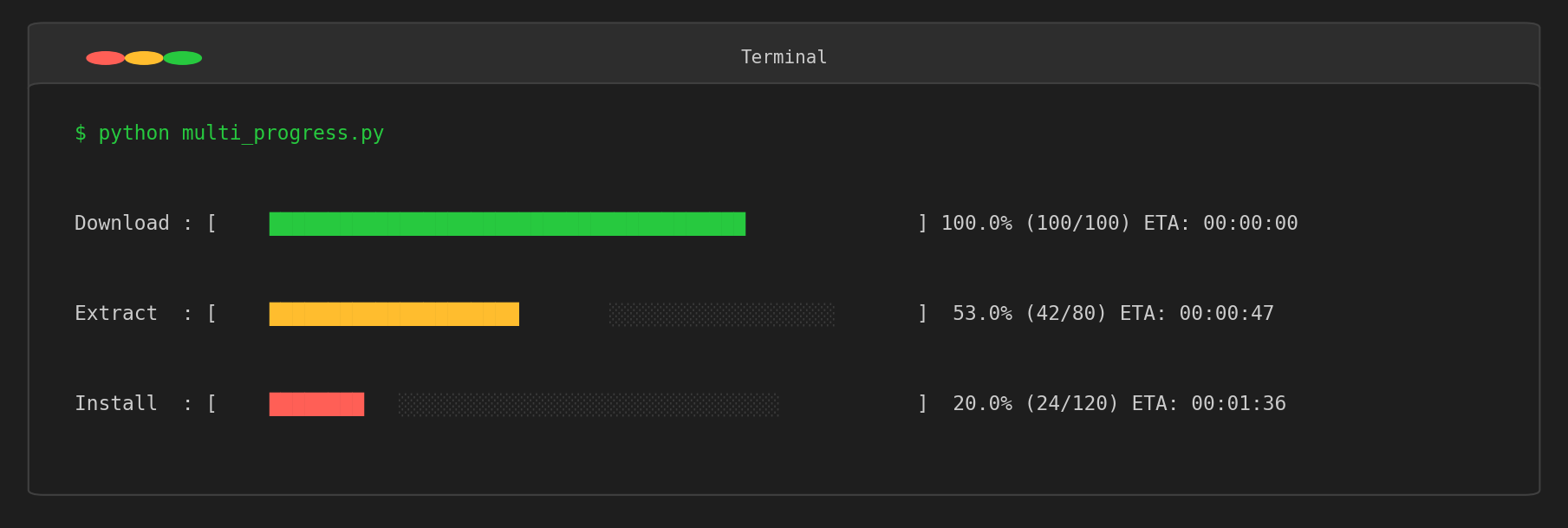
\033[K clears from the cursor to the end of the line. This prevents leftover characters when the bar gets shorter than the previous render.
Putting It Together: ProgressBar Class
Here is a complete class that combines everything we have built.
import os
import sys
import time

class ProgressBar:
    def __init__(self, total, label="Progress", bar_length=None, color=True):
        self.total = total
        self.label = label
        self.color = color
        self.current = 0
        self.start_time = None

        if bar_length is None:
            try:
                self.bar_length = max(10, os.get_terminal_size().columns - 60)
            except OSError:
                self.bar_length = 30
        else:
            self.bar_length = bar_length

    def _get_color(self, fraction):
        if not self.color:
            return ""
        if fraction < 0.33:
            return "\033[91m"
        elif fraction < 0.66:
            return "\033[93m"
        return "\033[92m"

    def _format_time(self, seconds):
        h = int(seconds // 3600)
        m = int((seconds % 3600) // 60)
        s = int(seconds % 60)
        return f"{h:02d}:{m:02d}:{s:02d}"

    def update(self, n=1):
        if self.start_time is None:
            self.start_time = time.time()

        self.current = min(self.current + n, self.total)
        fraction = self.current / self.total
        filled = int(self.bar_length * fraction)
        color = self._get_color(fraction)
        reset = "\033[0m" if self.color else ""
        bar = color + "█" * filled + reset + "░" * (self.bar_length - filled)

        elapsed = time.time() - self.start_time
        if self.current > 0:
            rate = self.current / elapsed
            remaining = (self.total - self.current) / rate
            eta_str = self._format_time(remaining)
            rate_str = f"{rate:.1f} it/s"
        else:
            eta_str = "--:--:--"
            rate_str = "-- it/s"

        percent = fraction * 100
        line = f"\r{self.label}: [{bar}] {percent:5.1f}% | ETA: {eta_str} | {rate_str}"
        sys.stdout.write(line + "\033[K")
        sys.stdout.flush()

    def finish(self):
        self.update(0)
        print()

# Usage
bar = ProgressBar(total=100, label="Training")
for i in range(100):
    time.sleep(0.03)
    bar.update()
bar.finish()
Sample output:
Training: [██████████████████████████████] 100.0% | ETA: 00:00:00 | 32.8 it/s
This class is about 60 lines and covers the core functionality of tqdm. You can extend it further by adding a context manager (__enter__ / __exit__) or an iterable wrapper for even more convenience.
Related Articles
- Python Decorators: Mechanics and Practical Patterns - Decorator patterns applicable to progress bar implementations.
- Introduction to Asynchronous Programming with Python asyncio - Combining progress bars with async processing.
- Python Regular Expressions: Practical Guide - Practical Python tips.
- Matplotlib Practical Tips: Creating Publication-Quality Figures - Tips for visualizing data processing results.