Introduction
In team development, Git branching strategy is a critical factor affecting code quality and development velocity. This article compares major branching strategies, then goes deeper than the usual “merge preserves history, rebase makes it linear” summary: we look at what rebase and merge actually do to Git’s object graph, using real commit hashes and log output from a throwaway repository we build and manipulate live. We also reproduce, for real, why “never rebase a shared/pushed branch” is not just folklore.
Branching Strategies
Git Flow
Proposed by Vincent Driessen, using multiple branch types:
| Branch | Purpose | Lifecycle |
|---|---|---|
main | Released code | Permanent |
develop | Integration branch | Permanent |
feature/* | New features | Temporary |
release/* | Release preparation | Temporary |
hotfix/* | Emergency fixes | Temporary |
# Create and complete a feature branch
git checkout -b feature/user-auth develop
# ... develop ...
git checkout develop
git merge --no-ff feature/user-auth
git branch -d feature/user-auth
Best for: Products with clear release cycles, parallel version maintenance.
GitHub Flow
Simple strategy with only main and feature branches:
# 1. Branch from main
git checkout -b feature/add-search main

# 2. Commit and push
git add .
git commit -m "feat: add search functionality"
git push -u origin feature/add-search

# 3. Create Pull Request for review

# 4. Merge to main (via PR)

# 5. Deploy
Best for: Continuous deployment, web applications, small-to-medium teams.
Trunk-Based Development
All developers commit directly to main (trunk) or use short-lived branches:
# Short-lived branch (merge within 1-2 days)
git checkout -b fix/typo main
# ... fix ...
git checkout main
git merge fix/typo
git branch -d fix/typo
Best for: Teams with mature CI/CD, organizations using feature flags.
Comparison
| Strategy | Complexity | Release Management | CI/CD Required | Team Size |
|---|---|---|---|---|
| Git Flow | High | Explicit | No | Large |
| GitHub Flow | Low | Simple | Recommended | Small-Medium |
| Trunk-Based | Medium | Continuous | Yes | Any |
rebase vs merge: what actually happens at the object-graph level
Remembering “merge preserves history, rebase makes history linear” as a black-box rule doesn’t explain why rebasing a shared branch is dangerous. A Git commit is an immutable object whose ID is the hash of its own contents:
git cat-file -p <commit-hash>
tree <snapshot of every file at this commit>
parent <hash of the parent commit>          # a merge commit has TWO parent lines
author <name> <email> <timestamp>
committer <name> <email> <timestamp>

<commit message>
Change even one byte of tree, parent, author, committer, or the message, and the resulting commit gets a completely different hash. That single fact is the whole story:
git mergecreates one new commit whose parents are the tips of both branches. It does not touch any existing commit. Every commit that was already on either branch stays exactly as it was, and the new merge commit (with two parents) is simply added on top.git rebasetakes the patch (diff) of each commit being moved and replays it as a brand-new commit object on top of a new parent. The message and the diff content can be identical, but becauseparentchanges,treechanges too, and so the hash changes. Rebase does not “move” a commit — it creates a different object with similar content and repoints the branch to it. The original commits become unreachable from any branch and are eventually garbage-collected bygit gc.
This difference is the entire basis for the rule “never rebase a branch that has already been pushed/shared.” The commits produced by a rebase are, internally, completely different objects from the ones that existed before the rebase — even though they look identical in a diff. Anyone who already pulled the old commits is left pointing at objects that no longer exist on the branch tip; the next time they synchronize, both the old and new commits exist somewhere in the picture (a divergent, duplicated history). This is not a metaphor — it’s literally what happens in Git’s object store, and we reproduce it below.
Hands-on verification: applying merge and rebase to the same divergence
We created a throwaway repository under /private/tmp where main and feature/add-search diverge from a common point.
git init -q -b main
echo "# Demo Project" > README.md && git add README.md && git commit -q -m "chore: initial commit"
echo "console.log('v1');" > app.js && git add app.js && git commit -q -m "feat: add app.js"

git checkout -q -b feature/add-search
echo "function search() { ... }" > search.js
git add search.js && git commit -q -m "feat: add search.js skeleton"
echo "function search(query) { return query.toLowerCase(); }" > search.js
git add search.js && git commit -q -m "feat: implement search logic"

# main advances independently in the meantime
git checkout -q main
echo "console.log('v1'); console.log('logging enabled');" > app.js
git add app.js && git commit -q -m "feat: add logging to app.js"
echo "MIT License" > LICENSE && git add LICENSE && git commit -q -m "chore: add LICENSE"
Right after the divergence, git log --graph --oneline --all gives this real output:
* 65a3a39 feat: implement search logic
* 1b2a1aa feat: add search.js skeleton
| * 00e3649 chore: add LICENSE
| * b6db395 feat: add logging to app.js
|/
* 3438623 feat: add app.js
* 0e7b16d chore: initial commit
We copied this repository twice — one copy gets merge --no-ff, the other gets rebase.
Applying merge –no-ff
git checkout main
git merge --no-ff feature/add-search -m "Merge branch 'feature/add-search' into main"
Merge made by the 'ort' strategy.
 search.js | 1 +
 1 file changed, 1 insertion(+)
 create mode 100644 search.js
git log --graph --oneline --all
*   2565f0c Merge branch 'feature/add-search' into main
|\
| * 65a3a39 feat: implement search logic
| * 1b2a1aa feat: add search.js skeleton
* | 00e3649 chore: add LICENSE
* | b6db395 feat: add logging to app.js
|/
* 3438623 feat: add app.js
* 0e7b16d chore: initial commit
Inspecting the merge commit itself (git log -1 --pretty='%H%n%P') confirms it really has two parents:
commit 2565f0c682e4d9573472e03d819c9b5b2494a883
parents: 00e3649374dcf04bdc2a914300c656946434ab77 65a3a39a41bec93ba9914516c02ec1c9ddf68c08
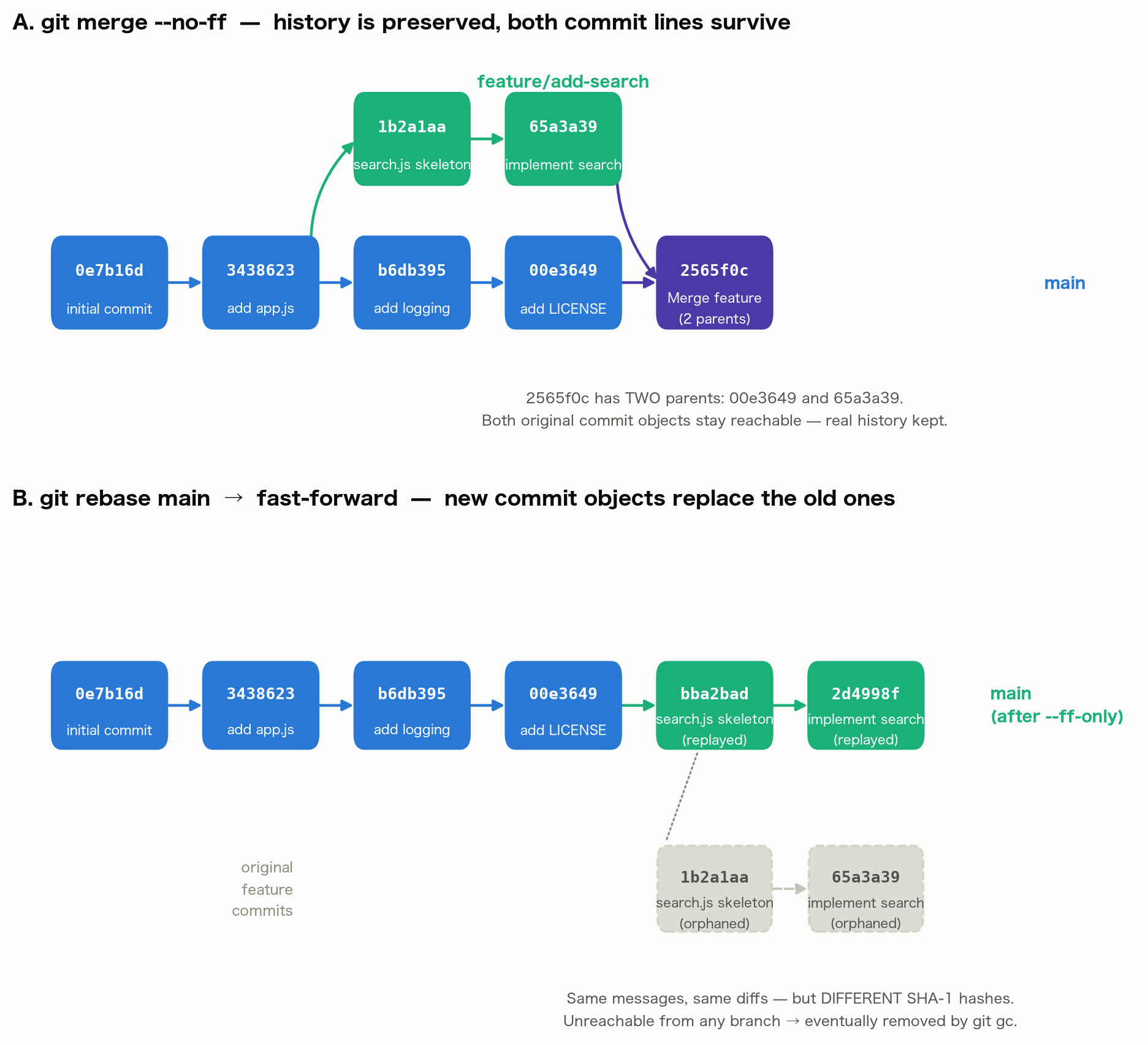
65a3a39 — the tip of the feature branch — is preserved unchanged and is one of the merge commit’s parents. Every original commit on both lines of development stays reachable.
Applying rebase (on the other copy of the repository)
git checkout feature/add-search
git rebase main
Successfully rebased and updated refs/heads/feature/add-search.
git log --oneline -2
Comparing hashes before and after the rebase shows the exact same message and diff produce a completely different hash:
| Commit message | Before rebase | After rebase |
|---|---|---|
feat: add search.js skeleton | 1b2a1aa | bba2bad |
feat: implement search logic | 65a3a39 | 2d4998f |
git cat-file -p on both objects shows exactly why: the parent field changed, which changes the tree (the whole-snapshot hash) as well.
# BEFORE rebase (original 65a3a39)
tree 2d4f674e53a54ea506c2e7c0fa7ca43bb660b6fa
parent 1b2a1aa41fe7f2c034c9c5f79dbda3c22ad6a44e
author Demo Dev <demo@example.com> 1784422199 +0900
committer Demo Dev <demo@example.com> 1784422199 +0900

# AFTER rebase (newly created 2d4998f)
tree 7c0f1ecf8a7ff6f69e4aa3bb22706f2b531d16b5
parent bba2bad1aa8078fead764be62a7fa31b80aab87e
author Demo Dev <demo@example.com> 1784422199 +0900
committer Demo Dev <demo@example.com> 1784422210 +0900
Notice the author timestamp (when the change was originally authored) is preserved, while the committer timestamp (when the commit object was actually created) changed. The tree changes because a commit’s snapshot is the entire file set at that point, and the new commit’s snapshot is built on top of a different parent (one that already includes LICENSE and the logging change) — so even though search.js’s own diff is identical, the whole-repo snapshot is a different object.
Fast-forwarding main afterward (git merge --ff-only feature/add-search) produces a perfectly linear history:
* 2d4998f feat: implement search logic
* bba2bad feat: add search.js skeleton
* 00e3649 chore: add LICENSE
* b6db395 feat: add logging to app.js
* 3438623 feat: add app.js
* 0e7b16d chore: initial commit
The original 1b2a1aa and 65a3a39 are no longer referenced by any branch and become unreachable objects, eligible for git gc (recoverable via git reflog in the meantime).
The diagram below visualizes both outcomes: the top row is merge --no-ff, where both lines of commits survive and are joined by a two-parent merge commit; the bottom row is rebase followed by a fast-forward, where the original feature commits (shown in gray) become orphaned objects while new commits with the same messages but different hashes are created in line with main.
Reproducing a real merge conflict
Change the same line on both branches and merge can’t auto-resolve it. Here is an actual conflict we produced:
# The same line (timeout) is changed on both main and feature
git checkout main
sed -i '' 's/timeout: 30/timeout: 60/' config.js
git commit -am "fix: bump default timeout to 60s"

git checkout feature/increase-timeout
sed -i '' 's/timeout: 30/timeout: 120/' config.js
git commit -am "fix: increase timeout to 120s for slow endpoints"

git checkout main
git merge feature/increase-timeout -m "Merge feature/increase-timeout"
Auto-merging config.js
CONFLICT (content): Merge conflict in config.js
Automatic merge failed; fix conflicts and then commit the result.
git status reports the file as both modified, and config.js now literally contains conflict markers:
const config = {
<<<<<<< HEAD
  timeout: 60,
=======
  timeout: 120,
>>>>>>> feature/increase-timeout
  retries: 3,
};
module.exports = config;
Everything from <<<<<<< HEAD to ======= is the current branch’s (main’s) content; everything from ======= to >>>>>>> feature/increase-timeout is the incoming branch’s content. Decide on the correct value (here, the larger 120-second timeout), remove the markers, and commit.
# after editing out the markers and choosing the right value
git add config.js
git commit -m "Merge feature/increase-timeout"
*   8c7b331 Merge feature/increase-timeout
|\
| * e003676 fix: increase timeout to 120s for slow endpoints
* | 8ddaa10 fix: bump default timeout to 60s
|/
* 1e39563 chore: initial config
Resolving a conflict is mechanically the same whether it happens during merge or rebase (read the markers, reconcile by hand), but with rebase and multiple commits, the same conflict can reappear once per replayed commit — a real practical cost of a multi-commit rebase.
The real danger: rebasing a shared branch and force-pushing
Let’s actually break the “never rebase a shared branch” rule and watch what happens. We created a bare repository origin.git and two independent clones, simulating two developers, Alice and Bob.
git init -q -b main --bare origin.git
git clone -q origin.git alice   # Alice's working copy
git clone -q origin.git bob     # Bob's working copy
- Alice creates
feature/payments, commits once, and pushes.
# alice/
git checkout -b feature/payments
echo "step1" > payments.js
git commit -am "feat(payments): add payment stub"
git push -u origin feature/payments
# → 3f7afae feat(payments): add payment stub
- Bob clones/checks out the branch and builds on top of Alice’s commit (not pushed yet).
# bob/
git checkout -t origin/feature/payments
echo "step2-bob" > invoices.js
git commit -am "feat(payments): add invoice generation on top of Alice's stub"
42b3dbb feat(payments): add invoice generation on top of Alice's stub
3f7afae feat(payments): add payment stub
8af15f5 chore: initial commit
- Meanwhile, Alice notices
mainhas moved on and rebases herfeature/paymentsonto it, then force-pushes.
# alice/
git checkout main && git pull   # main now has "docs: update README" (84a6378)
git checkout feature/payments
git rebase origin/main
Successfully rebased and updated refs/heads/feature/payments.
git log --oneline
5e7dfb8 feat(payments): add payment stub    # same message, brand-new hash
84a6378 docs: update README
8af15f5 chore: initial commit
git push --force origin feature/payments
The original 3f7afae is no longer referenced by feature/payments on origin — it has been replaced by 5e7dfb8, a different object with the same content.
- Bob, unaware, does his usual
git pull. What happens?
# bob/
git pull origin feature/payments
 * branch            feature/payments -> FETCH_HEAD
 + 3f7afae...5e7dfb8 feature/payments -> origin/feature/payments  (forced update)
hint: You have divergent branches and need to specify how to reconcile them.
hint: You can do so by running one of the following commands sometime before
hint: your next pull:
hint:
hint:   git config pull.rebase false  # merge
hint:   git config pull.rebase true   # rebase
hint:   git config pull.ff only       # fast-forward only
fatal: Need to specify how to reconcile divergent branches.
git status
On branch feature/payments
Your branch and 'origin/feature/payments' have diverged,
and have 2 and 2 different commits each, respectively.
Git detects the forced update and refuses a plain pull. If Bob, not understanding what happened, reconciles with a merge (git pull --no-rebase), the history really does get messy:
git pull --no-rebase origin feature/payments
Merge made by the 'ort' strategy.
git log --graph --oneline --all
*   0f75841 Merge branch 'feature/payments' of .../origin into feature/payments
|\
| * 5e7dfb8 feat(payments): add payment stub
| * 84a6378 docs: update README
* | 42b3dbb feat(payments): add invoice generation on top of Alice's stub
* | 3f7afae feat(payments): add payment stub
|/
* 8af15f5 chore: initial commit
git log --oneline --all | grep "payment stub" confirms it: the “payment stub” commit now exists twice — 3f7afae and 5e7dfb8 — with identical diffs (one line added to payments.js).
5e7dfb8 feat(payments): add payment stub
3f7afae feat(payments): add payment stub
This is what genuinely happens when another developer runs an ordinary pull against a branch that was rebased and force-pushed. The history is left with a meaningless merge commit and a duplicated commit, degrading the usefulness of git blame and git log. The correct fix is for Bob to understand what happened, stash or note his unpushed work, and either git pull --rebase or git fetch + git rebase origin/feature/payments to cleanly replay on top (Bob’s own commit hash will still change in the process). This is the concrete mechanism behind the rule: only rebase a branch that is exclusively yours, or one you’re certain nobody else has fetched.
Guidelines for choosing rebase vs merge
Practical guidance based on the verification above:
| Situation | Recommended | Reason |
|---|---|---|
| Updating a feature branch only you touch | rebase | Linear history, cleaner diffs, no effect on others |
| Integrating into a shared branch | merge --no-ff | Clear merge points; both sides’ commits are preserved |
| A branch someone else has already pulled | merge (not rebase) | Rebase creates new objects that diverge from what others already have |
| Solo development (before push) | rebase | Cleaner history, no side effects |
| Team development | merge or squash | Safer, easier to understand |
squash merge
Combines all feature branch commits into one. Internally, squash — like rebase — creates one brand-new commit object; the feature branch’s individual commits are not carried into the target branch (they stay reachable if the feature branch itself is kept around).
git checkout main
git merge --squash feature/add-search
git commit -m "feat: add search functionality"
GitHub PRs support this via the “Squash and merge” button.
Commit Message Convention
Conventional Commits
<type>(<scope>): <description>

[optional body]

[optional footer]
| type | Usage |
|---|---|
feat | New feature |
fix | Bug fix |
docs | Documentation |
refactor | Code refactoring |
test | Adding tests |
chore | Build/tooling |
git commit -m "feat(auth): add OAuth 2.0 login support"
git commit -m "fix(api): handle null response from payment service"
Practical Workflow
Feature Branch Workflow
# 1. Get latest main
git switch main
git pull origin main

# 2. Create feature branch
git switch -c feature/new-api

# 3. Periodically sync with main (only safe on branches nobody else touches)
git fetch origin
git rebase origin/main

# 4. Push (force-push needed after rebase; prefer --force-with-lease if
#    anyone else could plausibly have pushed to this branch)
git push --force-with-lease origin feature/new-api

# 5. Create PR → Review → Merge
--force-with-lease only force-pushes if the remote ref hasn’t moved since you last fetched it. As in Bob’s scenario above, if someone else already pushed to the remote, the push is rejected — a meaningfully safer default than a bare --force.
Conflict Resolution (during rebase)
# When conflicts occur during rebase, this can repeat once per commit
git rebase main
# ... resolve conflicts manually (see the worked conflict example above for how to read the markers) ...
git add <resolved-files>
git rebase --continue

# To abort the rebase
git rebase --abort
Notable 2024-2025 Git developments worth knowing
Two changes relevant to branching that we verified via web search (not from memory):
git switch/git restorelost their “experimental” label (Git 2.44, released March 2024). Both commands were introduced in Git 2.23 (2019) as a split of the overloadedgit checkout, but stayed marked experimental for nearly five years. After that track record, the experimental designation was removed. You can usegit switch -cin place ofgit checkout -bthroughout this article’s examples —checkoutconflates “switch branches” and “restore files” into one confusing command, whileswitchandrestoreare each dedicated to one job.- The
recursivemerge strategy became a pure alias forort(Git 2.50, released 2025). The default strategy already moved toortback in Git 2.33/2.34, butrecursiveremained a separate implementation you could still select explicitly. As of Git 2.50, passing-s recursiveis internally redirected toort, so there is effectively a single recursive-family strategy left. TheMerge made by the 'ort' strategy.output shown in this article’s examples reflects that current default.
Related Articles
- Local Development with Docker Compose: MySQL, Redis, and MinIO - Combine development environment setup with branching strategy.
- OAuth 2.0 and OpenID Connect: Fundamentals of Authorization and Authentication - Example of a feature developed on a feature branch.
- Zero Trust Architecture: Principles, Components, and Implementation - Security considerations for branch protection policies.
References
- Driessen, V. (2010). “A successful Git branching model”.
- GitHub Flow
- Forsgren, N., Humble, J., & Kim, G. (2018). Accelerate. IT Revolution Press.
- Conventional Commits
- Git - git-switch Documentation
- Git - merge-strategies Documentation
- Revert “Declare both git-switch and git-restore experimental”