Introduction
Python’s asyncio is a standard library for asynchronous I/O processing. It efficiently runs I/O-bound operations like network communication and file I/O concurrently.
This article covers the basics of async/await syntax, concurrent task execution, and practical async HTTP requests.
Synchronous vs Asynchronous
The Synchronous Problem
import time

def fetch_data(url, delay):
    print(f"Fetching {url}...")
    time.sleep(delay)  # Simulate I/O wait
    print(f"Done {url}")
    return f"data from {url}"

# Sequential: total 6 seconds
start = time.time()
fetch_data("api/users", 2)
fetch_data("api/posts", 3)
fetch_data("api/comments", 1)
print(f"Total: {time.time() - start:.1f}s")  # ~6 seconds
Async Improvement
import asyncio

async def fetch_data(url, delay):
    print(f"Fetching {url}...")
    await asyncio.sleep(delay)  # Async I/O wait
    print(f"Done {url}")
    return f"data from {url}"

async def main():
    results = await asyncio.gather(
        fetch_data("api/users", 2),
        fetch_data("api/posts", 3),
        fetch_data("api/comments", 1),
    )
    return results

# Concurrent: ~3 seconds (time of slowest task)
import time
start = time.time()
results = asyncio.run(main())
print(f"Total: {time.time() - start:.1f}s")  # ~3 seconds
How the Event Loop Actually Works: Handling Thousands of Connections on One Thread
The secret behind asyncio’s speed isn’t magic parallelism – it’s cooperative task switching inside a single OS thread. Understanding the exact mechanism makes the “don’t do this” rules in the edge-case sections below fall out naturally.
The cooperative scheduling loop
- The event loop picks one runnable coroutine and executes it until it hits an
await. - When it reaches
await some_io(), the coroutine voluntarily yields control back to the event loop. This is the crucial difference from OS threads: nothing preempts the coroutine – the code itself chooses to hand back control. - While that coroutine is suspended, the event loop runs other runnable coroutines.
- Once a socket or file descriptor that a suspended coroutine was waiting on becomes ready for reading/writing, the event loop detects this and reschedules the corresponding coroutine.
Step 4 is powered by OS-level I/O multiplexing. Under the hood, CPython’s asyncio uses the selectors module (a thin, high-level wrapper around the lower-level select module), which automatically picks the most efficient implementation available on the current platform.
import selectors

# DefaultSelector picks the best implementation per platform:
# Linux:      EpollSelector (epoll)
# macOS/BSD:  KqueueSelector (kqueue)
# fallback:   SelectSelector (select), etc.
sel = selectors.DefaultSelector()
print(type(sel).__name__)  # e.g. KqueueSelector on macOS, EpollSelector on Linux
select(2) scales linearly (O(n)) with the number of watched file descriptors, whereas epoll (Linux) and kqueue (BSD/macOS) let the kernel keep track of registered descriptors and notify you only about the ones that became ready (closer to O(1)). This is exactly why epoll/kqueue became the standard answer to the “C10K problem” of serving tens of thousands of simultaneous connections – and asyncio’s event loop is built directly on top of this mechanism.
The key point: a single OS thread drives this entire loop. Waiting on ten thousand connections does not require ten thousand OS threads; it only requires one syscall telling the kernel “wake me when any of these sockets are ready.”
Contrast with threading (the GIL) and multiprocessing
asyncio is not the only way to achieve I/O-bound concurrency. Here is an honest comparison of the trade-offs:
| Approach | Unit of concurrency | Memory | Effect of the GIL | Main overhead | Best suited for |
|---|---|---|---|---|---|
asyncio | Coroutine (within one thread) | Shared within the process | N/A (only one thread to begin with) | Task switching is roughly the cost of a user-space function call | I/O-bound work with many simultaneous connections |
threading | OS thread | Shared within the process | The GIL lets only one thread execute Python bytecode at a time (CPU-bound work does not parallelize) | OS context switches (register save/restore, kernel-mode transitions) | Isolating blocking I/O calls (e.g. via to_thread) |
multiprocessing | OS process | Not shared (separate address spaces; requires IPC) | N/A (each process has its own independent GIL) | Process creation (fork/spawn) cost and serialization cost for inter-process communication | CPU-bound work (true parallel computation) |
- threading: CPython’s GIL (Global Interpreter Lock) means only one OS thread can execute Python bytecode at any instant. The GIL is released while a thread waits on I/O, so other threads can run – but CPU-bound work does not get faster just by adding threads. On top of that, every OS-level context switch costs a kernel-mode transition and register save/restore, and that overhead becomes non-negligible as thread counts grow.
- multiprocessing: processes have independent memory spaces, so they achieve true parallelism unconstrained by the GIL. The cost is that spawning a process (
fork/spawn) is expensive, and data must be serialized (pickled) to cross process boundaries – you can’t just pass an object by reference like you can with shared memory. - asyncio: switching between coroutines inside one thread triggers neither an OS context switch nor a process spawn. That’s why handling thousands of simultaneous connections barely increases overhead. But this is fundamentally about “doing other work while waiting on I/O” – it does not make CPU-bound computation itself faster, which is the key premise of the next section.
(CPython 3.13+ also ships an optional “free-threaded” build that can disable the GIL entirely, but that change targets parallelizing CPU-bound multi-threaded code – it does not affect the design rationale behind I/O-bound asyncio. See the references at the end of this article for details.)
Coroutines and async/await
Defining Coroutines
Functions defined with async def are coroutine functions that return coroutine objects when called.
async def greet(name):
    return f"Hello, {name}"

# Returns a coroutine object (not executed)
coro = greet("Alice")

# Requires await or asyncio.run() to execute
result = asyncio.run(greet("Alice"))
print(result)  # "Hello, Alice"
The Role of await
await waits for async operation completion. While awaiting, the event loop can transfer control to other tasks.
async def process():
    data = await fetch_data("api/users", 1)  # Other tasks can run during wait
    return data
Concurrent Task Execution
asyncio.create_task()
Schedules a coroutine as a task, starting background execution.
async def main():
    task1 = asyncio.create_task(fetch_data("api/users", 2))
    task2 = asyncio.create_task(fetch_data("api/posts", 3))

    # Both tasks running concurrently
    result1 = await task1
    result2 = await task2
    return result1, result2
asyncio.gather()
Runs multiple coroutines concurrently and returns all results together.
async def main():
    results = await asyncio.gather(
        fetch_data("api/users", 2),
        fetch_data("api/posts", 3),
        fetch_data("api/comments", 1),
    )
    # results returned as a list in input order
    return results
asyncio.as_completed()
Iterate in completion order:
async def main():
    tasks = [
        fetch_data("api/users", 2),
        fetch_data("api/posts", 3),
        fetch_data("api/comments", 1),
    ]
    for coro in asyncio.as_completed(tasks):
        result = await coro
        print(f"Completed: {result}")
    # Output order: comments → users → posts (fastest first)
Practical Example: Async HTTP Requests
Concurrent HTTP requests using aiohttp:
import asyncio
import aiohttp
import time

async def fetch_url(session, url):
    """Async fetch of a single URL"""
    async with session.get(url) as response:
        data = await response.text()
        return {"url": url, "status": response.status, "length": len(data)}

async def fetch_all(urls):
    """Concurrent fetch of multiple URLs"""
    async with aiohttp.ClientSession() as session:
        tasks = [fetch_url(session, url) for url in urls]
        return await asyncio.gather(*tasks)

# --- Run ---
urls = [
    "https://httpbin.org/delay/1",
    "https://httpbin.org/delay/2",
    "https://httpbin.org/delay/1",
    "https://httpbin.org/delay/2",
    "https://httpbin.org/delay/1",
]

start = time.time()
results = asyncio.run(fetch_all(urls))
elapsed = time.time() - start

for r in results:
    print(f"{r['url']}: status={r['status']}, length={r['length']}")
print(f"Total: {elapsed:.1f}s")  # Sequential: 7s, Concurrent: ~2s
Async Patterns
Rate Limiting with Semaphore
Limit concurrent connections to avoid overloading servers:
async def fetch_with_limit(session, url, semaphore):
    async with semaphore:  # Limit concurrency
        async with session.get(url) as response:
            return await response.text()

async def main():
    semaphore = asyncio.Semaphore(5)  # Max 5 concurrent
    async with aiohttp.ClientSession() as session:
        tasks = [fetch_with_limit(session, url, semaphore) for url in urls]
        return await asyncio.gather(*tasks)
Producer-Consumer with Queue
async def producer(queue):
    for i in range(10):
        await queue.put(f"item-{i}")
        await asyncio.sleep(0.1)
    await queue.put(None)  # Sentinel

async def consumer(queue, name):
    while True:
        item = await queue.get()
        if item is None:
            await queue.put(None)  # Propagate to other consumers
            break
        print(f"{name} processed {item}")
        await asyncio.sleep(0.2)

async def main():
    queue = asyncio.Queue(maxsize=5)
    await asyncio.gather(
        producer(queue),
        consumer(queue, "worker-1"),
        consumer(queue, "worker-2"),
    )
Edge Case #1: A Blocking Call Stalls the Entire Event Loop
The classic beginner mistake is calling a synchronously blocking function (time.sleep(), a non-awaited blocking I/O call, or heavy CPU-bound work) directly inside a coroutine. The common misconception is that this only blocks that one coroutine – but as explained above, since the event loop runs on a single thread, while that blocking call is running, the entire event loop is frozen and no other task can make any progress. The thread has no opportunity to hand control back to any other coroutine because the OS itself has taken control away from Python during time.sleep().
The code below compares the behavior of three gathered tasks under both scenarios.
import asyncio
import time


async def main_blocking():
    """One task uses time.sleep() (blocking)."""
    t0 = time.perf_counter()

    async def worker(name, use_blocking, duration):
        start = time.perf_counter() - t0
        print(f"[{start:6.3f}] {name} START")
        if use_blocking:
            time.sleep(duration)  # WRONG: stalls the entire event loop
        else:
            await asyncio.sleep(duration)
        end = time.perf_counter() - t0
        print(f"[{end:6.3f}] {name} END (took {end - start:.3f}s)")

    await asyncio.gather(
        worker("blocking-task", True, 2.0),
        worker("async-task-A", False, 0.5),
        worker("async-task-B", False, 0.5),
    )
    print(f"total: {time.perf_counter() - t0:.3f}s")


async def main_nonblocking():
    """All tasks use asyncio.sleep() (non-blocking)."""
    t0 = time.perf_counter()

    async def worker(name, duration):
        start = time.perf_counter() - t0
        print(f"[{start:6.3f}] {name} START")
        await asyncio.sleep(duration)
        end = time.perf_counter() - t0
        print(f"[{end:6.3f}] {name} END (took {end - start:.3f}s)")

    await asyncio.gather(
        worker("async-task-C", 2.0),
        worker("async-task-A", 0.5),
        worker("async-task-B", 0.5),
    )
    print(f"total: {time.perf_counter() - t0:.3f}s")


asyncio.run(main_blocking())
print()
asyncio.run(main_nonblocking())
Actual output (Python 3.14, macOS):
[ 0.000] blocking-task START
[ 2.005] blocking-task END (took 2.005s)
[ 2.005] async-task-A START
[ 2.005] async-task-B START
[ 2.506] async-task-A END (took 0.501s)
[ 2.506] async-task-B END (took 0.501s)
total: 2.507s

[ 0.000] async-task-C START
[ 0.000] async-task-A START
[ 0.000] async-task-B START
[ 0.501] async-task-A END (took 0.500s)
[ 0.501] async-task-B END (took 0.500s)
[ 2.001] async-task-C END (took 2.001s)
total: 2.001s
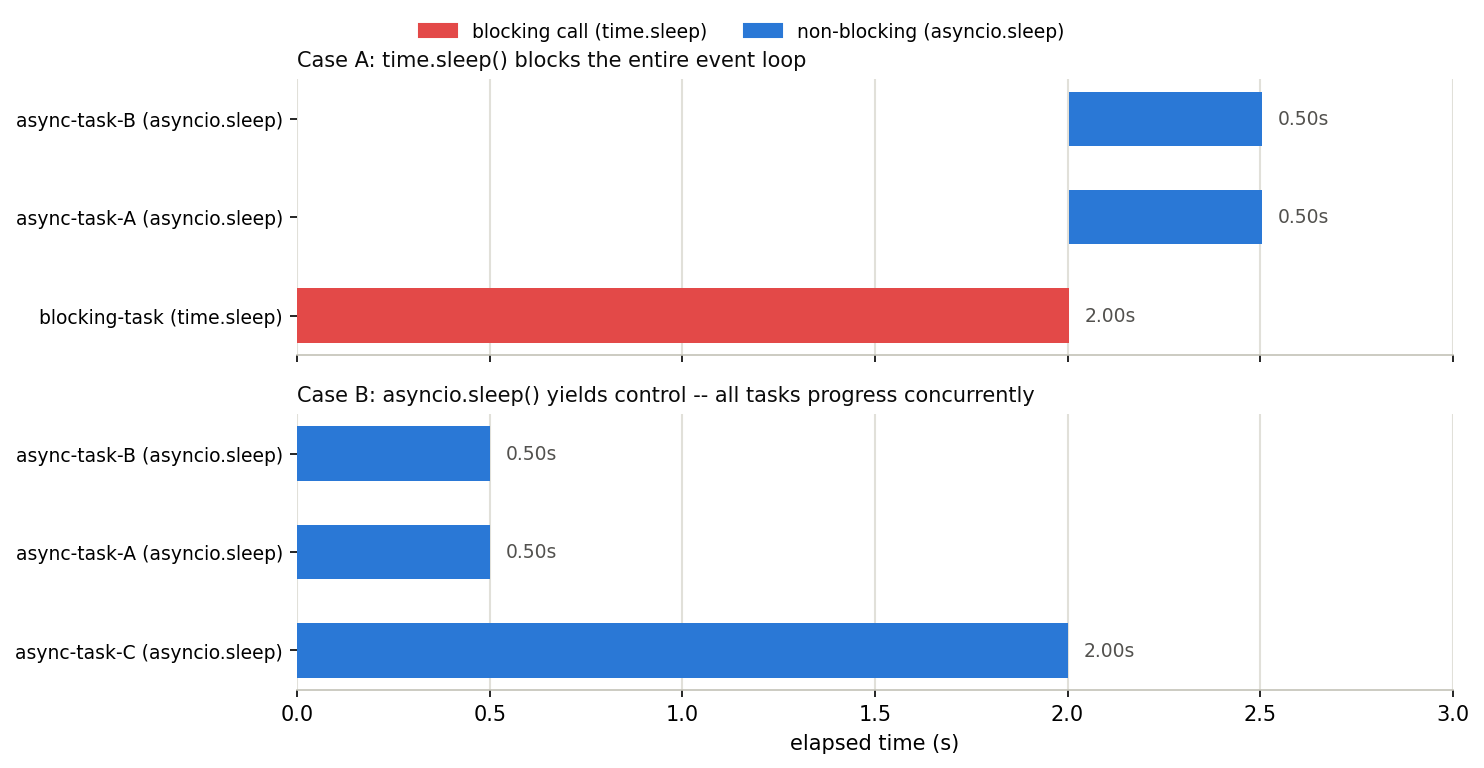
In the time.sleep() case, async-task-A and async-task-B – which should finish in 0.5 seconds – don’t even START until blocking-task’s time.sleep(2.0) finishes. The event loop was monopolized by blocking-task, with no opportunity to hand control to any other task. The total time is 2.5 seconds (the 2.0s block plus 0.5s), noticeably worse than the ~2.0s a correctly concurrent version would take. In the non-blocking case below it, all three tasks START simultaneously, and the total (2.001s) matches the slowest task (2.0s) almost exactly.
Here’s that timeline visualized:
Fix: whenever a coroutine needs to call something blocking (synchronous I/O, a sync HTTP client like requests, heavy CPU work), always offload it with asyncio.to_thread() (Python 3.9+) or loop.run_in_executor().
async def worker(name, duration):
    # Don't call time.sleep(duration) directly -- run it in a separate thread.
    await asyncio.to_thread(time.sleep, duration)
Edge Case #2: asyncio Gives No Speedup for CPU-Bound Work
asyncio makes I/O-bound work (waiting on the network, waiting on disk) efficient – it does not make raw computation faster. As explained above, the event loop runs on a single thread, so bundling CPU-bound coroutines with asyncio.gather() doesn’t run them concurrently in any meaningful sense; it just executes them one after another on that one thread.
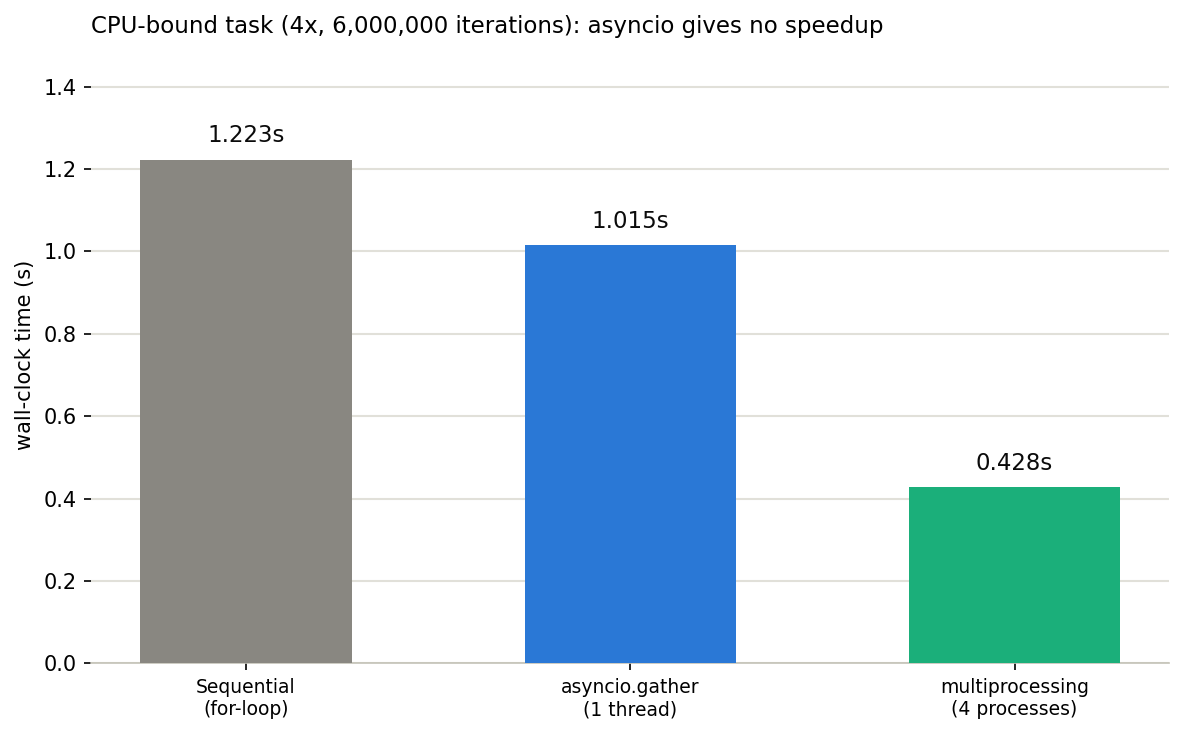
The benchmark below compares four CPU-bound computations (a loop of 6,000,000 iterations each) run (1) sequentially, (2) via asyncio.gather, and (3) via multiprocessing (ProcessPoolExecutor).
import asyncio
import time
from concurrent.futures import ProcessPoolExecutor

N_TASKS = 4
N = 6_000_000


def cpu_bound_task(n):
    """A purely CPU-bound computation (no I/O wait)."""
    total = 0
    for i in range(n):
        total += i * i
    return total


async def cpu_bound_coro(n):
    # Contains no await at all -- just a sync function wearing a coroutine costume.
    return cpu_bound_task(n)


def run_sequential():
    start = time.perf_counter()
    results = [cpu_bound_task(N) for _ in range(N_TASKS)]
    return time.perf_counter() - start, results


def run_asyncio_gather():
    async def main():
        return await asyncio.gather(*[cpu_bound_coro(N) for _ in range(N_TASKS)])

    start = time.perf_counter()
    results = asyncio.run(main())
    return time.perf_counter() - start, results


def run_multiprocessing():
    start = time.perf_counter()
    with ProcessPoolExecutor(max_workers=N_TASKS) as pool:
        results = list(pool.map(cpu_bound_task, [N] * N_TASKS))
    return time.perf_counter() - start, results


if __name__ == "__main__":
    t_seq, r_seq = run_sequential()
    t_async, r_async = run_asyncio_gather()
    t_mp, r_mp = run_multiprocessing()

    print(f"Sequential (for-loop):      {t_seq:.3f}s")
    print(f"asyncio.gather (1 thread):  {t_async:.3f}s")
    print(f"multiprocessing (4 procs):  {t_mp:.3f}s")
    print(f"asyncio vs sequential speedup: {t_seq / t_async:.2f}x (expect ~1x)")
    print(f"multiprocessing vs sequential speedup: {t_seq / t_mp:.2f}x")
Actual output (Python 3.14, 8-core macOS):
Sequential (for-loop):      1.223s
asyncio.gather (1 thread):  1.015s
multiprocessing (4 procs):  0.428s
asyncio vs sequential speedup: 1.20x (expect ~1x)
multiprocessing vs sequential speedup: 2.86x
asyncio.gather finishes in roughly the same time as sequential execution – the difference is noise, not a real speedup. multiprocessing, in contrast, measured about a 2.9x speedup (the theoretical ceiling with 4 processes is 4x; the gap comes from process-creation and pickle-serialization overhead). Exact numbers will vary by machine, so read this qualitatively: asyncio ~= sequential, multiprocessing is clearly faster.
Fix: to parallelize CPU-bound work, use multiprocessing or concurrent.futures.ProcessPoolExecutor instead of asyncio. If you need to call CPU-bound code from within async code, offload it to a separate process with loop.run_in_executor(ProcessPoolExecutor(), func, arg).
Error Handling
Exception Propagation in gather (Verified)
When one of the coroutines passed to asyncio.gather() raises, the default behavior (return_exceptions=False) is to propagate that exception immediately to the caller. What’s easy to miss: the other, still-running tasks are not automatically cancelled. Tasks that were already created with create_task() keep running in the background even after gather() has raised.
import asyncio


async def risky_task(n, delay):
    await asyncio.sleep(delay)
    if n == 2:
        raise ValueError(f"error in task {n}")
    return f"result-{n}"


async def without_return_exceptions():
    t1 = asyncio.create_task(risky_task(1, 0.3), name="task-1")
    t2 = asyncio.create_task(risky_task(2, 0.1), name="task-2")  # fails first
    t3 = asyncio.create_task(risky_task(3, 0.5), name="task-3")  # slowest

    try:
        results = await asyncio.gather(t1, t2, t3)
        print("results:", results)
    except ValueError as e:
        print(f"gather raised: {e!r}")

    print("--- state immediately after the exception propagates ---")
    for t in (t1, t2, t3):
        print(f"  {t.get_name()}: done={t.done()} cancelled={t.cancelled()}")

    await asyncio.sleep(0.6)  # wait for background tasks to finish
    print("--- state after waiting ---")
    for t in (t1, t2, t3):
        print(f"  {t.get_name()}: done={t.done()} cancelled={t.cancelled()}")


asyncio.run(without_return_exceptions())
Actual output:
gather raised: ValueError('error in task 2')
--- state immediately after the exception propagates ---
  task-1: done=False cancelled=False
  task-2: done=True cancelled=False
  task-3: done=False cancelled=False
--- state after waiting ---
  task-1: done=True cancelled=False
  task-2: done=True cancelled=False
  task-3: done=True cancelled=False
The instant task-2 raises at 0.1s, gather() propagates that exception to the caller – but at that moment task-1 (due at 0.3s) and task-3 (due at 0.5s) are still done=False, i.e. not cancelled, and still running in the background. If the caller catches the exception and moves on, these tasks keep executing unobserved; their results are silently discarded, and if one of them later raises too, you can get an “Task exception was never retrieved” warning. This is the hidden trap in an except-and-move-on style use of gather().
Passing return_exceptions=True instead stores the exception as a value in the results list and waits for every task to finish before returning.
async def with_return_exceptions():
    t1 = asyncio.create_task(risky_task(1, 0.3), name="task-1")
    t2 = asyncio.create_task(risky_task(2, 0.1), name="task-2")
    t3 = asyncio.create_task(risky_task(3, 0.5), name="task-3")

    results = await asyncio.gather(t1, t2, t3, return_exceptions=True)
    for r in results:
        if isinstance(r, Exception):
            print(f"Error: {r}")
        else:
            print(f"OK: {r}")
Actual output:
OK: result-1
Error: error in task 2
OK: result-3
TaskGroup Cancels Siblings the Moment One Fails
If you want structured concurrency where one failure aborts the rest, use asyncio.TaskGroup (added in Python 3.11) instead of gather(). When one child task raises, TaskGroup explicitly cancels the other children before raising a combined ExceptionGroup.
async def with_taskgroup():
    tasks = {}
    try:
        async with asyncio.TaskGroup() as tg:
            tasks["task-1"] = tg.create_task(risky_task(1, 0.3), name="task-1")
            tasks["task-2"] = tg.create_task(risky_task(2, 0.1), name="task-2")
            tasks["task-3"] = tg.create_task(risky_task(3, 0.5), name="task-3")
    except* ValueError as eg:
        print(f"ExceptionGroup caught: {[repr(e) for e in eg.exceptions]}")

    for name, t in tasks.items():
        print(f"  {name}: done={t.done()} cancelled={t.cancelled()}")


asyncio.run(with_taskgroup())
Actual output:
ExceptionGroup caught: ["ValueError('error in task 2')"]
  task-1: done=True cancelled=True
  task-2: done=True cancelled=False
  task-3: done=True cancelled=True
Unlike the gather() case, task-1 and task-3 are now cancelled=True – TaskGroup called cancel() on them the moment task-2 failed. In new code, use plain gather() for simple aggregation and TaskGroup when a failure in one task should abort the whole group.
Common Pitfalls
| Pitfall | Solution |
|---|---|
| Blocking the event loop | Offload blocking I/O or CPU-heavy work with asyncio.to_thread() / run_in_executor |
| Using asyncio for CPU-bound work | No speedup over sequential execution; use multiprocessing/ProcessPoolExecutor |
Sibling tasks keep running after a gather() failure | Use TaskGroup to abort the group, or return_exceptions=True to just aggregate |
Forgetting await | Coroutine won’t execute, RuntimeWarning raised |
| Calling from sync code | Use asyncio.run(), or nest_asyncio for nesting |
| Task reference lost | Store create_task result in a variable |
Related Articles
- Efficient CSV File Processing in Python: csv, pandas, and polars Compared
- Concrete examples of parallel CSV processing combined with
asyncio.gatherandProcessPoolExecutor. - Python Logging Module Practical Guide: Beyond print() - Structured logging patterns essential for tracking progress and errors of individual async tasks.
- Python Type Hints Practical Guide: From Basics to mypy
- Best practices for typing async APIs with
Awaitable[T],Coroutine, andAsyncIterator. - Python Decorators: Mechanics and Practical Patterns - Decorator patterns useful for implementing async decorators.
- Python Regular Expressions: Practical Guide - Regex patterns for async text processing.
- Building a Progress Bar in Python from Scratch - Progress bars applicable to async processing.
- Matplotlib Practical Tips: Creating Publication-Quality Figures - Visualizing data retrieved via async processing.
- How to Overwrite Print Output in Python - Practical Python tips.
- Creating 3D Animations (GIF) with Python Matplotlib - Advanced Python usage.
- How to Send Experiment Results to Slack with Python - Calling external APIs from Python, which can be made more efficient with async.
References
- Python official documentation: asyncio
- Python official documentation: selectors — High-level I/O multiplexing
- Documents the
epoll/kqueue/selectwrapper that asyncio’s event loop uses internally for I/O readiness notification. - aiohttp official documentation
- PEP 492 – Coroutines with async and await syntax
- What’s New In Python 3.13 — asyncio
- Official changelog covering
asyncio.as_completed()now yielding the original Task/Future objects, and improvedTaskGroupcancellation behavior. - Python official documentation: Free-threaded CPython (PEP 703)
- The official guide to the GIL-free build shipped starting with Python 3.13. It targets parallelizing CPU-bound multi-threaded code and is orthogonal to the I/O-bound design of
asyncio.