Introduction
Decorators are a powerful Python mechanism for adding functionality to existing functions or classes without modifying their behavior. Applied declaratively with the @ syntax, they are widely used for cross-cutting concerns such as logging, timing, retry logic, and caching.
This article covers decorator fundamentals through practical patterns with code examples.
Prerequisites: First-Class Functions and Closures
In Python, functions are objects that can be assigned to variables, passed to other functions, and returned from functions.
def greet(name):
    return f"Hello, {name}"

say_hello = greet  # Assign function to variable
print(say_hello("Alice"))  # "Hello, Alice"
A closure is an inner function that references variables from the enclosing function’s scope, retaining access even after the outer function returns.
def make_multiplier(factor):
    def multiplier(x):
        return x * factor  # References factor (closure)
    return multiplier

double = make_multiplier(2)
print(double(5))  # 10
Basic Decorator Pattern
A decorator is a “function that takes a function and returns a function.”
def my_decorator(func):
    def wrapper(*args, **kwargs):
        print(f"Calling {func.__name__}")
        result = func(*args, **kwargs)
        print(f"Finished {func.__name__}")
        return result
    return wrapper

@my_decorator
def add(a, b):
    return a + b

# @my_decorator is equivalent to add = my_decorator(add)
print(add(3, 4))
# Output:
# Calling add
# Finished add
# 7
The crucial point is that @my_decorator does not invoke any special runtime machinery. Decorator syntax is nothing more than syntactic sugar for the following code:
def add(a, b):
    return a + b
add = my_decorator(add)  # what decoration actually does: call a higher-order function and reassign
The function defined right after @my_decorator gets its name immediately reassigned to whatever my_decorator(original_function) returns. Once you internalize that a decorator is “a higher-order function call plus a reassignment” and nothing more, the stacking-order and parameterized-decorator behavior discussed later becomes mechanically predictable rather than mysterious.
Edge case: forgetting to forward *args, **kwargs
Even when wrapper accepts *args, **kwargs, forgetting to forward them when calling func makes keyword arguments silently disappear with no error at all. Because the call still succeeds, this is a classic bug that slips past casual testing.
import functools

# BUGGY: wrapper accepts **kwargs but forgets to pass them along to func
def buggy_logger(func):
    @functools.wraps(func)
    def wrapper(*args, **kwargs):
        print(f"[buggy_logger] calling {func.__name__} with args={args}, kwargs={kwargs}")
        return func(*args)  # BUG: kwargs is dropped here
    return wrapper

# CORRECT: forward both *args and **kwargs
def correct_logger(func):
    @functools.wraps(func)
    def wrapper(*args, **kwargs):
        print(f"[correct_logger] calling {func.__name__} with args={args}, kwargs={kwargs}")
        return func(*args, **kwargs)
    return wrapper

@buggy_logger
def greet_buggy(name, greeting="Hello"):
    return f"{greeting}, {name}!"

@correct_logger
def greet_correct(name, greeting="Hello"):
    return f"{greeting}, {name}!"

print("=== correct_logger: the keyword argument is honored ===")
print("result:", greet_correct("Alice", greeting="Hi"))

print()
print("=== buggy_logger: the keyword argument silently vanishes ===")
print("result:", greet_buggy("Alice", greeting="Hi"))
Output:
=== correct_logger: the keyword argument is honored ===
[correct_logger] calling greet_correct with args=('Alice',), kwargs={'greeting': 'Hi'}
result: Hi, Alice!

=== buggy_logger: the keyword argument silently vanishes ===
[buggy_logger] calling greet_buggy with args=('Alice',), kwargs={'greeting': 'Hi'}
result: Hello, Alice!
The wrapper’s own log line shows kwargs={'greeting': 'Hi'} was received correctly, yet the final result falls back to the default value ("Hello"). Because func(*args) never passes kwargs through, greet_buggy sees no greeting argument at all. The rule of thumb: a decorator’s inner call must always forward both *args and **kwargs as func(*args, **kwargs).
The Importance of functools.wraps
Applying a decorator replaces the original function’s metadata (__name__, __doc__, __wrapped__, and its signature) with the wrapper’s. functools.wraps prevents this and also leaves a reference to the original function via __wrapped__. Let’s verify exactly what is lost and what is preserved, including inspect.signature.
import functools
import inspect

def logger_no_wraps(func):
    def wrapper(*args, **kwargs):
        print(f"calling {func.__name__}")
        return func(*args, **kwargs)
    return wrapper

def logger_with_wraps(func):
    @functools.wraps(func)  # Preserve original function metadata
    def wrapper(*args, **kwargs):
        print(f"calling {func.__name__}")
        return func(*args, **kwargs)
    return wrapper

@logger_no_wraps
def add(a, b):
    """Return the sum of a and b."""
    return a + b

@logger_with_wraps
def add2(a, b):
    """Return the sum of a and b."""
    return a + b

print("=== without functools.wraps ===")
print("__name__      :", add.__name__)
print("__doc__       :", add.__doc__)
print("__wrapped__   :", getattr(add, "__wrapped__", None))
print("signature     :", inspect.signature(add))

print()
print("=== with functools.wraps ===")
print("__name__      :", add2.__name__)
print("__doc__       :", add2.__doc__)
print("__wrapped__   :", add2.__wrapped__)
print("signature     :", inspect.signature(add2))
Output:
=== without functools.wraps ===
__name__      : wrapper
__doc__       : None
__wrapped__   : None
signature     : (*args, **kwargs)

=== with functools.wraps ===
__name__      : add2
__doc__       : Return the sum of a and b.
__wrapped__   : <function add2 at 0x105721c70>
signature     : (a, b)
Without functools.wraps, __name__ gets clobbered to "wrapper", the docstring disappears, __wrapped__ doesn’t even exist, and inspect.signature returns (*args, **kwargs) instead of the real (a, b). This corrupts debugger stack traces, help() output, IDE autocompletion, and any framework that inspects signatures (e.g. FastAPI or Click, which parse parameters via inspect). Simply adding functools.wraps(func) copies __module__, __name__, __qualname__, __doc__, and __dict__, and sets __wrapped__ to reference the original function — there is essentially no reason to ever skip it.
Parameterized Decorators
When passing arguments to the decorator itself, a triple-nested structure is needed.
import functools

def repeat(n):
    """Decorator that repeats a function n times"""
    def decorator(func):
        @functools.wraps(func)
        def wrapper(*args, **kwargs):
            results = []
            for _ in range(n):
                results.append(func(*args, **kwargs))
            return results
        return wrapper
    return decorator

@repeat(3)
def greet(name):
    return f"Hello, {name}"

print(greet("Alice"))  # ["Hello, Alice", "Hello, Alice", "Hello, Alice"]
The most common mistake with this repeat(n) → decorator(func) → wrapper(*args, **kwargs) triple nesting is forgetting the outermost call level.
Edge case: forgetting a call level
import functools

# Correct decorator factory: 3 levels of nesting
def repeat(n):
    def decorator(func):
        @functools.wraps(func)
        def wrapper(*args, **kwargs):
            return [func(*args, **kwargs) for _ in range(n)]
        return wrapper
    return decorator

@repeat(3)
def greet(name):
    return f"Hello, {name}"

print("=== correct usage: @repeat(3) ===")
print(greet("Alice"))

print()
print("=== common mistake: forgetting the extra call level ===")

# MISTAKE: only 2 levels -- repeat_broken IS a plain decorator (func -> wrapper),
# not a factory that returns one.
def repeat_broken(func):
    def wrapper(*args, **kwargs):
        return [func(*args, **kwargs) for _ in range(3)]
    return wrapper

try:
    @repeat_broken(3)  # WRONG: calling it as if it were a factory
    def greet_broken(name):
        return f"Hello, {name}"
except TypeError as e:
    print(f"TypeError at decoration time: {e}")
Output:
=== correct usage: @repeat(3) ===
['Hello, Alice', 'Hello, Alice', 'Hello, Alice']

=== common mistake: forgetting the extra call level ===
TypeError at decoration time: 'int' object is not callable
Tracing this through the func = decorator(func) equivalence explains exactly what happens. @repeat_broken(3) means “apply the return value of repeat_broken(3) to greet_broken.” But repeat_broken’s parameter is named func, and the value actually passed in is the integer 3. Calling repeat_broken(3) doesn’t error — it just returns wrapper, a closure that captured func = 3. The error appears the instant wrapper(greet_broken) is invoked as part of decoration: inside wrapper, func(*args, **kwargs) becomes 3(greet_broken), and calling an integer raises TypeError. Because this happens at decoration time rather than at a later call site, a missing nesting level usually surfaces immediately — check whether the traceback points at the decoration line itself.
Practical Patterns
Execution Timer
import functools
import time

def timer(func):
    """Decorator to measure execution time"""
    @functools.wraps(func)
    def wrapper(*args, **kwargs):
        start = time.perf_counter()
        result = func(*args, **kwargs)
        elapsed = time.perf_counter() - start
        print(f"{func.__name__}: {elapsed:.4f}s")
        return result
    return wrapper

@timer
def slow_function():
    time.sleep(1)
    return "done"

slow_function()  # "slow_function: 1.0012s"
Retry with Exponential Backoff
import functools
import time

def retry(max_attempts=3, base_delay=1.0):
    """Retry decorator with exponential backoff"""
    def decorator(func):
        @functools.wraps(func)
        def wrapper(*args, **kwargs):
            for attempt in range(max_attempts):
                try:
                    return func(*args, **kwargs)
                except Exception as e:
                    if attempt == max_attempts - 1:
                        raise
                    delay = base_delay * (2 ** attempt)
                    print(f"Attempt {attempt + 1} failed: {e}. Retrying in {delay}s...")
                    time.sleep(delay)
        return wrapper
    return decorator

@retry(max_attempts=3, base_delay=0.5)
def unreliable_api_call():
    import random
    if random.random() < 0.7:
        raise ConnectionError("API unavailable")
    return {"status": "ok"}
Simple Cache
import functools

def simple_cache(func):
    """Decorator to cache results"""
    cache = {}
    @functools.wraps(func)
    def wrapper(*args):
        if args not in cache:
            cache[args] = func(*args)
        return cache[args]
    return wrapper

@simple_cache
def fibonacci(n):
    if n < 2:
        return n
    return fibonacci(n - 1) + fibonacci(n - 2)

print(fibonacci(100))  # Impractical without caching
In practice, functools.lru_cache provides equivalent functionality:
@functools.lru_cache(maxsize=128)
def fibonacci(n):
    if n < 2:
        return n
    return fibonacci(n - 1) + fibonacci(n - 2)
Let’s measure the effect. A naive recursive Fibonacci makes an exponentially growing number of calls, so the benefit of functools.lru_cache becomes dramatic as n grows.
import functools
import time

def fib_naive(n):
    if n < 2:
        return n
    return fib_naive(n - 1) + fib_naive(n - 2)

@functools.lru_cache(maxsize=None)
def fib_cached(n):
    if n < 2:
        return n
    return fib_cached(n - 1) + fib_cached(n - 2)

for n in (25, 28, 30, 32):
    start = time.perf_counter()
    fib_naive(n)
    t_naive = (time.perf_counter() - start) * 1000

    start = time.perf_counter()
    fib_cached(n)
    t_cached = (time.perf_counter() - start) * 1000

    print(f"fib_naive({n}):  {t_naive:8.1f} ms")
    print(f"fib_cached({n}): {t_cached:8.4f} ms   (speedup: {t_naive / t_cached:,.0f}x)")
Output (absolute numbers vary by machine, but the order of magnitude reproduces):
fib_naive(25):       8.3 ms
fib_cached(25):   0.0055 ms   (speedup: 1,518x)
fib_naive(28):      35.7 ms
fib_cached(28):   0.0022 ms   (speedup: 16,456x)
fib_naive(30):     219.7 ms
fib_cached(30):   0.0033 ms   (speedup: 65,903x)
fib_naive(32):     253.0 ms
fib_cached(32):   0.0085 ms   (speedup: 29,910x)
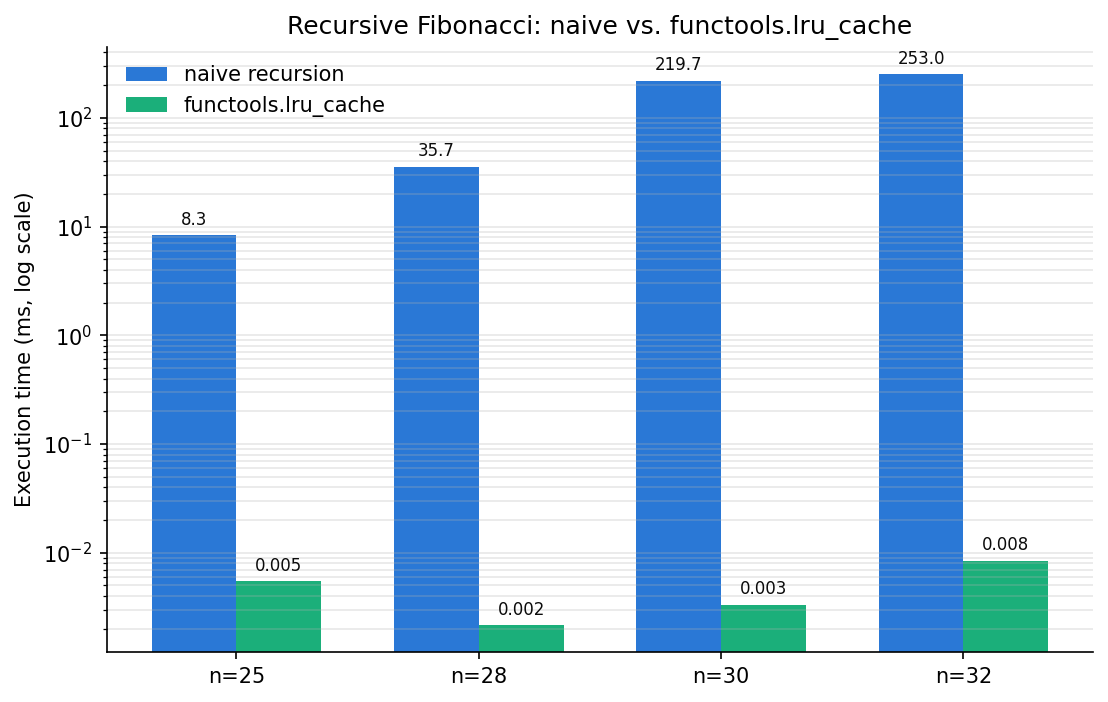
The naive recursion’s call count grows by roughly the square of the golden ratio (about 2.6x) for every 2 added to n, so n=32 triggers nearly a million redundant calls. lru_cache memoizes every fibonacci(k) result the first time it’s computed and returns it from a dict on subsequent calls in O(1), turning the exponential-time O(φ^n) recursion into linear-time O(n). The chart’s y-axis is logarithmic: the naive version (blue) takes tens to hundreds of milliseconds depending on n, while the cached version (green) plateaus in the microsecond range.
Class-Based Decorators
Classes implementing __call__ can also serve as decorators, useful when maintaining state.
import functools

class CountCalls:
    """Decorator that counts function invocations"""
    def __init__(self, func):
        functools.update_wrapper(self, func)
        self.func = func
        self.count = 0

    def __call__(self, *args, **kwargs):
        self.count += 1
        return self.func(*args, **kwargs)

@CountCalls
def say_hello():
    print("Hello!")

say_hello()
say_hello()
print(f"Called {say_hello.count} times")  # "Called 2 times"
Stacking Decorators
Multiple decorators are applied bottom-up and executed top-down.
@timer
@retry(max_attempts=2)
def api_call():
    pass

# Equivalent: api_call = timer(retry(max_attempts=2)(api_call))
# Execution order: timer → retry → api_call
This isn’t just a stylistic convention — it’s the same func = decorator(func) assignment chain from the “Basic Decorator Pattern” section. Stacking @A then @B produces A(B(func)), so the bottommost decorator wraps func first, and the topmost decorator owns the outermost call. This ordering isn’t cosmetic: it changes what your timings actually measure and how caching behaves.
Edge case: stacking order changes what a cache-timing decorator measures
Stacking @timer and @functools.lru_cache in different orders fundamentally changes what the timer is measuring.
import functools
import time

def timer(func):
    @functools.wraps(func)
    def wrapper(*args, **kwargs):
        start = time.perf_counter()
        result = func(*args, **kwargs)
        elapsed = time.perf_counter() - start
        print(f"{func.__name__}({args[0]}): {elapsed * 1000:.4f} ms")
        return result
    return wrapper

def slow_square(n):
    time.sleep(0.05)  # simulate expensive computation
    return n * n

# Pattern A: @timer is OUTER, @lru_cache is INNER -> timer sees every call, including cache hits
@timer
@functools.lru_cache(maxsize=None)
def square_timer_outer(n):
    return slow_square(n)

# Pattern B: @lru_cache is OUTER, @timer is INNER -> on a cache hit, timer never runs at all
@functools.lru_cache(maxsize=None)
@timer
def square_cache_outer(n):
    return slow_square(n)

print("=== Pattern A: @timer then @lru_cache (timer sees every call, incl. cache hits) ===")
square_timer_outer(5)  # cache miss: measures real compute time
square_timer_outer(5)  # cache hit: timer still runs, measures near-zero (dict lookup only)
square_timer_outer(5)  # cache hit again

print()
print("=== Pattern B: @lru_cache then @timer (timer is INSIDE the cache) ===")
square_cache_outer(5)  # cache miss: timer prints the real compute time
square_cache_outer(5)  # cache hit: lru_cache returns before timer's wrapper ever runs -> no print
square_cache_outer(5)  # cache hit again: still no print
Output:
=== Pattern A: @timer then @lru_cache (timer sees every call, incl. cache hits) ===
square_timer_outer(5): 55.0224 ms
square_timer_outer(5): 0.0016 ms
square_timer_outer(5): 0.0003 ms

=== Pattern B: @lru_cache then @timer (timer is INSIDE the cache) ===
square_cache_outer(5): 50.4704 ms
Even though Pattern B calls the function three times, timer prints only one line. Because @functools.lru_cache is outermost, the second and third calls return the cached result immediately, and the inner timer(square_cache_outer) never executes at all. Pattern A, with timer outermost, observes every call — including the fact that cache hits cost “almost 0 ms because it’s just a dict lookup.” Whether you want latency observability that includes cache hits/misses, or want to hide the cache’s internals and only ever measure real computation, determines the correct order — for monitoring purposes, putting @timer on the outside is the standard choice.
Recent Changes in functools
Since Python 3.12, functools.wraps and functools.update_wrapper also copy the __type_params__ attribute (the type parameters introduced by PEP 695 generic function syntax, e.g. def f[T](x: T) -> T), so type-parameter information is no longer lost when decorating a generic function. Python 3.14 also added a functools.Placeholder sentinel to functools.partial, letting you leave a gap in the middle of the positional arguments to fill in later (not a decorator feature per se, but useful when combining decorators with partial application). Both changes extend functools’s core role of “preserve metadata” / “compose functions” seen throughout this article, and neither changes the conclusion that you should always use functools.wraps.
Built-in Decorators
Key standard library decorators:
| Decorator | Purpose |
|---|---|
@property | Access methods as properties |
@staticmethod | Methods without instance reference |
@classmethod | Methods receiving class as first argument |
@functools.lru_cache | Memoization cache |
@functools.wraps | Preserve metadata in decorators |
@dataclasses.dataclass | Auto-generate data classes |
Related Articles
- Introduction to Asynchronous Programming with Python asyncio - Combining async with decorator patterns.
- Python Regular Expressions: Practical Guide - Combining decorators with regex for validation patterns.
- Building a Progress Bar in Python from Scratch - Progress bar implementation using decorator patterns.
- Matplotlib Practical Tips: Creating Publication-Quality Figures - Visualization best practices.
- How to Overwrite Print Output in Python - Practical Python tips.
- Creating 3D Animations (GIF) with Python Matplotlib - Practical Matplotlib usage.
- Setting Up a Python Development Environment - Setting up Python development environments.
References
- Python official documentation: functools
- Ramalho, L. (2022). Fluent Python (2nd ed.) . O’Reilly Media. Chapter 9: Decorators and Closures.
- PEP 318 – Decorators for Functions and Methods
- What’s New In Python 3.13 / 3.14
—
functools.wraps/update_wrapper’s__type_params__copying,functools.Placeholder, and related changes