Introduction
Regular expressions are a powerful tool for text processing. Python’s re module supports Perl-compatible regular expressions, useful for log parsing, data cleaning, validation, and more.
Basic Patterns
Common Metacharacters
| Pattern | Meaning | Example |
|---|---|---|
. | Any character | a.c → “abc”, “a1c” |
\d | Digit [0-9] | \d{3} → “123” |
\w | Word char [a-zA-Z0-9_] | \w+ → “hello_42” |
\s | Whitespace | \s+ → " “, “\t” |
^ / $ | Start / end of line | ^Hello$ |
* / + / ? | 0+, 1+, 0-1 | ab*c → “ac”, “abc” |
{n,m} | n to m times | \d{2,4} → “12”, “1234” |
Basic Operations
import re

text = "2026-02-26 Error: Connection timeout (retry: 3)"

# match: from start
m = re.match(r'\d{4}-\d{2}-\d{2}', text)
print(m.group())  # "2026-02-26"

# search: first match
m = re.search(r'retry: (\d+)', text)
print(m.group(1))  # "3"

# findall: all matches as list
numbers = re.findall(r'\d+', text)
print(numbers)  # ['2026', '02', '26', '3']

# sub: replacement
cleaned = re.sub(r'\d{4}-\d{2}-\d{2}', '[DATE]', text)
print(cleaned)  # "[DATE] Error: Connection timeout (retry: 3)"
Groups and Capturing
Named Groups
log = "2026-02-26 14:30:45 [ERROR] Database connection failed"

pattern = r'(?P<date>\d{4}-\d{2}-\d{2}) (?P<time>\d{2}:\d{2}:\d{2}) \[(?P<level>\w+)\] (?P<message>.+)'
m = re.match(pattern, log)

if m:
    print(m.group('date'))     # "2026-02-26"
    print(m.group('level'))    # "ERROR"
    print(m.group('message'))  # "Database connection failed"
    print(m.groupdict())       # {'date': '2026-02-26', 'time': '14:30:45', ...}
Non-Capturing Groups
# (?:...) groups without capturing
pattern = r'(?:https?|ftp)://[\w./\-]+'
urls = re.findall(pattern, "Visit https://example.com or ftp://files.example.com")
print(urls)  # ['https://example.com', 'ftp://files.example.com']
Lookahead and Lookbehind
Positive / Negative Lookahead
# Positive lookahead: (?=...)
passwords = ["abc123", "password", "Str0ng!Pass", "12345"]
strong = [p for p in passwords
          if re.match(r'(?=.*[A-Z])(?=.*\d)(?=.*[!@#$%^&*]).{8,}', p)]
print(strong)  # ['Str0ng!Pass']

# Negative lookahead: (?!...)
lines = ["test_func", "main_func", "test_class", "helper"]
non_test = [l for l in lines if re.match(r'(?!test)\w+', l)]
print(non_test)  # ['main_func', 'helper']
Positive / Negative Lookbehind
# Positive lookbehind: (?<=...)
text = "Price: $100, Tax: $8, Total: $108"
amounts = re.findall(r'(?<=\$)\d+', text)
print(amounts)  # ['100', '8', '108']

# Negative lookbehind: (?<!...)
text = "v1.0 v2.0-beta v3.0 v4.0-rc1"
stable = re.findall(r'v[\d.]+(?!-)', text)
print(stable)  # ['v1.0', 'v3.0']
Practical Patterns
Email Extraction
text = "Contact us at info@example.com or support@test.co.jp"
pattern = r'[\w.+-]+@[\w-]+\.[\w.]+'
emails = re.findall(pattern, text)
print(emails)  # ['info@example.com', 'support@test.co.jp']
Safe CSV Splitting
# Split on commas but ignore commas inside quotes
line = 'John,"Doe, Jr.",30,"New York, NY"'
pattern = r',(?=(?:[^"]*"[^"]*")*[^"]*$)'
fields = re.split(pattern, line)
print(fields)  # ['John', '"Doe, Jr."', '30', '"New York, NY"']
IPv4 Validation
def is_valid_ipv4(ip):
    pattern = r'^(?:(?:25[0-5]|2[0-4]\d|[01]?\d\d?)\.){3}(?:25[0-5]|2[0-4]\d|[01]?\d\d?)$'
    return bool(re.match(pattern, ip))

print(is_valid_ipv4("192.168.1.1"))   # True
print(is_valid_ipv4("256.1.1.1"))     # False
Performance Optimization
Compiled Patterns
Pre-compile patterns used repeatedly:
# Inefficient: recompiles each iteration
for line in lines:
    re.search(r'\d{4}-\d{2}-\d{2}', line)

# Efficient: compile once
date_pattern = re.compile(r'\d{4}-\d{2}-\d{2}')
for line in lines:
    date_pattern.search(line)
Greedy vs Non-Greedy
html = '<div>Hello</div><div>World</div>'

# Greedy (default): longest match
print(re.findall(r'<div>.*</div>', html))
# ['<div>Hello</div><div>World</div>']

# Non-greedy: shortest match (add ?)
print(re.findall(r'<div>.*?</div>', html))
# ['<div>Hello</div>', '<div>World</div>']
How Regex Engines Actually Work: Backtracking and ReDoS
Every pattern so far matches instantly. But without understanding what a regex engine does internally, an innocuous-looking pattern can turn exponentially slow on certain inputs. This phenomenon has a name — ReDoS (Regular Expression Denial of Service) — and is classified as CWE-1333 (“Inefficient Regular Expression Complexity”), a well-established vulnerability class that has caused real production incidents repeatedly.
Backtracking Engines vs. Finite-Automaton Engines
Regex engines fall into two broad implementation families.
| Family | Implementations | Matching strategy | Worst-case complexity | Feature support |
|---|---|---|---|---|
| Backtracking | Python re, PCRE, Perl, Java, .NET | Recursive depth-first search; on failure, backtrack to the last choice point and try another alternative | Worst case \(O(2^n)\) for input length \(n\) (can be worse for some patterns) | Backreferences \1, lookahead/lookbehind, rich extended syntax |
| Finite automaton (Thompson NFA) | RE2 (Google), Rust regex crate, Go regexp | Build an NFA via Thompson’s construction and simulate all states simultaneously | Guaranteed \(O(nm)\) for input length \(n\) , pattern length \(m\) | No backreferences; most lookahead/lookbehind unsupported |
Python’s re is a backtracking engine. When a match attempt fails, it recursively rewinds to the last choice point and tries a different alternative. The size of this search tree is usually proportional to the input size — but for certain pattern shapes it blows up exponentially in the input length.
RE2 and Rust’s regex crate, by contrast, are built on Thompson NFA simulation (a technique devised by Ken Thompson in 1968 and popularized again by Russ Cox’s 2007 article series). By tracking every possible automaton state simultaneously rather than trying alternatives one at a time and backtracking, they guarantee linear time in the input length — with zero backtracking. The price is that features that cannot be expressed by a finite automaton, most notably backreferences, are unsupported (matching regexes with backreferences is known to be NP-hard in general). Expressive power and a worst-case time guarantee are fundamentally in tension.
Why Backtracking Can Be Exponential
The most famous catastrophic-backtracking pattern is (a+)+b. Consider matching it against 'a' * n — a string of n copies of a with no trailing b.
The outer (...)+ repeats the inner group (a+) one or more times. The inner a+ greedily consumes a run of as, but the outer + controls how many times that inner group repeats — so the engine must try every way of partitioning the n a’s among some number of iterations of the inner group, each iteration consuming at least one character.
The number of ways to split a run of n identical characters into one or more contiguous, non-empty groups is known as the number of compositions of n, and it equals \(2^{n-1}\)
. For n=4 ("aaaa"), the eight partitions are:
{aaaa}{aaa, a}/{a, aaa}{aa, aa}{aa, a, a}/{a, aa, a}/{a, a, aa}{a, a, a, a}
That matches \(2^{4-1} = 8\)
. Because the string never contains a trailing b, the engine must exhaust every one of these partitions before it can finally declare failure. The backtracking search tree therefore has \(O(2^n)\)
leaves, and the total time to resolve the match (including the eventual failure) is \(O(2^n)\)
.
Other classic patterns share the same structural flaw:
(a|a)*b— an alternation with two branches that both match the same character, repeated(a|aa)*b— an alternation whose branches overlap in length(.*)*— a repetition of “any string” nested inside another repetition
In each case, the root cause is a quantifier nested inside another quantifier over an overlapping character class — the same slice of input can be consumed in more than one way. Not every ReDoS case is exponential, either:
CVE-2025-27789
(a .replace polyfill Babel generates when transpiling named capturing groups) is a quadratic-complexity case in generated code — less dramatic than exponential blowup, but still capable of causing a denial of service given a sufficiently long input.
Measuring the Blowup
Rather than taking the theory on faith, let’s time it. As a safety measure we wrap every match attempt in a signal.alarm timeout that forcibly aborts any single call that exceeds 3 seconds (this is Unix-only and main-thread-only; on Windows or in a multi-threaded program, concurrent.futures.ProcessPoolExecutor combined with future.result(timeout=...) is a portable equivalent).
import re
import time
import signal


class RegexTimeout(Exception):
    """Raised when a single match() call exceeds the safety timeout."""


def _on_alarm(signum, frame):
    raise RegexTimeout()


def timed_match(pattern, text, timeout_sec=3):
    """Run pattern.match(text) once, aborting after timeout_sec seconds.

    Uses SIGALRM, so even a catastrophic-backtracking case cannot make
    this script itself hang for more than timeout_sec seconds.
    """
    signal.signal(signal.SIGALRM, _on_alarm)
    signal.alarm(timeout_sec)
    start = time.perf_counter()
    try:
        re.match(pattern, text)
        return time.perf_counter() - start
    except RegexTimeout:
        return None
    finally:
        signal.alarm(0)


CATASTROPHIC = r'(a+)+b'

for n in [10, 12, 14, 16, 18, 20, 22, 24, 25, 26]:
    text = 'a' * n  # deliberately no trailing 'b' -> always fails to match
    t = timed_match(CATASTROPHIC, text, timeout_sec=3)
    print(f"n={n:3d}  time={t}")
Here are the actual results from a run on Python 3.14 / macOS (single-shot measurements — the catastrophic pattern is far too slow to repeat many times for averaging):
| Input length \(n\) | Time | Ratio vs. previous row |
|---|---|---|
| 10 | 87.6 µs | — |
| 12 | 162 µs | ×1.85 (+2 chars) |
| 14 | 641 µs | ×3.96 (+2 chars) |
| 16 | 2.47 ms | ×3.85 (+2 chars) |
| 18 | 9.50 ms | ×3.85 (+2 chars) |
| 20 | 34.7 ms | ×3.65 (+2 chars) |
| 22 | 135 ms | ×3.89 (+2 chars) |
| 24 | 536 ms | ×3.96 (+2 chars) |
| 25 | 1.06 s | ×1.99 (+1 char) |
| 26 | 2.13 s | ×2.00 (+1 char) |
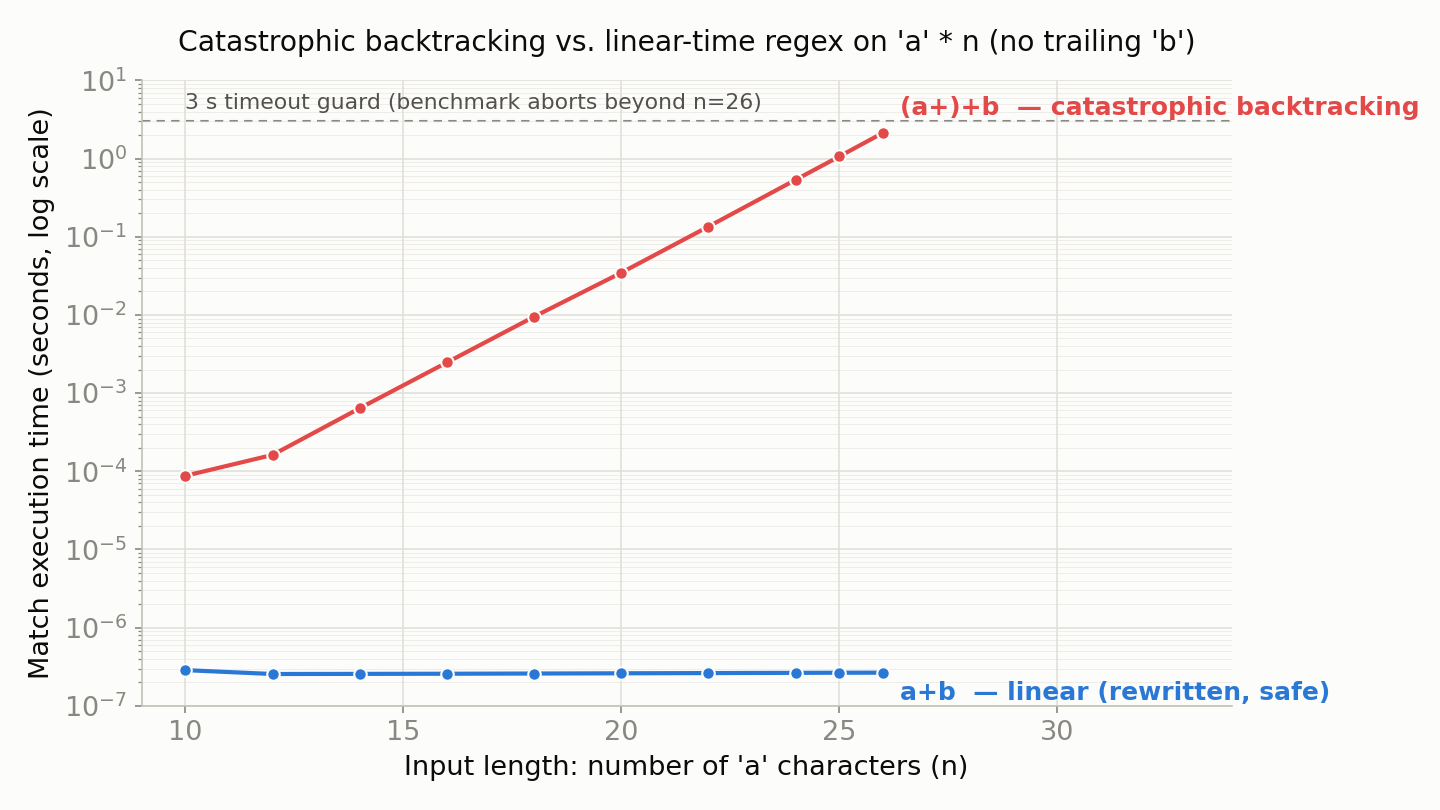
Time roughly quadruples for every 2 additional characters — that is, roughly doubles per character — qualitatively matching the theoretical \(2^{n-1}\)
blowup (microbenchmarks are noisy, but the trend is unambiguous). Going from n=10 to n=26 (16 more characters), execution time increased by roughly 24,000x. Extending this benchmark past n=27 would hit the 3-second timeout, so it is safely cut off there.
Over the same range of n, the simplified, non-nested pattern a+b shows a dramatically different picture (a single call is too fast to measure reliably, so this averages 3,000 calls):
| Input length \(n\) | Average time |
|---|---|
| 10 | 286 ns |
| 14 | 256 ns |
| 18 | 259 ns |
| 22 | 262 ns |
| 26 | 266 ns |
From n=10 to n=26, execution time is essentially flat (dominated by a few hundred nanoseconds of fixed call overhead). To see true linear scaling we need a much larger n: timing the same a+b at n=1,000 and n=10,000 gives average times of 1.06 µs and 8.11 µs respectively — a 10x increase in input length yields only about a 7.6x increase in time, confirming \(O(n)\)
growth rather than exponential blowup.
Plotting both patterns on the same axes makes the contrast immediate:
Safe Rewrites and Python 3.11’s Built-in Defenses
DANGEROUS = r'(a+)+b'      # nested quantifiers: the cause of catastrophic backtracking
SIMPLIFIED = r'a+b'        # redundant nesting removed (accepts the same language)
ATOMIC = r'(?>a+)+b'       # Python 3.11+: atomic group forbids backtracking
POSSESSIVE = r'(a++)+b'    # Python 3.11+: possessive quantifier forbids backtracking
Atomic groups (?>...) and possessive quantifiers (*+, ++, ?+, {m,n}+) were added to the re module in Python 3.11. Both impose the same constraint: once a subexpression has matched, the engine is not allowed to backtrack into it — which shuts down the ambiguous-partitioning search entirely. Measured results confirm that ATOMIC and POSSESSIVE speed up to essentially the same range as SIMPLIFIED:
| Pattern | Avg at n=1,000 | Avg at n=10,000 |
|---|---|---|
a+b (rewritten) | 1.06 µs | 8.11 µs |
(?>a+)+b (atomic group) | 0.62 µs | 3.44 µs |
(a++)+b (possessive quantifier) | 0.62 µs | 3.42 µs |
All three scale roughly linearly in n, with none of the exponential blowup of (a+)+b. The most fundamental rule of thumb is to never nest a quantifier inside another quantifier over an overlapping character class. When an existing complex pattern can’t be safely rewritten, atomic groups or possessive quantifiers are a practical way to locally seal off backtracking without changing the accepted language.
ReDoS: Catastrophic Backtracking as a Real-World Vulnerability
Catastrophic backtracking isn’t an academic curiosity — it is an established vulnerability class that has caused serious production incidents repeatedly. An attacker only needs to send a few dozen to a few hundred crafted characters to pin a server’s CPU for an extended period, starving out every other request.
In the Node.js ecosystem, the widely-used argument-escaping package cross-spawn had a ReDoS in its regex, tracked as
CVE-2024-21538
— one of many repeated reports of vulnerable regexes in popular dependencies. Python’s re module has no built-in timeout or complexity cap. Before running untrusted input (user submissions, external API responses, etc.) through a regex, you must either cap the input length or, as demonstrated above, wrap the call in a timeout. The third-party regex package on PyPI accepts a timeout argument directly on its match functions, making it an attractive migration target from stdlib re.
Finite-automaton engines like RE2 or Rust’s regex crate are immune to ReDoS by design (at the cost of giving up backreferences and similar expressive features). For services that process large volumes of untrusted input — WAFs, log pipelines, API gateways — the choice of regex engine is itself a security decision.
Recent research and real-world examples worth knowing:
- Bhuiyan, M. H. M., Çakar, B., Burmane, E. H., Davis, J. C., & Staicu, C.-A. (2025). “SoK: A Literature and Engineering Review of Regular Expression Denial of Service (ReDoS).” ASIA CCS ‘25. A systematic survey of ReDoS detection, prevention, and mitigation research, citing real outages at Cloudflare and Stack Overflow.
- Su, W., Huang, H., Li, R., Chen, H., & Ge, T. (2024). “Towards an Effective Method of ReDoS Detection for Non-backtracking Engines.” USENIX Security ‘24. Shows that even non-backtracking engines like RE2 can suffer performance degradation depending on internal implementation choices, and proposes a detection method.
- CVE-2024-21538
(
cross-spawn, npm). A ReDoS in a widely-depended-upon argument-escaping package — a concrete example of supply-chain risk in production.
Key re Module Flags
| Flag | Description |
|---|---|
re.IGNORECASE (re.I) | Case-insensitive matching |
re.MULTILINE (re.M) | ^/$ match each line |
re.DOTALL (re.S) | . matches newlines |
re.VERBOSE (re.X) | Allow comments and whitespace |
pattern = re.compile(r'''
    (?P<year>\d{4})   # year
    -(?P<month>\d{2}) # month
    -(?P<day>\d{2})   # day
''', re.VERBOSE)
Related Articles
- Python Decorators: Mechanics and Practical Patterns - Combining decorators with regex for validation patterns.
- Introduction to Asynchronous Programming with Python asyncio - Using regex in async text processing.
- Building a Progress Bar in Python from Scratch - Practical Python tips.
- Matplotlib Practical Tips: Creating Publication-Quality Figures - Visualization best practices.
References
- Python re module documentation
- Friedl, J. E. F. (2006). Mastering Regular Expressions (3rd ed.) . O’Reilly Media.
- Regular Expressions 101 - Online regex tester
- Bhuiyan, M. H. M., Çakar, B., Burmane, E. H., Davis, J. C., & Staicu, C.-A. (2025). “SoK: A Literature and Engineering Review of Regular Expression Denial of Service (ReDoS).” ASIA CCS ‘25.
- Su, W., Huang, H., Li, R., Chen, H., & Ge, T. (2024). “Towards an Effective Method of ReDoS Detection for Non-backtracking Engines.” USENIX Security ‘24.
- CVE-2024-21538 — Regular Expression Denial of Service (ReDoS) in cross-spawn - GitHub Advisory Database.
- CWE-1333: Inefficient Regular Expression Complexity - MITRE.
- OWASP: Regular expression Denial of Service - ReDoS
- Cox, R. (2007). “Regular Expression Matching Can Be Simple And Fast.” - Explains linear-time, backtracking-free matching via Thompson NFA simulation; the design rationale behind RE2.