はじめに
Pythonは動的型付け言語ですが、Python 3.5 で導入された**型ヒント(Type Hints)**により、静的な型情報をコードに付与できるようになりました。型ヒントは実行時の動作に影響しませんが、以下のメリットがあります。
- 可読性の向上: 関数の引数と戻り値の型が一目で分かる
- IDEサポートの強化: 自動補完やリファクタリングの精度が向上する
- バグの早期発見: mypy 等の静的型チェッカーで実行前にエラーを検出できる
- ドキュメントとしての役割: コードが自己文書化される
本記事では、型ヒントの基礎から mypy を使った静的型チェックまでを実践的に解説します。
型ヒントは実行時に強制されない
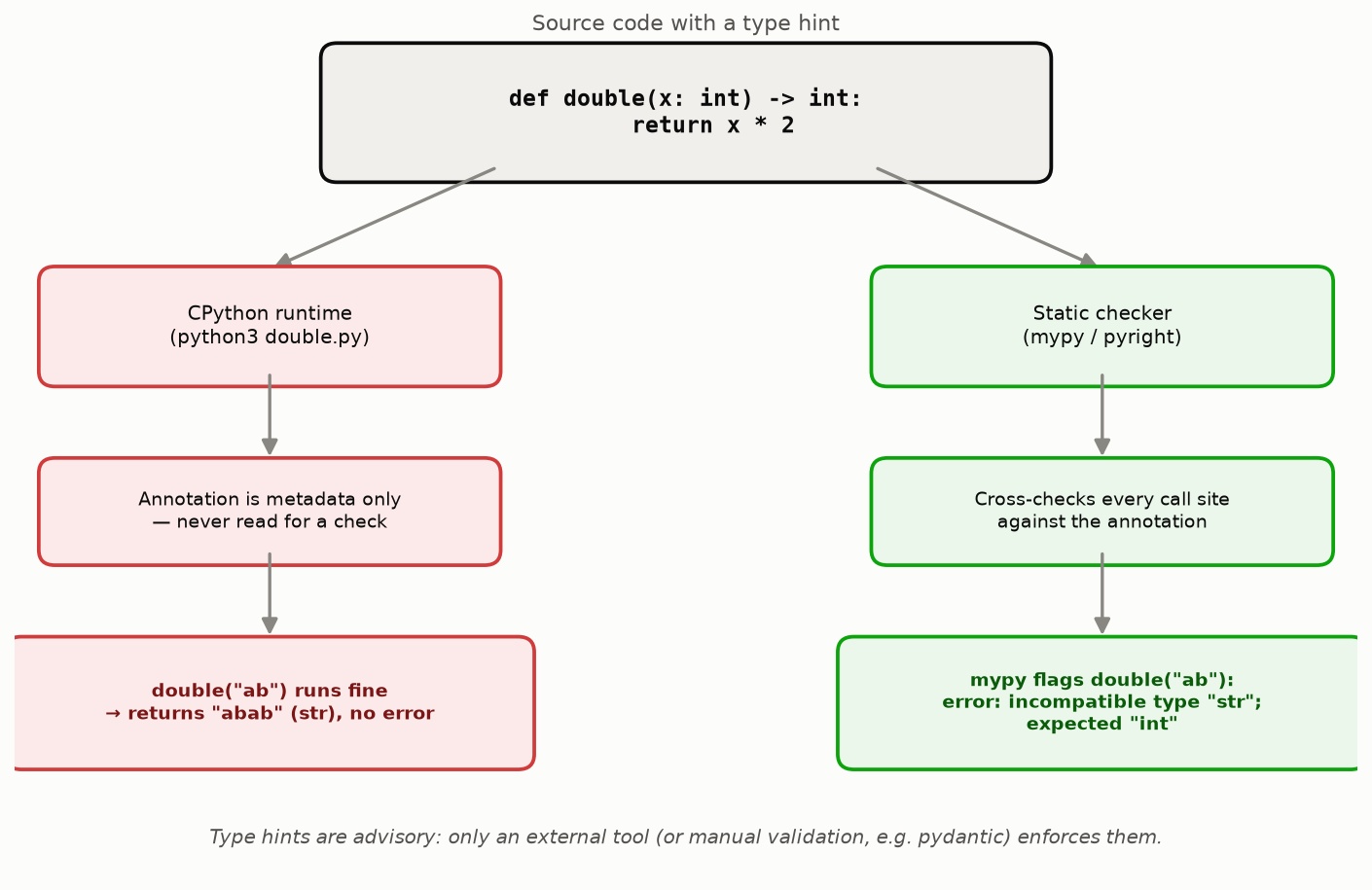
最初に、型ヒントの最も重要な性質をはっきりさせておきます。Pythonの型ヒントは、Java や TypeScript のように実行時にチェックされる仕組みではありません。CPythonインタプリタは関数の __annotations__ 属性に型情報を保存するだけで、呼び出し時にその型と実引数を照合することは一切しません。型ヒントは「実行可能なドキュメント」であり、それを検証するかどうかは、mypy・pyright のような外部の静的解析ツールや、pydantic のような実行時バリデーションライブラリに完全に委ねられています。
具体例で確認します。
# double.py
def double(x: int) -> int:
    return x * 2

# 型ヒントは "x: int" だが、str を渡してもPythonは何もチェックしない
result = double("ab")
print(repr(result))
print(type(result))
$ python3 double.py
'abab'
<class 'str'>
double("ab") は例外を発生させることなく実行され、"abab" という型ヒントに反した戻り値をそのまま返します(str * 2 が文字列の繰り返しとして解釈されるため)。関数シグネチャは x: int -> int と宣言していますが、実行時には一切チェックされないため、バグが静かに紛れ込みます。
同じファイルに mypy をかけると、この不整合を実行前に検出できます。
$ mypy double.py
double.py:6: error: Argument 1 to "double" has incompatible type "str"; expected "int"  [arg-type]
Found 1 error in 1 file (checked 1 source file)
(検証環境: mypy 2.3.0 / Python 3.14.6。上記はすべて実際に実行した出力です。)
この差が型ヒントの本質です。型ヒントは静的解析ツールへの入力データにすぎず、Pythonランタイムはそれを読み取っても検証には使いません。以下の図はこの流れをまとめたものです。
型ヒントを「実行時の保証」として設計に組み込みたい場合は、次のいずれかが必要です。
- 静的チェッカー(mypy、pyright)をCIに組み込み、マージ前に検出する
- pydantic のようなランタイムバリデーションライブラリでデータ境界(APIの入出力など)を検証する
typing.get_type_hints()で型情報を取得し、isinstance()などで手動チェックする(実装コストが高く、通常は前2者を優先すべき)
基本的な型ヒント
変数の型ヒント
Python 3.6+ では変数にも型ヒントを付けられます。
name: str = "hello"
age: int = 30
height: float = 175.5
is_active: bool = True
型ヒントと異なる値を代入してもランタイムエラーにはなりませんが、mypy が警告を出します。
name: str = 123 # mypy: Incompatible types in assignment
関数の型ヒント
関数の引数と戻り値に型を付けるのが最も一般的な使い方です。
def greet(name: str) -> str:
    return f"Hello, {name}"

def add(a: int, b: int) -> int:
    return a + b
戻り値がない関数
戻り値がない関数には -> None を付けます。
def log_message(message: str) -> None:
    print(f"[LOG] {message}")
デフォルト引数
デフォルト引数がある場合は、型ヒントの後に = で記述します。
def greet(name: str, greeting: str = "Hello") -> str:
    return f"{greeting}, {name}"
コレクション型
Python 3.9+ のビルトインジェネリクス
Python 3.9 以降では、組み込み型をそのままジェネリクスとして使えます。
# Python 3.9+
names: list[str] = ["Alice", "Bob"]
scores: dict[str, int] = {"Alice": 95, "Bob": 87}
coordinates: tuple[float, float] = (35.68, 139.76)
unique_tags: set[str] = {"python", "typing"}
可変長タプルには ... を使います。
# 任意の長さのintタプル
numbers: tuple[int, ...] = (1, 2, 3, 4, 5)
Python 3.8 以前(typing モジュール)
Python 3.8 以前では typing モジュールからインポートする必要があります。
from typing import List, Dict, Tuple, Set

names: List[str] = ["Alice", "Bob"]
scores: Dict[str, int] = {"Alice": 95}
coordinates: Tuple[float, float] = (35.68, 139.76)
unique_tags: Set[str] = {"python", "typing"}
推奨: Python 3.9+ ではビルトイン型(
list,dict,tuple,set)を使いましょう。typing.List等は将来的に非推奨になります。
ネストしたコレクション
コレクション型はネストできます。
# 文字列のリストを値に持つ辞書
user_tags: dict[str, list[str]] = {
    "alice": ["python", "ml"],
    "bob": ["go", "docker"],
}

# タプルのリスト
points: list[tuple[int, int]] = [(0, 0), (1, 2), (3, 4)]
Optional と Union
Optional
値が None になり得る場合に使います。
from typing import Optional

# Python 3.9 以前
def find_user(user_id: int) -> Optional[str]:
    if user_id == 1:
        return "Alice"
    return None
Python 3.10 以降では | 演算子で簡潔に書けます。
# Python 3.10+
def find_user(user_id: int) -> str | None:
    if user_id == 1:
        return "Alice"
    return None
Union
複数の型を受け入れる場合に使います。
from typing import Union

# Python 3.9 以前
def process(value: Union[int, str]) -> str:
    return str(value)

# Python 3.10+
def process(value: int | str) -> str:
    return str(value)
Optional は Union の糖衣構文
Optional[X] は Union[X, None] と完全に等価です。
# 以下はすべて等価
from typing import Optional, Union

x: Optional[str]
x: Union[str, None]
x: str | None  # Python 3.10+
TypedDict と dataclass
TypedDict
辞書のキーと値の型を定義できます。APIレスポンスや設定ファイルの型付けに便利です。
from typing import TypedDict

class UserProfile(TypedDict):
    name: str
    age: int
    email: str
    is_active: bool

def get_user() -> UserProfile:
    return {
        "name": "Alice",
        "age": 30,
        "email": "alice@example.com",
        "is_active": True,
    }

user = get_user()
print(user["name"])  # "Alice" — IDEが補完してくれる
オプショナルなキーがある場合は total=False またはキーごとの NotRequired(3.11+)を使います。
from typing import TypedDict, NotRequired  # Python 3.11+

class UserProfile(TypedDict):
    name: str
    age: int
    nickname: NotRequired[str]  # 省略可能
dataclass
構造化データには dataclass が適しています。TypedDict と異なり、属性アクセス(.name)ができます。
from dataclasses import dataclass

@dataclass
class User:
    name: str
    age: int
    email: str
    is_active: bool = True

user = User(name="Alice", age=30, email="alice@example.com")
print(user.name)  # "Alice"
print(user)       # User(name='Alice', age=30, email='alice@example.com', is_active=True)
frozen=True でイミュータブルにできます。
@dataclass(frozen=True)
class Point:
    x: float
    y: float

p = Point(1.0, 2.0)
p.x = 3.0  # FrozenInstanceError
TypedDict vs dataclass の使い分け
| 観点 | TypedDict | dataclass |
|---|---|---|
| データ構造 | dict | クラスインスタンス |
| アクセス方法 | d["key"] | obj.attr |
| JSON互換性 | そのまま dict として扱える | 変換が必要 |
| イミュータブル | 不可 | frozen=True で可能 |
| 用途 | API応答、設定 | ドメインモデル、値オブジェクト |
ジェネリクス(Generics)
TypeVar によるジェネリック関数
型を抽象化して汎用的な関数を作れます。
from typing import TypeVar

T = TypeVar("T")

def first(items: list[T]) -> T:
    return items[0]

# 型推論が働く
name = first(["Alice", "Bob"])   # str
number = first([1, 2, 3])        # int
TypeVar に制約を付けることもできます。
from typing import TypeVar

Number = TypeVar("Number", int, float)

def double(x: Number) -> Number:
    return x * 2

double(5)      # OK: int
double(3.14)   # OK: float
double("hi")   # mypy error
Python 3.12+ の新しい構文
Python 3.12 では、TypeVar を明示的に定義する必要がなくなりました。
# Python 3.12+
def first[T](items: list[T]) -> T:
    return items[0]
ジェネリッククラス
from typing import TypeVar, Generic

T = TypeVar("T")

class Stack(Generic[T]):
    def __init__(self) -> None:
        self._items: list[T] = []

    def push(self, item: T) -> None:
        self._items.append(item)

    def pop(self) -> T:
        if not self._items:
            raise IndexError("Stack is empty")
        return self._items.pop()

    def is_empty(self) -> bool:
        return len(self._items) == 0

# 使用時に型が確定する
int_stack = Stack[int]()
int_stack.push(1)
int_stack.push(2)
value: int = int_stack.pop()  # 2

str_stack = Stack[str]()
str_stack.push("hello")
Python 3.12+ ではクラスも新しい構文で書けます。
# Python 3.12+
class Stack[T]:
    def __init__(self) -> None:
        self._items: list[T] = []

    def push(self, item: T) -> None:
        self._items.append(item)

    def pop(self) -> T:
        return self._items.pop()
変性(Variance): なぜ list[int] は list[float] ではないのか
ジェネリック型を安全に使うには、変性(variance) の理解が欠かせません。算術的には int を float の代わりに使えますが、list[int] は list[float] が要求される場所に渡せません。理由は、list のような**書き換え可能(ミュータブル)なコンテナは不変(invariant)**だからです。
# variance_demo.py
from typing import Sequence


def sum_as_float(values: list[float]) -> float:
    return sum(values)


def sum_seq_as_float(values: Sequence[float]) -> float:
    return sum(values)


ints: list[int] = [1, 2, 3]

# list[int] は list[float] ではない(list は invariant)
sum_as_float(ints)  # mypy error

# Sequence[int] は Sequence[float] と互換(Sequence は covariant)
sum_seq_as_float(ints)  # OK
$ mypy variance_demo.py
variance_demo.py:16: error: Argument 1 to "sum_as_float" has incompatible type "list[int]"; expected "list[float]"  [arg-type]
variance_demo.py:16: note: "list" is invariant -- see https://mypy.readthedocs.io/en/stable/common_issues.html#variance
variance_demo.py:16: note: Consider using "Sequence" instead, which is covariant
Found 1 error in 1 file (checked 1 source file)
mypy自身が提案している通り、引数型が Sequence[float] の sum_seq_as_float は同じ ints をエラーなく受け取れます。なぜこの違いが生じるのでしょうか。
- 不変(invariant):
list[int]をlist[float]の代わりに使えない。listは要素の書き込み(appendなど)が可能なため、もしこの代入を許してしまうと、呼び出し先がvalues.append(1.5)のようにfloatを書き込める。しかし呼び出し元は依然としてlist[int]だと思っているので、後で取り出した要素をintとして扱うコードが1.5を受け取り、実行時に壊れる。この事故を防ぐため mypy は代入自体を禁止する。 - 共変(covariant):
Sequence[int]はSequence[float]の代わりに使える(読み取り専用の位置で)。Sequenceにはappendのような書き込みメソッドがなく、要素を読み取るだけなので、書き込みによる型破壊が起こり得ない。そのため「intはfloatとして読み取ってよい」という直感通りの関係が安全に成立する。 - 反変(contravariant): 関数の引数位置などで逆向きの関係が成立する。より汎用的な型を受け取れる関数は、より限定的な型を要求する関数の代わりに使える(例:
Callable[[object], None]はCallable[[int], None]が必要な場所で使える)。TypeVarをcontravariant=Trueで宣言することで表現できる。
| 変性 | 意味 | 代表例 | 書き込み |
|---|---|---|---|
| 不変 (invariant) | A[int] と A[float] の間に代入関係なし | list[T], dict[K, V], set[T] | 可能 |
| 共変 (covariant) | int が float の部分型なら A[int] も A[float] の部分型 | Sequence[T], Tuple[T, ...], FrozenSet[T] | 不可(読み取り専用) |
| 反変 (contravariant) | 上記と逆向きの関係 | Callable の引数位置 | 該当なし(関数引数) |
実務上の指針として、関数が引数として受け取るだけでコンテナ自体を変更しないなら、list ではなく Sequence(読み取り専用の共変コレクション)を型ヒントに使うことで、より柔軟で呼び出しやすいAPIになります。書き込みが必要な場合のみ list や MutableSequence を使いましょう。
Protocol(構造的部分型)
ダックタイピングに型安全性を
Pythonの「ダックタイピング」の思想を活かしつつ、型チェックの恩恵を受けられるのが Protocol(Python 3.8+)です。
from typing import Protocol

class Drawable(Protocol):
    def draw(self) -> str:
        ...

class Circle:
    def draw(self) -> str:
        return "Drawing a circle"

class Square:
    def draw(self) -> str:
        return "Drawing a square"

def render(shape: Drawable) -> None:
    print(shape.draw())

# CircleもSquareもDrawableを明示的に継承していないが、
# draw() メソッドを持つので型チェックを通過する
render(Circle())  # OK
render(Square())  # OK
Protocol と ABC の違い
Protocol は**構造的部分型(structural subtyping)**で、明示的な継承が不要です。
from abc import ABC, abstractmethod
from typing import Protocol

# ABC: 明示的に継承が必要(名目的部分型)
class DrawableABC(ABC):
    @abstractmethod
    def draw(self) -> str:
        ...

class CircleABC(DrawableABC):  # 継承が必要
    def draw(self) -> str:
        return "circle"

# Protocol: 継承不要(構造的部分型)
class DrawableProtocol(Protocol):
    def draw(self) -> str:
        ...

class CircleProtocol:  # 継承不要。draw()があればOK
    def draw(self) -> str:
        return "circle"
実用例:ロガーインターフェース
from typing import Protocol

class Logger(Protocol):
    def log(self, message: str) -> None:
        ...

class ConsoleLogger:
    def log(self, message: str) -> None:
        print(f"[CONSOLE] {message}")

class FileLogger:
    def __init__(self, path: str) -> None:
        self.path = path

    def log(self, message: str) -> None:
        with open(self.path, "a") as f:
            f.write(f"{message}\n")

def process_data(data: list[int], logger: Logger) -> int:
    logger.log(f"Processing {len(data)} items")
    result = sum(data)
    logger.log(f"Result: {result}")
    return result

# どちらも Logger Protocol を満たす
process_data([1, 2, 3], ConsoleLogger())
process_data([1, 2, 3], FileLogger("/tmp/app.log"))
mypyによる静的型チェック
インストールと基本的な使い方
pip install mypy

# 単一ファイルのチェック
mypy script.py

# ディレクトリ全体のチェック
mypy src/

# パッケージのチェック
mypy -p mypackage
mypy が検出するエラーの例
# example.py
def greet(name: str) -> str:
    return f"Hello, {name}"

result: int = greet("Alice")  # error: Incompatible types in assignment
greet(123)                     # error: Argument 1 has incompatible type "int"
$ mypy example.py
example.py:4: error: Incompatible types in assignment
    (expression has type "str", variable has type "int")
example.py:5: error: Argument 1 to "greet" has incompatible type "int";
    expected "str"
Found 2 errors in 1 file (checked 1 source file)
設定ファイル
pyproject.toml または mypy.ini で設定を管理します。
# pyproject.toml
[tool.mypy]
python_version = "3.12"
warn_return_any = true
warn_unused_configs = true
disallow_untyped_defs = true
disallow_incomplete_defs = true
check_untyped_defs = true
no_implicit_optional = true
strict_equality = true

# サードパーティライブラリの型スタブがない場合
[[tool.mypy.overrides]]
module = ["some_untyped_library.*"]
ignore_missing_imports = true
–strict モード
--strict は最も厳格なチェックを有効にします。新規プロジェクトでの採用を推奨します。
mypy --strict src/
--strict が有効にする主なオプション:
| オプション | 説明 |
|---|---|
disallow_untyped_defs | 型ヒントなし関数を禁止 |
disallow_any_generics | list を list[int] のように要求 |
warn_return_any | Any を返す関数に警告 |
no_implicit_reexport | 明示的でない再エクスポートを禁止 |
strict_equality | 型が異なる == 比較に警告 |
--strict モードで実際に検出されるエラー
一見「動きそうな」次のPythonコードに mypy --strict をかけると、代表的な3種類のエラーが検出されます。
# strict_demo.py
from typing import Optional


# 1. 戻り値の型ヒントがない
def get_display_name(user_id: int):
    if user_id == 1:
        return "Alice"
    return "Guest"


# 2. 互換性のない代入
count: int = "42"


# 3. Optional を None チェックせずに使用
def to_upper(name: Optional[str]) -> str:
    return name.upper()
$ mypy --strict strict_demo.py
strict_demo.py:6: error: Function is missing a return type annotation  [no-untyped-def]
strict_demo.py:13: error: Incompatible types in assignment (expression has type "str", variable has type "int")  [assignment]
strict_demo.py:18: error: Item "None" of "str | None" has no attribute "upper"  [union-attr]
Found 3 errors in 1 file (checked 1 source file)
(検証環境: mypy 2.3.0 / Python 3.14.6。上記は実際に実行して得られた出力です。)
各エラーの原因と対処:
| 行 | エラーコード | 原因 | 対処 |
|---|---|---|---|
| 5 | no-untyped-def | --strict は disallow_untyped_defs を有効化するため、戻り値の型が推論可能でも明示が必須 | -> str: を追加 |
| 12 | assignment | int 型の変数 count に str を代入している | count: int = 42 に修正するか、意図的なら型を広げる |
| 17 | union-attr | Optional[str](str | None)は None の可能性があるのに .upper() を無条件に呼んでいる | if name is None: return "" のようなガードを追加 |
Any は型チェックを「無効化」する — object との違い
Any は「何でも許容する」特別な型で、mypy はその値に対するあらゆる操作を無条件に許可します。しかもこの「無検査」状態は代入や関数呼び出しを通じて下流に伝播するため、一度 Any が紛れ込むと、その値を経由するコード全体で型チェックが実質的に無効化されます。これは大規模コードベースで型の恩恵が徐々に失われていく典型的な原因です。
object は逆に「あらゆる型の親クラスだが、共通のインターフェース(__str__、__eq__ など)しか持たない」という最も厳格な型です。同じ「なんでも受け取れる引数」でも、Any と object では mypy の振る舞いがまったく異なります。
# any_vs_object.py
from typing import Any


def use_any(value: Any) -> int:
    # value は Any なので、存在しないメソッドを呼んでも mypy は一切チェックしない
    return value.nonexistent_method()


def use_object(value: object) -> int:
    # value は object なので、object にないメソッドを呼ぶと mypy が検出する
    return value.nonexistent_method()
$ mypy any_vs_object.py
any_vs_object.py:12: error: "object" has no attribute "nonexistent_method"  [attr-defined]
Found 1 error in 1 file (checked 1 source file)
use_any の7行目は明らかに存在しないメソッドを呼び出しているにもかかわらず、mypyは1件もエラーを報告しません。一方 use_object の同じ呼び出しパターン(12行目)は正しく検出されます。「なんでも受け取りたいが中身の安全性は保ちたい」場合は Any ではなく object を使い、必要に応じて isinstance() で型を絞り込む(narrowing)のが定石です。
よくあるエラーと対処法
# 1. Missing return statement
def get_name(user_id: int) -> str:
    if user_id == 1:
        return "Alice"
    # error: Missing return statement
    # 修正: return "" または raise ValueError()

# 2. Incompatible types in assignment
data: list[int] = []
data.append("hello")  # error
# 修正: data: list[int | str] = [] または data.append(123)

# 3. Item "None" of "Optional[str]" has no attribute "upper"
def process(name: str | None) -> str:
    return name.upper()  # error: name が None の可能性
    # 修正: None チェックを追加
    # if name is None:
    #     return ""
    # return name.upper()

# 4. type: ignore で特定行を除外(最終手段)
result = some_untyped_function()  # type: ignore[no-untyped-call]
型ヒントのベストプラクティス
| プラクティス | 説明 |
|---|---|
| 公開APIから始める | まずは関数のシグネチャ(引数と戻り値)に型を付ける |
Any を避ける | Any は型チェックを無効化する。具体的な型や object を使う |
Optional を明示する | None を返す可能性がある場合は必ず Optional / X | None を付ける |
TypeVar に制約を付ける | 無制約の TypeVar よりも bound や制約型を使う |
| 段階的に導入する | 既存プロジェクトには --disallow-untyped-defs を段階的に適用 |
type: ignore にコメントを | 理由を添える: # type: ignore[arg-type] # legacy API |
| CI に mypy を組み込む | pre-commit や CI パイプラインで自動チェックする |
py.typed マーカーを配置 | ライブラリを公開する場合は py.typed ファイルを含める |
最近のPythonバージョンにおける型ヒントの進化
型ヒント関連の仕様は Python 3.12 以降も活発に拡張されています。いずれも Python 3.14.6 上で実際に動作を確認済みです。
| バージョン | PEP | 内容 |
|---|---|---|
| 3.12 | PEP 695 | def first[T](...) の新ジェネリクス構文、type Alias = ... 文(遅延評価される TypeAliasType) |
| 3.13 | PEP 696 | 型パラメータのデフォルト値(例: class Box[T = str]: ...) |
| 3.13 | PEP 705 | TypedDict の読み取り専用キー ReadOnly[...] |
| 3.13 | PEP 742 | TypeIs — TypeGuard よりも直感的に型を絞り込める新しい型ガード |
| 3.14 | PEP 649 / PEP 749 | アノテーションの遅延評価。from __future__ import annotations なしでも前方参照が書けるようになった |
type 文(PEP 695)は TypeAlias を置き換える新しい構文で、右辺は必要になるまで評価されません(前方参照にも強い)。
# Python 3.12+ (PEP 695): type alias 文
type StringList = list[str]
type Coordinate = tuple[float, float]

def normalize(values: StringList) -> StringList:
    return [v.strip() for v in values]

print(normalize([" a ", "b "]))  # ['a', 'b']
TypeIs(PEP 742)は isinstance ベースの絞り込み関数に正確な戻り値型を与えます。ここでも変性の知識が効いてきます — Sequence は共変なので Sequence[object] から Sequence[str] への絞り込みが素直に成立しますが、これを list[object] → list[str] にすると list の不変性により mypy がエラーを出します。
# Python 3.13+ (PEP 742): TypeIs による型の絞り込み
from typing import TypeIs, Sequence

def is_str_seq(val: Sequence[object]) -> TypeIs[Sequence[str]]:
    return all(isinstance(x, str) for x in val)

items: Sequence[object] = ["a", "b"]
if is_str_seq(items):
    print("narrowed to Sequence[str]:", items)
$ mypy pep_features_final.py
Success: no issues found in 1 source file
ReadOnly(PEP 705)は TypedDict のキー単位でイミュータブル性を表現します。実際にキーへの再代入を試みると、mypyが専用のエラーコードで検出します。
# Python 3.13+ (PEP 705): TypedDict の読み取り専用キー
from typing import TypedDict, ReadOnly

class Config(TypedDict):
    name: str
    version: ReadOnly[str]

def bump(c: Config) -> None:
    c["version"] = "2.0"  # ReadOnly キーへの書き込み
$ mypy readonly_check.py
readonly_check.py:8: error: ReadOnly TypedDict key "version" TypedDict is mutated  [typeddict-readonly-mutated]
Found 1 error in 1 file (checked 1 source file)
(上記3件のコード例・mypy出力はいずれも mypy 2.3.0 / Python 3.14.6 で実際に実行して確認したものです。)
Python 3.14 では PEP 649 / PEP 749 により関数・クラスのアノテーション評価が遅延化され、from __future__ import annotations を使わなくても、まだ定義されていないクラス名などの前方参照を型ヒントに書けるようになりました。ランタイムでアノテーションを読み取るライブラリ(dataclass や pydantic など)への影響もあるため、移行時は annotationlib モジュールのドキュメントを確認してください。
関連記事
- Pythonデコレータの仕組みと実践パターン - デコレータに型ヒントを付ける実践的なパターンを解説しています。
- Python asyncio入門
- 非同期関数の型ヒント(
Coroutine,Awaitable)について解説しています。 - Python正規表現実践ガイド
-
reモジュールの型ヒント(re.Match,re.Pattern)の活用を紹介しています。 - Pythonのloggingモジュール実践ガイド - Protocol パターンを使ったロガーインターフェースの設計に関連します。
参考文献
- Python公式ドキュメント: typing
- mypy公式ドキュメント
- PEP 484 – Type Hints
- PEP 604 – Allow writing union types as X | Y
- PEP 695 – Type Parameter Syntax
- PEP 544 – Protocols: Structural subtyping
- PEP 696 – Type Defaults for Type Parameters
- PEP 705 – TypedDict: Read-only items
- PEP 742 – Narrowing types with TypeIs
- PEP 649 – Deferred Evaluation of Annotations Using Descriptors
関連ツール
- DevToolBox - 開発者向け無料ツール集 - JSON整形、正規表現テスターなど85種類以上の開発者向けツール
- CalcBox - 暮らしの計算ツール - 統計計算、周波数変換など61種類以上の計算ツール